So, What Exactly Is a Matterport Tour?
At its core, Matterport is a technology platform that creates a fully interactive 3D digital twin of a physical space. Forget flat photos or simple video walkthroughs. We're talking about an immersive, self-guided tour that lets potential buyers virtually explore a property from their own living room, anywhere in the world.
The Magic is in the "Digital Twin"
The best way to think about a Matterport tour isn't as a video, but as a detailed digital dollhouse of the property. Users get complete control. They can navigate through rooms, look up at the ceilings, inspect the flooring, and get a genuine feel for the layout and flow. This isn't just a series of stitched-together 360° photos; it's a spatially accurate model that creates a real sense of being there.
This digital twin—a photorealistic, dimensionally accurate 3D replica—is the foundation for what becomes a 24/7 virtual open house. It’s an incredibly powerful tool for agents to engage clients and qualify leads long before anyone steps through the front door. To get a deeper sense of the concept, this guide explains what a digital twin means for architects and builders.
How a Physical Space Becomes a Digital Asset
Creating this digital version of a property is a lot simpler than it sounds. A specialized 3D camera (or even a compatible smartphone) moves through the property, capturing both visual and spatial data from dozens of different points. Matterport’s software then does the heavy lifting, processing all that data and stitching it together to build the final, walkable model.
This process is what gives the tours their most valuable features:
- Immersive Walk-Through: A smooth, first-person view that lets users move through the space as if they were actually there.
- Dollhouse View: A unique 3D perspective that shows the entire property with the "roof" off, helping viewers grasp the layout instantly.
- Floor Plan View: A classic top-down view that gives a clear understanding of room dimensions and how they connect.
- Measurement Mode: A handy tool that lets users measure walls, doors, or windows with up to 99% accuracy.
A digital twin is far more than just a virtual tour; it's a complete digital record of a property. It gives buyers an unprecedented level of access and information, completely changing how they experience and assess a potential home.
The impact of this technology speaks for itself. Since its founding in 2011, Matterport has helped digitize over 12 million spaces in 178 countries. Its importance is also reflected in the numbers; the global virtual tour software market hit USD 492.2 million in 2025 and is expected to climb to USD 1,373.5 million by 2034. For any agent looking to stay competitive, understanding what a Matterport tour is has become non-negotiable. Learning how a house virtual tour can elevate your listings is the perfect place to start.
How the 3D Scanning Process Actually Works
Ever wonder how a physical property gets turned into one of those slick digital tours? It might look like magic, but the process is actually a pretty straightforward blend of smart hardware and even smarter software. Think of it like putting together a high-tech quilt, where each scan is a detailed patch of visual and spatial information.
It all starts with spatial data capture on-site. A specialized 3D camera, like Matterport's Pro3, or even just a compatible smartphone, is set up in multiple spots throughout the property. From each point, the device spins around, capturing a full 360-degree view.
But it’s doing a lot more than just snapping photos. The camera also uses infrared to measure the distance to every object in the room—walls, furniture, you name it. This creates a "point cloud," which is basically a massive collection of data points that map out the room’s exact dimensions. Each scan gathers millions of these points, essentially building a precise architectural blueprint on the fly.
From Individual Scans to a Cohesive Model
Once all the scans are done, the raw data gets uploaded to Matterport’s cloud. This is where the real heavy lifting begins, handled by their AI engine, Cortex.
Cortex sifts through all the scans, identifying overlapping features and data points from one scan to the next. It then intelligently stitches these individual "patches" together, aligning them perfectly to create a single, seamless 3D model. The best part? It's completely automated, which takes out the human error and ensures the final digital twin is dimensionally spot-on.
This diagram breaks down the simple but powerful three-step process.
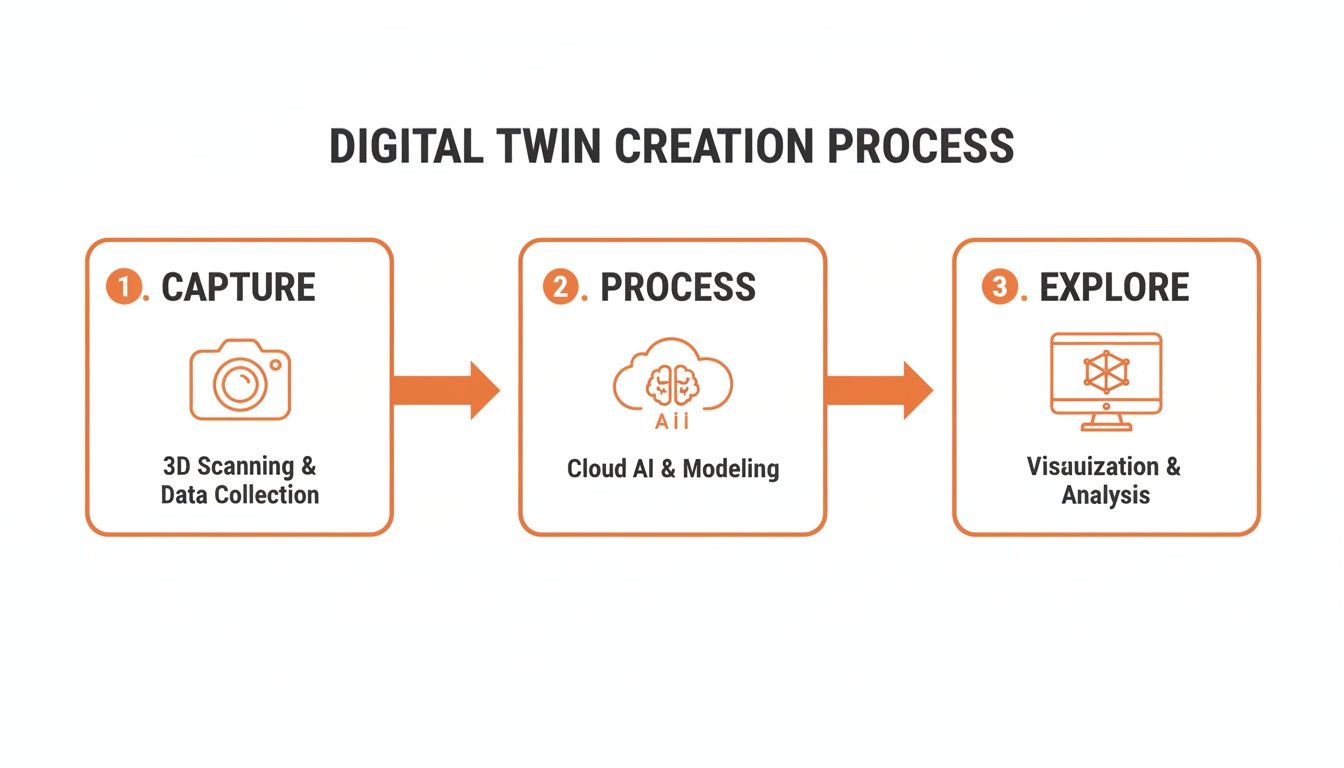
As you can see, it’s a clear workflow: capture the data on-site, let the AI process it in the cloud, and then deliver a fully interactive model to your clients. The result isn't just a simple tour; it's a complete dataset of the property.
The Final Output and Its Components
After a few hours of processing, the finished digital twin is delivered. This isn't just one single thing; it’s a package of useful marketing assets:
- The Immersive Tour: This is the main event—the interactive experience where people can "walk" through the home from their screen.
- Dollhouse View: A fantastic 3D cutaway that gives anyone an instant feel for the property's overall layout and flow.
- Floor Plan View: A classic top-down 2D schematic that provides a traditional blueprint-style look.
Having all these components ensures that a potential buyer can explore and understand the property from every possible angle, leaving no questions about how the space fits together.
The real power of Matterport is how it turns millions of raw measurements into a fluid, walkable experience. It’s that jump from a cloud of data points to a photorealistic 3D world that makes it so incredibly useful for real estate.
This process also sets the stage for creating other marketing materials. For example, all that spatial data can be used to generate highly accurate floor plans, a must-have for any serious listing. You can see just how valuable these visuals are in our guide on the benefits of a rendered floor plan. Ultimately, one scan creates a rich, multi-purpose marketing toolkit for your property.
Your Real-World Workflow for Real Estate Listings

Knowing the tech is one thing, but actually putting it to work is what really counts. Weaving Matterport into your marketing isn’t just about making a neat virtual tour; it's about creating a solid, repeatable process that makes your listings pop. Think of this as your playbook for getting it right, from planning the shoot to pushing it live.
Your first big decision is a classic one: do it yourself, or hire a pro? There’s no single correct answer here. It really boils down to your budget, how many listings you handle, and how comfortable you are with the tech side of things.
To DIY or Hire a Professional
Choosing to Do It Yourself (DIY) puts you in the driver's seat. If you have a compatible smartphone or a 360 camera, you can scan a property whenever it fits your schedule. This is a fantastic option for agents who want total control or are just dipping their toes in the water to see how Matterport can work for them.
On the other hand, bringing in a Certified Matterport Professional is your ticket to guaranteed quality and consistency. These pros know all the tricks to scan a property quickly and effectively, which frees you up to handle the million other things on your plate. For luxury homes or agents juggling a high volume of listings, this is almost always the smarter, more time-efficient choice.
No matter which route you take, the most important work happens before a camera ever comes out of its bag. A Matterport scan captures a space exactly as it is—the good, the bad, and the cluttered. So, tidying up, deep cleaning, and flipping on every single light is non-negotiable for a polished, professional tour.
The On-Site Scanning Process
Once the home is picture-perfect, it’s time to start scanning. The whole point is to build a smooth, logical path for someone to follow virtually. This means you'll be setting up the camera every five to eight feet, making sure each scan point has a clear line of sight to the next.
Here’s a quick look at the steps on the ground:
- Plan Your Path: Start right at the front door and move through the house just like a potential buyer would on a real showing.
- Scan Each Room: Pop the tripod in the middle of a room for your main scan, then add a few more from different angles to get full coverage. No one wants to see a blank spot where a corner should be.
- Capture Connecting Spaces: Don't skip the hallways, staircases, or doorways! These are the connective tissue that stitches the whole tour together into a seamless experience.
- Mark Windows and Mirrors: Inside the Matterport app, you'll need to mark any windows and mirrors. This simple step is crucial for helping the software process the data correctly and preventing weird reflections or alignment errors.
From Upload to Final Tour
With the scan complete, you’ll upload the data straight from your device to the Matterport cloud. This is where their AI engine, called Cortex, does the heavy lifting. It takes all your individual scans and pieces them together into that final 3D model. The process usually takes a few hours, and you’ll get an email notification when it’s ready to go.
Now you can hop into your Matterport dashboard to fine-tune the tour. This is your chance to add Mattertags—those little interactive pop-ups—to call out specific features like brand-new appliances or custom-built shelving. You can also generate schematic floor plans and even pull high-res photos directly from the 3D model.
Finally, it’s showtime. You can embed the 3D tour directly on your website or the MLS. A pro tip is to feature it on a dedicated single property website, which can seriously boost buyer engagement. With a simple link, you can also blast it out on social media, include it in email campaigns, and send it directly to interested buyers, turning one shoot into a marketing powerhouse.
The True Business Impact of Matterport Tours
Knowing what a Matterport tour is and how to create one is a great start. But let's get down to the real question: what does it actually do for your business? The answer is simple—it completely changes how potential buyers discover and connect with a property, giving you a tangible return on your investment.
This isn't just about cool tech. It fundamentally shifts how buyers interact with a listing. Instead of passively scrolling through a gallery of static photos, they become active participants, walking through the space on their own terms and spending far more time exploring its layout and features. This deeper level of engagement means that when they finally do reach out, they are almost always more qualified and genuinely serious about the property.
Amplifying Your Reach as a 24/7 Open House
Think of a Matterport tour as your best marketing hire. It works around the clock, never gets tired, and can give a perfect, detailed tour to hundreds of people at once. It’s a perpetual open house, accessible anytime, from anywhere in the world. This is a massive advantage for attracting out-of-town or international buyers who can’t just pop over for a weekend showing.
It also acts as a powerful screening tool. By letting prospects explore a home in detail online, you weed out the window shoppers and those who would have been turned off by the layout anyway. This saves you, and your sellers, an incredible amount of time by ensuring physical showings are reserved for truly interested parties.
This accessibility has another important benefit. One of the standout achievements of Matterport is its positive environmental impact, making it a powerful tool for more sustainable real estate practices. By cutting down on the need for physical travel to properties, these digital twins help reduce carbon emissions. In fact, Matterport's ESG Report found that each digital twin creator avoids an average of 0.55 tonnes of CO2 equivalent (tCO2e) per year just by minimizing site visits.
An Honest Look at the Limitations
For all its benefits, Matterport isn't a magic wand, and it's crucial to understand its limitations. A clear-eyed, balanced perspective is the key to using it effectively in your business.
First off, there's the initial investment. Whether you're buying a camera or hiring a professional photographer, there's an upfront cost. You also need to account for the recurring subscription fees to keep the tours hosted and live online.
A Matterport scan is a snapshot in time. It captures the property exactly as it is on the day of the scan—clutter, dated furniture, and all. It does not offer the flexibility to digitally edit or improve the space within the tour itself.
This "as-is" nature can be a double-edged sword. While it provides an authentic, transparent view, it can't show a property's full potential if it's vacant, cluttered, or just needs a cosmetic update. This is where complementary tools for staging and enhancements really come into play.
Finally, the scanning process itself takes time and real attention to detail. A rushed or sloppy scan creates a clunky, unprofessional tour that could do more harm than good. Property preparation isn't just a suggestion; it's a critical, non-negotiable step for getting a great result.
Making a Strategic Decision
So, is Matterport right for you? It's a strategic choice that really depends on your market, your clients, and your business goals. To help you weigh the pros and cons, I've put together a quick-reference scorecard that breaks down what you can realistically expect.
Matterport for Real Estate: A Balanced Scorecard
Here’s a look at the primary advantages you can gain versus the practical limitations you need to plan for when integrating Matterport into your marketing toolkit.
Ultimately, understanding both sides of the coin allows you to make an informed decision and build a marketing plan that truly works.
Unlocking Your Digital Twin with AI Enhancements

A Matterport scan gives you an incredibly accurate, authentic digital foundation of a property. But its greatest strength—capturing a space exactly as it is—can also be its biggest weakness. What do you do when "as-is" means clutter, dated furniture, or empty rooms that just don't inspire buyers?
This is where you shift from simply documenting a space to truly marketing it. The raw digital twin is just your starting point. By layering artificial intelligence on top of this foundation, you can turn a basic virtual tour into a powerful sales tool that shows a property’s real potential.
Think of it this way: Matterport is the "capture" technology that creates the architectural blueprint. Then, AI tools like Bounti come in as the "creative" layer, taking that blueprint and turning it into a buyer's dream home.
Beyond the Basic Tour with AI Tools
A standard Matterport tour is a fantastic record of a property, but it was never designed for editing. You can't just digitally remove the seller's family photos from the wall or swap out that worn-out sofa in the living room. AI-powered platforms, on the other hand, are built for exactly this kind of visual magic.
Using the Matterport model as their source material, these tools let you:
- Pull Stunning MLS Photos: Instead of hiring a separate photographer, you can extract high-resolution, perfectly composed stills directly from the 3D model.
- Generate Compelling Property Descriptions: AI can analyze the visual data and key features from your tour to write engaging listing descriptions in just a few seconds.
- Visually Transform the Space: This is the real game-changer. It allows you to solve the "as-is" problem by showcasing what could be.
A raw Matterport tour shows buyers what a house is. An AI-enhanced tour shows them what their life could be like inside it. This shift from documentation to inspiration is what closes deals.
This creative step is crucial for helping buyers build an emotional connection to a space, which is often the final hurdle in their decision-making. The ability to present a clean, beautifully staged home—without the cost and hassle of physical staging—is a massive advantage.
Bringing a Property to Life
The most significant way AI complements a Matterport scan is through visual enhancement. It’s the perfect fix for the common problems that keep a property from looking its best.
Take an occupied home filled with the owner's personal belongings. While it's an accurate snapshot, it can easily distract buyers who can't see past the clutter. With AI decluttering, you can instantly create a version of the home that is clean, tidy, and depersonalized.
Likewise, an empty property often feels cold and impersonal, making it tough for buyers to judge the scale of a room or imagine where their furniture would fit. AI virtual staging solves this by filling the space with stylish, correctly-scaled digital furniture, turning a blank canvas into a warm, welcoming home.
These enhancements can go even further:
- Virtual Renovations: Show potential buyers what the kitchen would look like with new countertops and modern cabinets.
- Restyling: Instantly change the interior design from traditional to modern farmhouse to appeal to different buyer tastes.
By pairing the spatial accuracy of a Matterport tour with the creative freedom of AI, you really get the best of both worlds. You give buyers an honest, transparent view of the property's current state while also presenting an aspirational vision of its future. You can explore a curated list of the top 10 AI tools for real estate agents to see how these solutions are changing the industry. This two-part strategy ensures your listing appeals to the widest possible audience and truly maximizes its selling potential.
Navigating Matterport Pricing and Plans
Before you dive into adding Matterport to your marketing, it's smart to get a handle on the total cost. It's not just a one-and-done purchase; you're looking at a combination of buying the gear and paying for an ongoing subscription. Getting this right means looking at both pieces to figure out what truly fits your budget and how many listings you manage at once.
First up is the hardware. While you can technically get started with just a newer smartphone, the results won't be the same as a dedicated camera. For top-tier quality and precision, the Matterport Pro3 is the gold standard, but it comes with a serious price tag. A lot of agents find a happy medium with more affordable 360° cameras that still work great with the platform.
Decoding Subscription Tiers
Once you have a camera, you'll need a subscription plan to actually process, host, and share your virtual tours. Matterport offers several tiers, from free plans for dabblers to robust professional packages built for power users and entire teams. The biggest difference between them comes down to the number of "Active Spaces" you can have at any given time.
Think of an "Active Space" as a live, viewable 3D tour. If you have ten listings on the market, you'll need a plan that supports at least ten Active Spaces. The good news is that once a property sells, you can simply archive that tour. This frees up the slot for your next listing, so you don't necessarily have to upgrade your plan as your business ebbs and flows.
Choosing the right subscription is a balancing act. It's about finding the plan that accommodates your typical number of active listings without paying for capacity you don't need.
DIY vs. Hiring a Professional
The other big decision is whether you want to scan properties yourself or just hire a certified Matterport pro to do it for you. Going the DIY route gives you ultimate control and can save you money in the long run if you have a steady stream of listings. Just remember, it means buying the equipment and blocking out time to learn the ropes and do the work.
Hiring a professional, on the other hand, is all about convenience and guaranteed quality. You pay a fee for each property, but you get a polished, perfect scan every single time without having to touch any equipment. For agents who want consistent, expert-level results without the learning curve, this is almost always the way to go.
As you consider this investment, it's worth noting the company's own stability. Matterport is clearly in it for the long haul, with revenue growing from USD 136.1 million in 2022 to a projected USD 197.88 million by 2026. This kind of steady growth is a good sign you're building your marketing on a solid foundation. If you're curious, you can explore a detailed forecast of Matterport's financial performance to see their full trajectory.
Common Questions About Using Matterport
Even when you get the concept, a lot of agents I talk to have the same practical, "how does this actually work for me?" questions about using Matterport. Answering these is really the final step before you can feel confident adding this tool to your marketing arsenal. Let's dig into the questions I hear most often.
How Long Does It Take to Scan a Typical House?
For a standard 2,000 sq. ft. house, I tell people to block out about 60-90 minutes on their calendar. That's usually a safe bet for getting a clean, complete scan.
Of course, that's just a starting point. A house with a quirky layout, lots of little rooms, or three stories is going to take longer than a simple, open-concept ranch. If you want to include outdoor spaces like a great deck or a big backyard in the tour, make sure to add that to your time estimate.
Can I Use a Matterport Tour on My Local MLS?
Yes, absolutely. Almost every MLS out there is set up to handle Matterport tours. For most agents, it's a simple copy-and-paste job.
You just grab the shareable link from your Matterport account and drop it into the virtual tour field when you're building your listing. It's usually that easy. That said, it never hurts to do a quick check of your specific MLS guidelines, just in case they have a quirk you need to know about.
The real magic of Matterport isn't just making the tour—it's getting it everywhere. That one link can be embedded on your website, shared on social media, and most importantly, featured right on the MLS where serious buyers are looking.
Do I Need an Expensive Camera to Get Started?
Nope. You don’t have to shell out thousands to get started. While the top-tier cameras like the Matterport Pro3 give you incredible quality and pinpoint accuracy, they’re far from the only game in town.
You can actually create a really impressive, immersive tour with nothing more than your iPhone or a compatible Android phone running the Matterport app. This is what makes the technology so accessible—any agent can get into the 3D tour game without a huge upfront investment in hardware.
Can I Edit the 3D Model After It Is Created?
This is a really important one to get right. Think of a Matterport model as a digital snapshot—the underlying 3D data is locked in once the scan is processed. You can add things on top of it, like tags to point out the new countertops or measurements to show room dimensions.
What you can't do is go into the Matterport model and digitally remove a couch, repaint a wall, or clean up clutter. That's exactly where other AI tools come into play. They let you take that hyper-realistic "digital twin" and then stage it, declutter it, or even renovate it to help buyers see what's possible.
A Matterport scan gives you the perfect, accurate foundation. When you're ready to turn that raw digital twin into a buyer's dream home, Bounti acts as your AI assistant. Instantly pull stunning photos from the tour, declutter messy rooms, and virtually stage an empty house to help clients see its true potential.