


You’re probably dealing with one of these listings right now.
The house has strong layout, good light, and a neighborhood buyers want. But the photos don’t sell it. Maybe the seller’s furniture is oversized and dated. Maybe every countertop is covered. Maybe the place is vacant, which means every room feels smaller and colder than it does in person.
That’s where before and after photo editing stops being a cosmetic task and becomes a listing strategy.
In real estate, the job isn’t to falsify a property. It’s to help buyers understand its potential fast. The faster they understand it, the faster they engage, book a showing, and make the leap from browsing to acting. AI has changed how quickly agents can do that. What used to require manual editing, separate staging vendors, and long turnaround times can now happen in a much tighter workflow that starts at the shoot and ends with compliant distribution across every marketing channel that matters.
From Good Bones to Sold The Power of Visual Transformation
A lot of listings don’t need a miracle. They need translation.
A buyer walks into a dated condo and sees wallpaper, heavy drapes, and dark furniture. An agent needs that buyer to see ceiling height, window placement, floor plan, and what the room could feel like with a cleaner presentation. That gap between current condition and buyer imagination is where before and after photo editing does its real work.

Buyers respond to possibility
Empty rooms can feel flat online. Cluttered rooms feel smaller. Dated rooms make buyers overestimate renovation effort.
A good before-and-after image fixes those mental shortcuts. It gives buyers a cleaner path to the question you want them asking: “Could I live here?”
That’s why visual transformation matters beyond aesthetics:
- It reduces friction: Buyers spend less time decoding a room.
- It frames the narrative: You decide whether the story is “fixer” or “opportunity.”
- It helps sellers say yes: Before-and-afters make your marketing plan tangible during the listing presentation.
- It creates reusable assets: One strong transformation can work on MLS, social, email, and your next pitch deck.
Practical rule: If a buyer has to work hard to imagine the space, your photos are doing too little.
This isn’t new. The speed is new
Photo manipulation didn’t start with AI. It predates digital tools by more than a century, with early alterations going back to the 1860s and later evolving through darkroom retouching, collage, airbrushing, and composite printing before digital tools changed the process entirely. A useful history of that progression appears in this overview of manipulated photos before the digital era.
What changed in the digital era was accessibility. The first consumer digital camera arrived in the early 1990s, and Photoshop’s rise moved editing from hours in a darkroom to minutes on a computer, as described by the Science and Media Museum’s history of digital photo manipulation. In real estate, that same shift now shows up in AI workflows that can generate MLS-ready images and staging from a single walkthrough.
If you want to see how transformation storytelling works in property marketing, this example of house staging before and after is the kind of visual contrast that helps sellers understand what modern listing prep can look like.
What works and what doesn’t
The best before-and-afters are believable. They respect the room’s architecture, lighting direction, and actual use.
What doesn’t work is a dramatic transformation that feels disconnected from the property. If the edit looks like a design fantasy instead of a likely outcome, buyers don’t lean in. They pull back.
That’s the power of visual transformation. Not making a room look perfect. Making it look possible.
Shoot for the Edit How to Capture Perfect Before Photos
The seller wants proof that AI can clean up the listing without making it look fake. That proof starts at the shoot, not on the editing screen.
If the room is badly framed, underexposed, or shot from a corner no buyer would ever stand in, every later step gets weaker. AI staging, decluttering, retouching, compliance labeling, and distribution all depend on solid source files. Better inputs produce faster edits, fewer revision requests, and more credible before-and-after comparisons.

Build a repeatable capture standard
Agents do not need a masterclass in camera theory. They need a repeatable system their photographer, marketing coordinator, or team can follow every time.
Start with the basics that make editing easier and results more believable:
- Use a tripod: Stable framing makes alignment cleaner and before-and-after comparisons easier to trust.
- Pick one hero angle per room: Choose the angle that shows layout, light, and function. Ten weak options create more editing decisions, not better marketing.
- Keep vertical lines straight: Crooked walls and door frames make a property feel off, even after a strong edit.
- Keep lighting consistent: Mixed color temperatures create extra cleanup work and make AI results less natural.
- Remove easy distractions before shooting: Trash cans, cords, pet bowls, countertop clutter, and personal items should be handled in the room first.
That last point matters more than many agents expect. Every item removed before the shutter clicks saves editing time later and lowers the chance of strange AI artifacts.
Shoot with the intended transformation in mind
A vacant townhouse, a cluttered family home, and a dated condo should not be photographed the same way.
The planned edit should guide the composition. If the goal is decluttering, leave enough visible space around counters, desks, and shelves for a clean result. If the goal is virtual staging, show floor area, wall length, and traffic flow. If the goal is a style update, make sure the fixed elements are clearly visible, especially cabinets, flooring, windows, fireplaces, and tile.
This is also the point where tool choice matters. Teams comparing options should review AI photo editing software for real estate marketing workflows before they standardize their shoot process, because different tools handle staging, object removal, and style changes differently.
If your team uses a realistic AI photo generator, wide, level, well-lit source images give it far more usable context. Tight angles and blocked sightlines limit what the model can change without introducing obvious mistakes.
Video belongs in the same workflow
A steady walkthrough is no longer just a bonus asset for social media. It can support still extraction, editing references, short-form promotion, and listing distribution across multiple channels.
Shoot slowly. Hold each composition for a moment. Avoid fast pans and abrupt turns. AI tools can do useful work with video frames, but stable footage gives you cleaner options and more flexibility later.
A quick visual refresher helps here:
The rooms that create the most preventable problems
Three room types usually create the biggest gap between average source images and strong edited results.
| Room type | Common shooting mistake | Better approach |
|---|---|---|
| Living room | Shooting too wide from a doorway | Step into the room, level the tripod, and show seating plus windows |
| Kitchen | Mixed lighting and tilted counters | Turn off unattractive bulbs if needed, square the lines, and keep surfaces readable |
| Bedroom | Low angle or cramped corner framing | Shoot at eye level and show the bed wall with enough circulation space |
I use one simple rule on real estate shoots. If the angle would be hard to recreate for an after image, it should not be the hero shot.
Before photos are not just raw material for editing. They are the foundation for the whole AI-first marketing package, from transformation previews to compliant final assets your team can publish across the MLS, email, listing pages, and social channels.
Your AI Assistant for Instant Property Makeovers
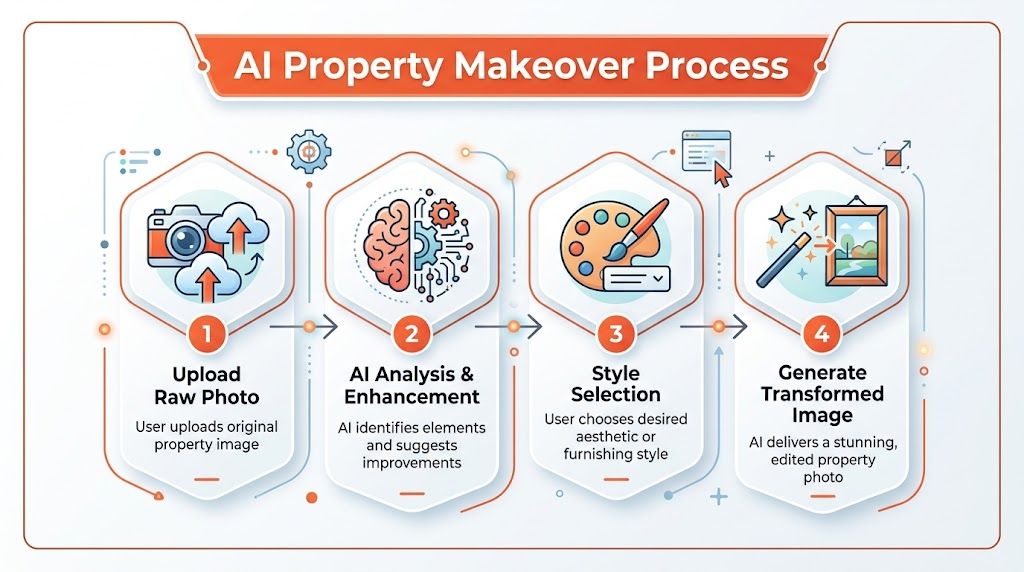
A seller wants the home live by Friday. The house is clean enough, but the spare bedroom reads as storage, the living room is vacant, and the kitchen still feels dated in photos. That is the point where AI stops being a novelty and starts doing real listing work.
Once the shoot is complete, one set of source images can support several business goals. You can create a clean, market-ready version for the MLS, a staged version for paid social, a renovation preview for investor outreach, and labeled comparison assets for the listing presentation. The value is speed, consistency, and better positioning.
Match the transformation to the listing problem
Good agents do not apply the same edit package to every property. They diagnose what is blocking buyer response, then choose the lightest edit that solves that problem.
Here’s a simple decision framework:
| Listing issue | Best AI move | Why it works |
|---|---|---|
| Seller clutter | Decluttering | Removes distractions without changing the room’s structure |
| Vacant property | Virtual staging | Gives scale, function, and emotional context |
| Outdated style | Restyling | Modernizes the presentation without implying construction |
| Investor or fixer listing | Virtual renovation | Helps buyers see upside where current finishes get in the way |
That restraint matters. Over-editing can create compliance problems, buyer disappointment, and awkward conversations at the showing.
Decluttering is the fastest win
Most occupied listings need subtraction, not reinvention.
Kitchen counters packed with appliances, bathroom shelves lined with products, kids’ rooms covered in toys, and garage shots full of bins all make a home feel tighter than it is. AI decluttering helps because it improves readability fast. Buyers can process the room, understand the storage, and focus on the layout.
Used properly, this is a presentation tool, not a deception tool. Remove visual noise. Keep permanent features, wear, and material conditions honest.
Virtual staging works when the room still feels believable
Vacant rooms usually underperform because buyers struggle to judge scale and function from empty walls and bare floors. Virtual staging fixes that, but only when the furniture feels like it belongs in the room and in the market segment.
I use four checks before approving a staged image:
- Furniture scale: Pieces need to fit the room dimensions and ceiling height.
- Price-point fit: Design choices should match the likely buyer and listing value.
- Traffic flow: Door swings, walk paths, and window access need to remain plausible.
- Light consistency: Shadows, window direction, and fixture glow should match the original photo.
If any of those fail, the image may still look impressive. It will not help sell the property.
Restyling and renovation previews solve different sales problems
Restyling is for homes that are structurally fine but visually behind the market. You update furniture, finishes, and decor cues so buyers stop fixating on the seller’s taste and start seeing the room’s potential in present-day terms.
Virtual renovation is more strategic. It helps when the value story depends on future upside, such as dated kitchens, worn bathrooms, or investor listings where current finishes drag down interest. Used well, it gives buyers a credible path from current condition to improved version.
The strongest AI edits support decision-making. They do not ask buyers to believe a fantasy.
For agents exploring broader creative references outside real estate-specific platforms, a realistic AI photo generator can be useful for studying how different AI systems handle realism, texture, and scene consistency. It’s not a substitute for a property workflow, but it can sharpen your eye for what looks convincing and what doesn’t.
Build one pipeline, not a pile of one-off tasks
The operational win is bigger than the image itself. A strong AI-first process starts before the listing goes live and continues after the edit is approved.
One capture session can feed staged stills, decluttered MLS photos, renovation previews for sellers, labeled before-and-after assets for presentations, and resized versions for social, email, and listing portals. The better systems also make room for compliance labeling and version control, so your team knows which images are conceptual, which are publishable, and where each one should appear. That is the difference between using AI as an editing trick and using it as a marketing system.
A good place to compare tools built for that kind of workflow is this guide to AI photo editing software for real estate workflows. The right platform should help your team move from raw capture to approved, distributed assets without extra handoffs or last-minute confusion.
The best AI assistant is the one that helps you produce believable visuals faster, label them correctly, and put them to work across every channel that helps win the listing and move the property.
Adding the Human Touch with Final Post-Production
AI should do the heavy lifting. It shouldn’t get the last word.
Once a room has been decluttered, staged, or restyled, there’s still a short quality-control pass that makes the difference between “good enough” and “professionally finished.” This doesn’t require advanced retouching skills. It requires restraint.
The five-minute polish pass

After AI output, I’d review each image for these issues:
- Brightness balance: Rooms should feel open, but windows shouldn’t become blank white blocks.
- Vertical correction: Door frames, cabinets, and window lines need to look straight.
- Color realism: Wood tones, wall paint, and exterior greens should feel believable.
- Edge cleanup: Check around furniture legs, rugs, lighting fixtures, and object boundaries.
- Sharpness: Add enough crispness to hold detail, not so much that surfaces look brittle.
Lightroom, Photoshop, or a built-in studio editor can earn their keep. If someone on your team needs a refresher on manual finishing, this walkthrough on how to edit photos with Photoshop is a practical reference for basic adjustments and cleanup concepts.
What AI handles well and what humans should still judge
AI is strong at broad visual transformation. It can remove clutter fast, generate staged layouts, and produce a polished starting point that would take much longer by hand.
Human review is still better for judgment.
| Task | AI does well | Human should check |
|---|---|---|
| Decluttering | Removing common distractions | Whether anything important was removed |
| Staging | Creating furniture layouts | Scale, style fit, and room logic |
| Exposure cleanup | Balancing overall scene | Whether the room still matches reality |
| Final export | Batch production | File selection, ordering, and publish readiness |
Final check: If the image makes the property look different in substance, not just better presented, keep editing or don’t publish it.
Don’t overfinish the image
A lot of edited listing photos fail because someone keeps going.
They add too much clarity, too much saturation, too much contrast, and suddenly the room looks crunchy, glossy, or synthetic. Buyers may not know which slider caused the problem, but they know the image feels off.
The target isn’t “impressive editing.” The target is confidence. The buyer should feel that the room is attractive, legible, and worth visiting. If your final pass helps that happen, stop there.
Building Trust with Ethical Edits and Clear Disclosures
The fastest way to undermine strong marketing is to create doubt.
Agents sometimes treat editing ethics as a legal footnote. It’s a conversion issue. If buyers think the photos are hiding something, every click, inquiry, and showing request gets harder.
The trust problem is already visible. A 2025 NAR report found that 68% of buyers distrust listings with heavy edits, with “fake staging” cited as a top complaint, and the same source says MLS rules in major US markets are increasingly requiring AI-enhanced labels while non-compliance fines are rising 40% year over year, according to this discussion of before-and-after editing trust and disclosure trends.
Know the line between enhancement and deception
A useful test is simple. Ask whether the edit helps a buyer understand the space, or whether it hides a condition that would matter to their decision.
Generally acceptable:
- Virtual staging of an empty room
- Decluttering personal items
- Brightness and color correction
- Minor restyling that doesn’t alter fixed features
High risk or deceptive:
- Hiding damage, stains, cracks, or wear
- Removing power lines, neighboring structures, or obstructions that affect the property
- Changing permanent finishes without disclosure
- Presenting renovated versions as current condition
That line matters because buyers don’t object to polish. They object to surprise.
Transparency helps you sell
A lot of agents worry that disclosure weakens the image. Usually it does the opposite.
When you label a virtually staged room clearly, buyers relax. They know what they’re looking at. They can evaluate the room for size and function without wondering whether the entire listing is manufactured. The same principle applies to renovation previews. If you present them as concept visuals, they become useful. If you present them as reality, they become risky.
Here’s copy that works in practice:
Virtually staged to show scale and furnishing potential. Room size, layout, and fixed features reflect the property as photographed.
AI-enhanced image for decluttering and presentation. No structural or permanent property features were altered.
Renovation concept image included to illustrate potential design direction. Current condition may differ.
Build disclosure into the workflow
Don’t leave compliance for the end of the job when everyone is rushing.
Use a simple internal checklist:
Tag edited images by type
Mark each file as corrected, decluttered, virtually staged, restyled, or renovation concept.Assign caption language early
Pair each edit type with approved disclosure copy before distribution starts.Apply platform-specific labels
MLS may require one format, while Instagram captions and property websites may allow more explanation.Keep originals accessible
If a buyer, seller, or broker has questions, you should be able to show the unedited source quickly.
For agents operating in markets that are tightening standards around AI imagery, this guide to California AB 723 and AI real estate photos is a useful reference point for how disclosure expectations are evolving.
The practical upside
Clear disclosures don’t just reduce risk. They improve your pitch to sellers.
You can say, truthfully, that your marketing makes the property look its best while staying transparent about what’s been enhanced. That positions you as an operator, not just a promoter. In a market where buyers are increasingly alert to manipulation, that reputation matters.
Deploying Your Before-and-Afters to Win Clients and Deals
Strong before-and-after photo editing only pays off when people see it in the right context.
The edited image that works on MLS isn’t always the one that wins a listing appointment. The transformation you post to Instagram isn’t the same asset you should lead with in an email to your sphere. Distribution needs intent.
Use different versions for different jobs
Take a common scenario. You list a vacant townhouse that looked cold in raw photos. You create a staged primary bedroom, a decluttered kitchen, and a cleaned-up living area.
Now split those assets by purpose.
For MLS, lead with the cleanest, most representative after images. If required in your market, label staged or AI-enhanced photos clearly. The priority here is readability and compliance.
For Instagram, the before-and-after itself becomes the hook. A carousel works because slide one stops the scroll, and slide two proves the transformation. A short reveal video also works because people understand instantly what changed.
For listing presentations, the before-and-after is less about the buyer and more about the seller. It shows your process. Sellers don’t hire “photo editing.” They hire outcomes. Transformation visuals make your marketing plan feel concrete.
A practical rollout that agents can repeat
Here’s a simple deployment rhythm that works well:
- Before launch: Show one or two transformation examples in the seller presentation to justify your prep strategy.
- Launch day: Publish clean final images to MLS and property portals with proper labels where needed.
- Social release: Share a before-and-after carousel or reveal clip with short commentary on how the room was repositioned.
- Follow-up marketing: Use one transformation in email or direct outreach to reinforce the property’s story.
- Future prospecting: Save the same assets in your portfolio to win similar listings later.
A before-and-after isn’t just a marketing asset for one property. It’s proof of how you think.
Captions that move the story forward
Most agents waste transformation posts with bland captions. Don’t just say “What a difference.” Tell people what the edit solved.
Examples:
- This vacant living room needed scale and warmth. Virtual staging helped buyers read the layout immediately.
- The kitchen had great bones but too much visual noise. Decluttering shifted attention back to the finishes and light.
- This bedroom wasn’t a remodel candidate. It was a presentation problem. Restyling showed the room’s actual potential.
That framing matters because it turns editing into expertise. You’re not posting pretty pictures. You’re demonstrating judgment.
The business effect
When used well, before-and-afters help on both sides of the business.
They help buyers process a listing faster. They help sellers believe you have a plan. They help future clients see what separates your marketing from the agent down the street who merely uploads whatever the photographer sends.
That’s the point of the whole workflow. Not more content. Better impact.
If you want a faster way to turn one walkthrough into listing photos, transformations, copy, and ready-to-publish marketing assets, Bounti Labs builds that workflow around real estate teams. It’s designed to help agents create polished property visuals with less manual back-and-forth, while keeping the process practical enough for everyday listing volume.



