


A seller hands over the keys to a house with great bones and bad visuals. The living room is empty. The kitchen is dated. One bedroom has become storage. You know buyers will respond to the layout in person, but the listing has to earn that showing first.
That gap between what a property is and how it photographs is where a virtual real image becomes useful. Not as a gimmick. As a working marketing asset that helps an agent show possibility without moving furniture, booking multiple vendors, or waiting on a long editing cycle.
Most agents already know the pain points. Traditional listing photos capture what is there, not what could be there. Physical staging can help, but it is not practical for every listing. Older virtual staging workflows solve part of the problem, but they feel slow, rigid, or disconnected from the rest of the marketing stack.
The newer category is different. AI can take a simple walkthrough, understand the room, and generate visuals that look like listing photography while representing a digitally improved version of the property. That is why the phrase virtual real image matters. It sits between optics, rendering, and real estate sales. It is a modern commercial tool built to make a property easier to understand, easier to market, and easier to sell.
Beyond the Listing Photo A New Visual Reality
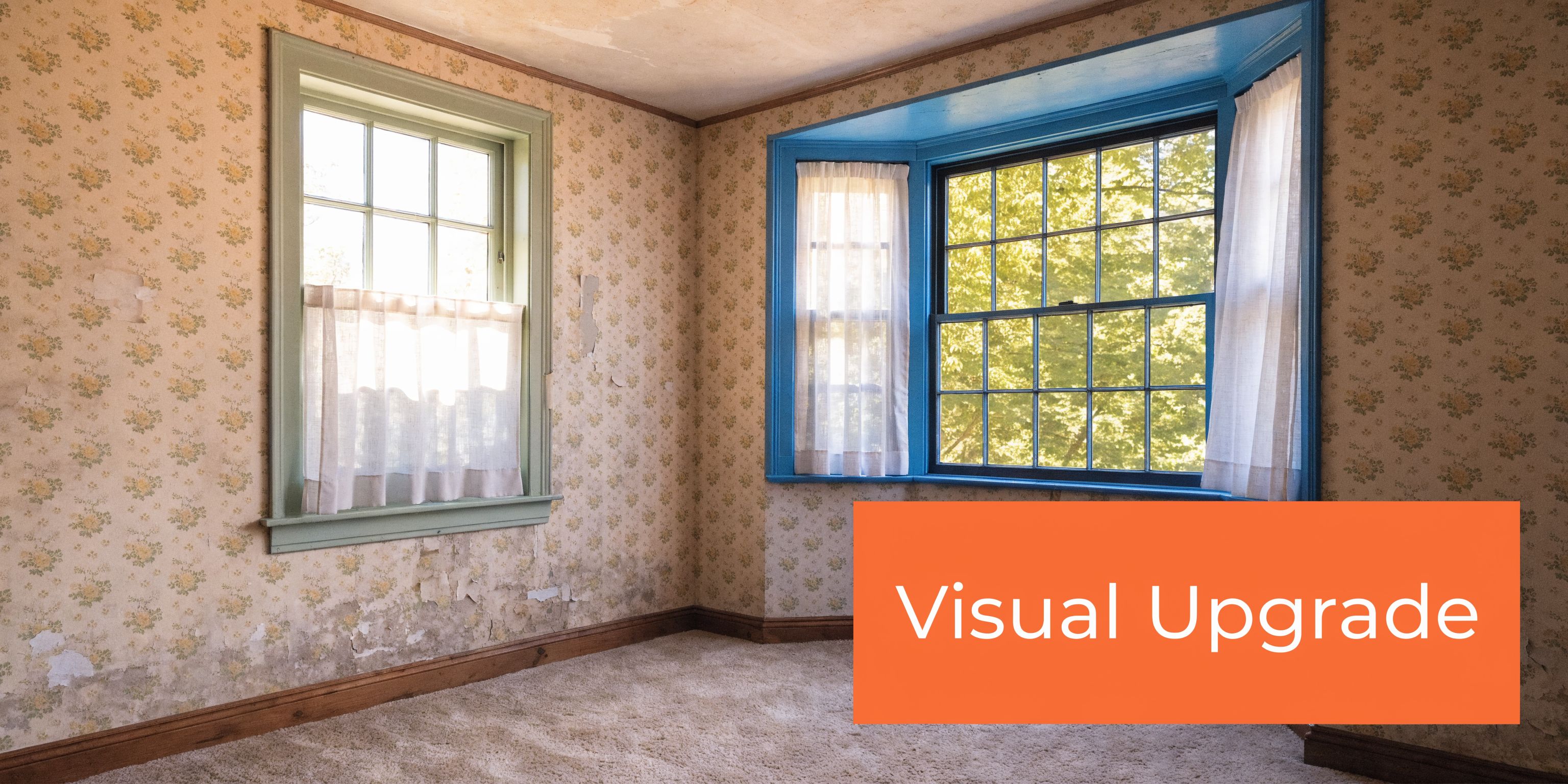
A lot of listings do not fail because the home lacks value. They fail because the visuals ask buyers to do too much interpretive work.
An empty condo can feel cold online. A heavily lived-in family home can look smaller than it is. A fixer with strong layout potential can get dismissed before a buyer ever reaches the second photo. Agents deal with this every week.
Why standard listing media falls short
Traditional photography is still necessary. It documents the actual property condition. It gives buyers a factual baseline. But it has limits.
It cannot declutter a room that is crowded. It cannot restyle a dated living room without physical labor. It cannot show a renovated kitchen before the renovation exists.
That is where agents start looking for alternatives. The old answers were familiar.
- Physical staging: Strong when the budget supports it and the timeline allows it.
- Manual virtual staging: Useful, but slower than agents want when revisions stack up.
- Do nothing: Cheap in the short term, expensive in missed attention.
A virtual real image gives you another option. It lets you show a room as buyers might use it, while keeping the presentation tied to the true structure of the property.
What makes this category commercially useful
The phrase sounds technical, but the business use is straightforward. A virtual real image is a photorealistic marketing visual generated from real property input, usually existing photos or a walkthrough video, then enhanced through AI to show staging, decluttering, restyling, or renovation concepts.
That matters in common listing situations:
- Vacant homes: Buyers can read scale faster when furniture is present.
- Dated interiors: A refreshed version can help clients see relevance instead of repair fatigue.
- Cluttered listings: Digital cleanup can make layout and natural light easier to read.
- Commercial spaces: Different layout concepts help tenants or investors compare possibilities.
Practical takeaway: The job of a virtual real image is not to fake a property. It is to reduce imagination friction so the buyer can understand the opportunity faster.
Agents who use this well are not replacing reality. They are packaging it better. The strongest use cases are simple. Show the current condition clearly. Show the possible condition clearly. Label both. Let buyers move from confusion to confidence.
From Physics to Pixels Real vs Virtual Images Explained
The term virtual real image makes more sense once you separate two ideas from basic optics.
A real image is what happens when light rays come together at a physical point. A projector is the easiest example. The light converges, and you can cast the image onto a screen.
A virtual image works differently. In optical physics, a virtual image is formed by the backward extensions of diverging rays, while a real image is formed by converging rays. The practical difference is simple: real images can be projected onto a screen, but virtual images cannot because the light rays never meet at the image location, as described in this optics history discussion from MIT Press.
The simple analogy agents can use
Think about two everyday experiences.
| Example | What you see | What is happening |
|---|---|---|
| Movie projector | An image on a screen | Light converges into a real image |
| Bathroom mirror | Your reflection behind the glass | Light appears to come from a place it does not physically occupy |
That distinction matters because real estate technology now uses both ideas in spirit, even if the workflow is digital.
A mirror gives you a believable visual that exists as perception. A projector gives you a physical image on a surface. AI-generated property visuals create something else again. They are not formed by lens-only optics in the classical sense, and they are not just a reflection either. They are rendered outputs based on data from the actual property.
Why this old physics concept matters in modern marketing
This is not classroom vocabulary. It helps agents understand why some visuals feel trustworthy and others feel sloppy.
A good virtual real image respects the geometry of the room. Windows stay where they are. Ceiling height reads correctly. Shadows make sense. Sightlines are coherent. The image is synthetic, but the space feels anchored to reality.
That is the bridge from physics to pixels. The final image is digitally created, yet it aims for the same perceptual credibility buyers expect from listing photography. In practice, that means the best workflows are built on real spatial input, not random scene generation.
If you want the staging side of this in more practical listing terms, this virtual staging guide is a useful reference for how agents apply the concept in day-to-day marketing.
Key point: A virtual real image works when the buyer reads it as a believable version of the actual property, not as generic interior design art.
How AI Creates Photorealistic Virtual Real Images
The process starts with something simple. An agent records the property.
That input can be a set of room photos, but video is often the more flexible starting point because it gives the system more context about layout, depth, lighting, and transitions from one space to another.

What the system reads from the property
AI does not “understand” a room the way an agent does, but it can map and infer enough structure to produce a strong result.
In a practical workflow, the system looks for:
- Room boundaries: Walls, floors, ceilings, windows, doors.
- Perspective: Camera angle, vanishing lines, depth cues.
- Surface cues: Materials, colors, trim, cabinetry, fixtures.
- Light behavior: Window direction, brightness, shadows, reflections.
- Object categories: Furniture, clutter, appliances, décor, built-ins.
That is why a single walkthrough can support many outputs. Once the software has a stable read on the room, it can generate variations that stay tied to the underlying space.
How the image becomes “virtual” but still reads as real
In AR and VR systems, the principle of virtual images is what lets a digital layer appear to coexist with the physical environment. Light from a micro-display is guided to create a stable virtual image, and because the image distance for virtual images is negative, the image appears upright, preserving spatial accuracy for overlays, as explained in this guide to real and virtual image formation in display systems.
Real estate AI uses a different delivery method, but a similar practical goal. The generated scene must remain spatially believable. If the replacement sofa floats, the staging fails. If a cabinet edge ignores perspective, the renovation mockup loses trust.
The better systems keep the room geometry stable while changing selected visual elements.
The usual transformation sequence
A clean workflow often looks like this:
Capture the property
Record a steady walkthrough or upload clear images. The cleaner the input, the more believable the output.
Build spatial context
The software estimates room structure and viewpoint. This is what keeps edits tied to the actual space.
Apply transformations
The agent selects the job. Declutter the room. Add furniture. Change wall color. Replace flooring. Restyle the kitchen. Visualize a full renovation.
Render final outputs
The system generates listing-ready stills or alternate concepts that retain the room’s perspective and proportions.
One practical reason agents explore this category is workflow compression. Instead of booking separate vendors for photos, copy, still extraction, and staging, some platforms combine those steps. For example, AI photo editing software for real estate centers on turning one property capture into multiple marketing assets.
What works: Use AI when you need multiple believable versions of the same room for different buyer profiles or marketing channels.
What does not: Using AI to invent architectural conditions that the property does not support.
The commercial value is not the novelty. It is the ability to create accurate, persuasive variations from one capture session without rebuilding the whole marketing process each time.
Comparing Visual Marketing Options for Agents
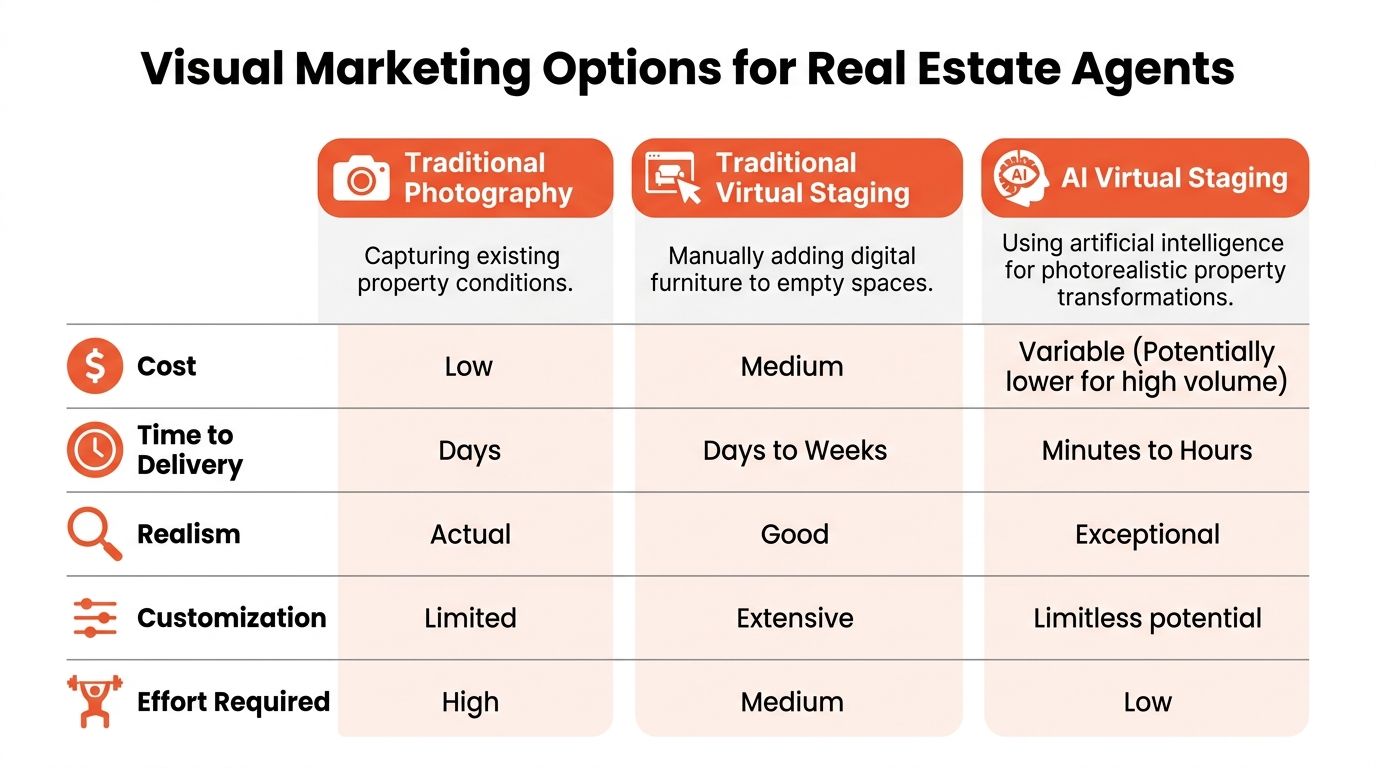
Agents usually choose between three broad paths. Use standard photography only. Use traditional virtual staging as an add-on. Or use AI-generated virtual real images that can create and revise visual concepts from the same source material.
Each method solves a different problem. The mistake is treating them as interchangeable.
Where each method fits
Traditional photography is the baseline. It records the property accurately and supports MLS requirements. But it is limited to what exists on shoot day.
Traditional virtual staging improved that picture. It gave agents a way to furnish empty rooms digitally. The trade-off was workflow friction. Revision rounds, style matching, and manual edits could slow down the process.
AI virtual staging and renovation tools changed the operating model. Computational rendering can remove the sharpness and degradation variables tied to physical optics, such as focal length and lens imperfections, allowing consistent and scalable visual variations for decluttering and staging, as described in this explanation of real versus virtual image rendering.
Visual Marketing Methods Compared
| Method | Cost | Speed | Flexibility | Realism |
|---|---|---|---|---|
| Traditional Photography | Low to moderate | Depends on shoot and edit schedule | Limited to the property as-is | Actual property condition |
| Traditional Virtual Staging | Moderate | Slower when revisions are needed | Good for furniture and décor changes | Can be strong, varies by editor |
| AI Virtual Real Images | Variable by workflow and volume | Fast once input is captured | High for staging, decluttering, restyling, renovation previews | Strong when geometry and disclosure are handled well |
What works for different listing types
- Luxury occupied listing: Traditional photography plus selective digital cleanup is the right balance.
- Vacant resale: AI staging offers the clearest buyer experience.
- Heavy cosmetic fixer: Renovation visualization can do more than furniture placement.
- Leasing and commercial marketing: Multiple layout or finish concepts are more useful than one polished hero image.
A lot of teams build this into a broader marketing system instead of treating visuals as a one-off task. If you are reworking your listing process from top to bottom, this modern playbook for marketing for real estate is a practical resource because it frames visuals as one part of a larger demand-generation workflow.
Decision rule: If the property’s current look is the product, photograph it. If the property’s potential is the product, add virtual real images.
One platform in this category is Bounti, which uses a single video walkthrough to generate stills, listing copy, and AI-based decluttering, staging, restyling, or renovation visuals. That kind of workflow is useful when the same listing needs many assets quickly.
Navigating MLS Rules and Ethical Disclosures
The stronger the image looks, the more important disclosure becomes.
That is not a burden. It is part of using the tool correctly.
Why disclosure matters more now
A Dartmouth College study found that people correctly classified photographic images 92 percent of the time but identified computer-generated images correctly only 60 percent of the time. With training, people improved at identifying synthetic images, but the core takeaway remains: it is hard for humans to distinguish real from computer-generated visuals, which is why transparency matters in fields like real estate, according to this summary of the Dartmouth research.
For agents, the implication is obvious. If buyers can misread synthetic visuals as actual property condition, disclosure is not optional in spirit, even where the exact rule varies by MLS.
What ethical use looks like in practice
The best approach is simple. Show the property accurately, and label the enhanced visual clearly.
Use AI images to clarify possibility, not to hide defects or invent features. If the room has old flooring, do not present a renovated floor as current condition without saying so. If you remove personal items digitally, make sure the final marketing set still reflects the physical property fairly.
A good disclosure does three things:
- States the image was altered
- Explains the purpose of the alteration
- Avoids confusion about current condition
Sample disclosure language agents can adapt
You do not need legal poetry. You need clean language.
- For virtually staged rooms: “Photo has been virtually staged to show furnishing scale and design possibilities.”
- For renovation previews: “Image has been digitally enhanced to illustrate potential improvements and does not represent current property condition.”
- For decluttered marketing images: “Photo has been digitally edited for presentation. Actual property condition may vary.”
If you are working in a market with more explicit AI-photo rules, review the compliance implications directly. This overview of California AB 723 and AI real estate photos is a useful starting point for agents who need clearer guardrails.
Trust-building move: Put the disclosure where buyers can see it. Hiding it in a footnote defeats the point.
Agents sometimes worry that disclosure weakens the image. In practice, it does the opposite. It tells the buyer, “I am helping you visualize the property, not tricking you.” That creates better conversations, better showings, and fewer surprises once the client walks through the door.
A Practical Guide to Creating Stunning AI Visuals
Most agents do not need a production crew to create useful AI visuals. They need a steady capture habit and a consistent review process.
The first half happens on site. The second half happens in the software.

Capture the property so the AI has something usable
Start with the walkthrough. Do not rush it.
Agents use wide-angle lenses to make rooms look bigger, but that can distort how buyers perceive space. Research on image perception shows that perceived angles in photos can deviate from reality, which is why AI tools can be calibrated toward more perceptually accurate visuals instead of wider-looking rooms, as noted in this optics reference discussing image distortion and perception.
That has a direct application in listing media. Your goal is not to make a room look huge. Your goal is to make it readable and believable.
Use this checklist:
- Walk slowly: Fast movement creates motion blur and weak spatial data.
- Hold the phone level: Tilting up or down too much makes vertical lines harder to interpret.
- Open blinds when appropriate: Natural light helps the system understand depth and surface texture.
- Capture room corners: Corners help establish shape and scale.
- Show transitions: Doorways and hall connections help the software map the floor plan mentally.
- Avoid extreme ultra-wide settings: Cleaner geometry beats exaggerated spaciousness.
Prompt for a result that fits the listing
Once the footage is uploaded, the next job is direction. AI does better when the request is specific.
A vague prompt like “make this nicer” produces generic work. A practical prompt sounds more like this:
- Scandinavian minimalist living room with warm oak accents
- Cozy modern farmhouse bedroom with neutral textiles
- Light cosmetic kitchen refresh with painted cabinets and brushed metal hardware
- Declutter room, preserve layout, keep finishes true to current condition. You are not just generating décor; you are matching the likely buyer profile.
If your team is building broader content workflows around listing visuals, this roundup of AI tools for content creators is useful context. The same operating principle applies in real estate. Better inputs and clearer prompts lead to cleaner outputs.
Review like an agent, not like a designer
The image can look stylish and be wrong for the listing.
Check these points before publishing:
Window placement
Confirm that openings, trim, and sightlines still match the actual room.Scale of furniture
Oversized staging makes a room look cramped. Tiny staging makes it look fake.Finish honesty
If the image shows renovation concepts, label them as concepts.Brand fit
A downtown investor condo and a suburban family listing should not get the same visual treatment.
A short walkthrough of the editing mindset helps here:
Working rule: Publish the image only if a buyer can walk into the room and say, “Yes, this is clearly the same space.”
The best virtual real image is not the flashiest one. It is the one that gets buyers from online interest to in-person recognition with no trust gap in between.
Frequently Asked Questions About AI Real Estate Images
Are virtual real images the same as virtual staging
Not exactly. Virtual staging means adding furniture and décor to an existing room image. A virtual real image is broader. It can include staging, decluttering, restyling, finish changes, or renovation concepts while still aiming to look like real property photography.
Should I replace all listing photos with AI-generated ones
No. Use actual property photos as the baseline set. Add AI visuals when they help buyers understand layout, style direction, or improvement potential. The strongest marketing packages pair documentation with visualization.
Do buyers react badly to AI images
Buyers react badly to misleading images, not clearly labeled ones. If the visual helps them understand the home and you disclose the alteration plainly, it improves the conversation rather than harming it.
What kinds of listings benefit most
Vacant homes, dated interiors, cosmetic fixers, rental turnovers, model-unit alternatives, and commercial spaces with multiple possible layouts are strong candidates. Homes that show beautifully may need very little enhancement.
What mistakes make AI visuals look fake
The common ones are predictable. Furniture scale is off. Shadows do not match the windows. Materials look too glossy. The design style ignores the neighborhood or price point. The room becomes prettier but less believable.
Can I use one captured walkthrough for multiple outputs
Yes, that is one of the most useful workflow shifts in this category. A single capture can support still images, different staging styles, renovation concepts, and marketing copy if the source footage is clean enough.
How should I explain this service to a seller
Keep it simple. Tell the seller you are using digital visualization to help buyers understand the home’s potential online, while still showing the actual property condition clearly. Sellers understand the value quickly when they see side-by-side examples.
If you want to turn one property walkthrough into listing photos, AI-enhanced visuals, and marketing assets without stitching together multiple vendors, Bounti Labs is built for that workflow. It is a practical option for agents who need to show current condition, future potential, and polished presentation from the same source capture.



