


You’re probably looking at a listing right now that should be easier to sell than it is.
The floor plan works. The location is solid. The seller insists the home has “great bones.” But the photos tell a different story. Maybe the living room is crowded with oversized furniture and family memorabilia. Maybe the kitchen looks stuck in another decade. Maybe the property is vacant, clean, and completely forgettable online.
That’s where ai home remodel tools have become useful for real estate teams. Not as a novelty. As a practical way to turn one walkthrough into marketing assets that help buyers see possibility before they ever book a showing.
The Modern Agent’s Dilemma and The AI Solution
A listing can lose momentum before it ever hits the market.
The usual pattern is familiar. You walk a home with the seller and immediately start mentally stacking tasks: photography, staging consult, decluttering notes, paint recommendations, contractor referrals, revised photos, refreshed remarks, new social assets. Even when everyone agrees on the plan, execution drags because every step depends on a different vendor.
For dated or vacant properties, that delay gets expensive in a different way. You’re not just waiting on a stager or designer. You’re waiting for the market to understand the home.

Where the old workflow breaks
Traditional prep works when the property is already close to showroom-ready. It breaks down when the visual gap is large.
A cluttered owner-occupied home needs depersonalization before buyers can read the room properly. A vacant condo needs warmth and scale. A cosmetically tired kitchen needs a visual answer to the buyer’s first objection: “How hard would this be to update?”
Practical rule: If a buyer has to do too much imagination work from the photos, your listing is already at a disadvantage.
This is the part many agents underestimate. Physical staging and light renovations still have a place, but they’re linear. One vendor finishes before the next can start. Every revision adds time, coordination, and cost.
What ai home remodel changes
An ai home remodel workflow compresses that prep. Instead of treating staging, restyling, renovation concepts, still-image extraction, and listing copy as separate projects, it treats them as outputs from the same source material.
That source material can be simple. One walkthrough video. A handful of room photos. Clear direction on target buyer, style, and budget level.
The practical advantage isn’t just prettier pictures. It’s control. Agents can test a modern kitchen version, a warm transitional living room, a clean unfurnished baseline, and a lightly renovated bathroom concept without waiting days for each change. That gives sellers a sharper marketing plan and buyers a faster path to understanding the property.
From Video to Vision What AI Home Remodel Really Is
Most agents hear “AI” and assume a black box. In practice, it helps to think of ai home remodel software as a digital design assistant paired with a production coordinator.
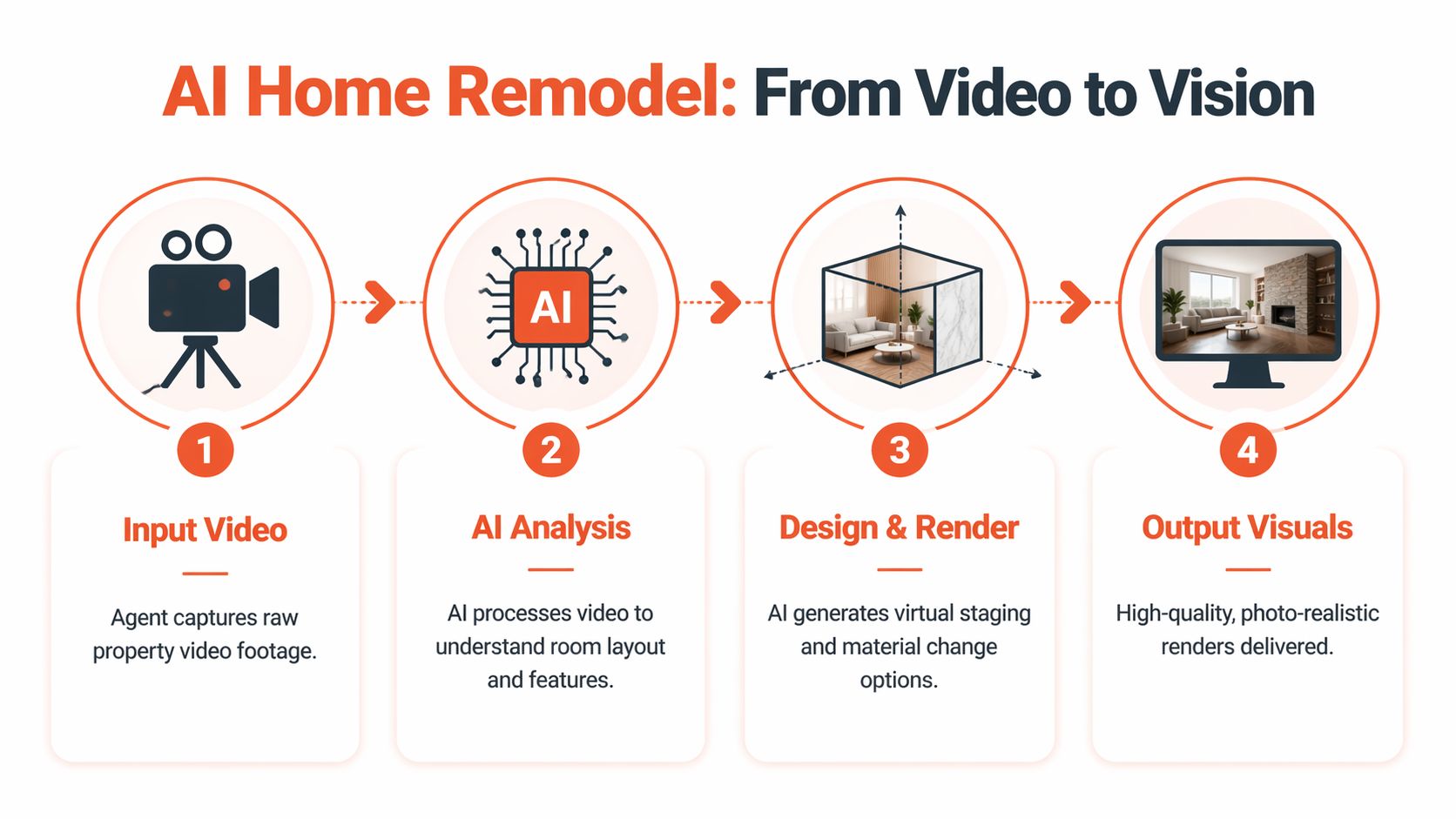
You hand that assistant a raw video walkthrough. It studies the rooms, identifies surfaces and layout cues, pulls useful stills, and starts producing assets tied to the same property. Instead of ordering photos, then staging, then redesign mockups, then remarks, you’re building from one visual intake.
What the software is doing behind the scenes
Two terms matter here: generative design and parametric modeling.
According to Ideal House on AI home remodeling workflows, these tools use generative design algorithms and parametric modeling to optimize layout generation, reducing design time from hours to seconds. The same source says benchmarks from 2026 show 80 to 90 percent faster layout ideation compared with traditional CAD, and that realtors can generate MLS-ready 3D renders from a single video walkthrough.
That sounds technical, but its real estate application is straightforward. The system looks at room dimensions, openings, surfaces, traffic flow, furniture fit, style direction, and visual constraints. Then it generates plausible variations without forcing a human designer to redraw the room every time you change cabinets, flooring, or furniture style.
What goes in
A strong input package usually includes:
- A steady walkthrough video that shows each room from doorway to corner.
- A few clean stills if you want extra control over hero angles.
- Style direction such as modern organic, transitional, coastal, or investment-grade neutral.
- Use-case notes like “declutter only,” “virtually stage,” or “show light kitchen renovation.”
- Audience context so the outputs match likely buyers, tenants, or investors.
If the input is sloppy, the output usually looks sloppy. Fast capture doesn’t mean careless capture.
The best results come from ordinary footage that is clean, well lit, and honest about the room. AI can improve presentation. It can’t rescue confusion.
What comes out
At this point, the workflow becomes useful for real teams.
From one intake, agents can produce a multi-asset package that may include MLS-ready stills, decluttered versions of occupied rooms, virtually staged options for vacant rooms, renovation visualizations for dated spaces, and listing descriptions aligned to the visual strategy. Some platforms also support alternate room concepts, which is especially helpful when a flex room could be marketed as an office, nursery, gym, or guest space.
For teams working with video-first marketing, this model fits neatly with listing animation and walkthrough outputs. The point isn’t just motion content. It’s consistent asset creation from the same source file so your photos, short-form video, and listing narrative aren’t built in isolation.
What works and what doesn’t
There are clear trade-offs.
What works well
- Vacant rooms: AI staging adds scale and purpose quickly.
- Cosmetic updates: Cabinet colors, counters, flooring, fixtures, and wall color changes are strong use cases.
- Occupied homes with too much personality: Decluttering and depersonalization can help buyers focus on space, not lifestyle clutter.
- Multiple buyer narratives: You can show one room as a dining room in one version and a home office in another.
What doesn’t work well
- Bad source footage: Dark rooms, shaky video, blocked sightlines, and incomplete room coverage limit quality.
- Structural fantasy: If you ask for unrealistic architecture or impossible sightlines, the results get less trustworthy.
- Over-styled outputs: Luxury finishes on an entry-level listing can create the wrong expectation.
- No disclosure discipline: If your market expects altered-image disclosure, treat that as part of your process, not an afterthought.
A good ai home remodel workflow doesn’t replace judgment. It speeds up the parts that used to require more waiting than thinking.
The Agent Advantage How AI Transforms Listing Timelines
The old listing-prep model is slow because it’s fragmented. Every specialist handles a separate slice of the job, and the agent becomes the project manager for all of it.
An AI-centered workflow changes the economics of attention. Instead of spending your energy coordinating tasks, you spend it choosing the right visual narrative for the property and the right version for the audience.

Speed that shows up in the client conversation
Sellers respond when you can present a plan immediately.
If you can sit at a listing appointment and say, “We’ll shoot one walkthrough, generate clean marketing stills, test staged and unstaged options, and visualize updates for the kitchen and primary bath,” you sound prepared in a way that a generic marketing checklist never will. The value is partly the output and partly the confidence it creates.
A Houzz report covered by Business of Home found that 31 percent of designers now use AI tools, and more recent data showed 32 percent adoption among construction pros. That same reporting notes that 45 percent save 3+ hours weekly, equating to over $108,000 yearly per firm.
For agents, the exact economics differ, but the operational lesson is clear: teams that remove repetitive production work move faster.
Why faster matters more than cheaper
Most agents first evaluate ai home remodel tools as a cost-saving alternative to staging. That’s only part of the return.
The bigger gain is compressed decision-making. Sellers can approve a visual direction sooner. Marketing coordinators can produce assets without waiting on multiple rounds of manual edits. Buyers can understand the home earlier in the funnel. That reduces friction before the first showing.
Here’s the practical comparison:
| Workflow area | Traditional prep | AI-centered prep |
|---|---|---|
| Visual concepting | Separate staging and design steps | Multiple concepts from one intake |
| Revisions | Vendor-dependent | Faster iteration |
| Vacant property storytelling | Limited without staging | Immediate room-purpose options |
| Dated finishes | Requires explanation | Can be shown visually |
| Team coordination | Multi-vendor handoffs | More centralized workflow |
Where agents gain leverage
Three advantages show up repeatedly in the field:
- Listing presentations get stronger because you can show sellers a process, not just promise effort.
- Marketing gets more adaptable because one room can support several audience-specific versions.
- Turnaround improves because your team is no longer waiting on every visual change from an outside vendor.
If a competing agent says, “We can stage it if needed,” and you say, “We can show buyers three realistic versions before we go live,” you’ve changed the conversation.
This doesn’t mean every home needs an AI renovation concept. Some listings need only cleaner photos and sharper copy. But when a property’s problem is visual uncertainty, speed wins because it gets the right story in front of buyers while attention is still fresh.
Four Powerful AI Remodel Use Cases for Your Listings
The strongest use of ai home remodel isn’t “make the room look nicer.” It’s removing a specific objection that keeps buyers from taking the next step.

A DecorAI Home analysis of AI renovation demand notes that 74 percent of contractors are seeing more homeowner demand for pre-commitment visualizations on major projects, and that virtual furniture blending via photorealistic AI can boost listing views by 20 to 50 percent. For agents, that matters because the buyer now expects to see possibility before making an emotional commitment.
Vacant rooms that feel cold online
A vacant home often shows well in person and underperforms online. Buyers can’t judge scale, and every room starts to feel smaller than it is.
This is where virtual staging earns its keep. Add furniture that matches the price point and the architecture, not a fantasy version of the buyer. A downtown condo needs a different visual language than a suburban family home.
If you want to compare categories and features before choosing a workflow, this guide to virtual home staging software is useful because it frames the decision around actual use cases rather than generic software claims.
Occupied homes that need less life in the frame
Some listings don’t need staging. They need subtraction.
That means removing visual noise from overfurnished living rooms, kids’ bedrooms packed with color and clutter, crowded countertops, or spaces that show too much of the current owner’s identity. Digital decluttering works best when you preserve the room’s honesty while stripping away distractions.
The mistake is over-cleaning to the point that the image feels synthetic. Buyers still want to recognize the room when they arrive.
Don’t use AI to create a different property. Use it to reveal the property that’s already there.
Dated kitchens and baths that trigger buyer discounting
This is one of the highest-value applications because it addresses the place where buyers often start doing mental math against your asking price.
A tired kitchen can be shown in at least two useful directions. One version might show a light cosmetic refresh with painted cabinets, new hardware, updated counters, and cleaner lighting. Another might show a more ambitious finish package for a buyer willing to renovate after closing.
Visual honesty matters. Keep the layout unless there’s a legitimate reason to explore alternatives. The point is to answer “what could this become?” without implying that the work has already been done.
For agents building out this capability, a practical companion is this virtual staging guide for real estate teams, especially when you need to decide which rooms should be staged, renovated, or left untouched.
Flexible rooms and awkward secondary spaces
Bonus rooms, enclosed patios, loft nooks, and oversized landings are where buyer confusion subtly diminishes momentum.
These spaces don’t need broad claims. They need a specific job. A spare room can be shown as a home office for one audience, a nursery for another, or a media room if that better matches the home’s likely buyer pool. Commercial teams and leasing marketers can use the same logic for small suites, waiting areas, or adaptable tenant layouts.
A short example helps here:
The takeaway across all four use cases is simple. The right visual doesn’t decorate the listing. It removes uncertainty.
Your Quick-Start Guide to AI-Powered Listing Prep
Teams generally don’t need a major operational overhaul to start using ai home remodel tools. They need a tighter intake process and a clear rule for when to use the technology.
Start with listing triage
Not every property needs the same treatment. Build a quick internal decision tree.
Use AI when the listing is vacant, cluttered, cosmetically dated, visually confusing, or difficult to photograph in a compelling way. Skip heavy visual manipulation when the property is already presentation-ready and simple photography will do the job.
A workable internal checklist looks like this:
Identify the visual problem first
Is the issue vacancy, clutter, outdated finishes, or poor room definition? Name the problem before ordering outputs.Choose one primary story
Decide whether the asset package should emphasize move-in readiness, light renovation potential, or flexible use.Define your essentials
Keep architectural features, window placement, room proportions, and finish level grounded in reality.
Standardize capture across the team
Most output quality problems begin at capture.
Train agents, showing assistants, or marketing coordinators to record a steady walkthrough with lights on, blinds adjusted, and clear room entry shots. Have them pause at corners rather than swing quickly across the room. Ask for one clean take of each major space before they chase detail shots.
If your team also handles photo cleanup, this review of AI photo editing software for real estate is a useful way to think about where editing ends and remodeling visualization begins.
Build a repeatable asset package
Give agents a menu, not an open-ended request form.
For example, your standard package for a challenging listing might include:
- One clean MLS version with accurate room presentation
- One virtually staged version for key vacant spaces
- One renovation concept for the kitchen or bath if needed
- One alternate-use image for a flex room
- One listing description draft aligned with the visuals
That keeps the process from becoming a design free-for-all.
Pick tools that fit your workflow
Some teams want point solutions. Others want a single workflow that starts with walkthrough capture and ends with listing-ready assets. One option in that second category is Bounti Labs, which uses a single video walkthrough to generate property descriptions, extract stills, create MLS-ready photos, and apply decluttering, staging, restyling, or renovation edits.
What matters more than brand loyalty is operational fit. Test any platform against real conditions: occupied homes, vacant listings, mixed lighting, odd floor plans, and agents who are moving quickly. If the workflow creates extra admin work, adoption will stall.
The tool isn’t the process. Your intake standard, approval path, and disclosure habits are the process.
Measuring the ROI of AI-Enhanced Properties
If you want brokerage buy-in, don’t argue that AI is exciting. Show that it changes outcomes you already track.
The broader trend supports paying attention. The Gitnux roundup on AI in home improvement says the global market for AI-powered home improvement tools is projected to hit $15.6 billion by 2028, that contractors using AI reported average profit margin boosts of 22.4 percent and material waste reductions of 31 percent, and that 85 percent of home improvement projects are expected to incorporate AI design assistance by 2030 as a projection. Real estate teams don’t measure profit margins the same way contractors do, but the direction is obvious. Efficiency is becoming part of the category, not an optional extra.
Track before-and-after listing performance
You don’t need a perfect lab environment. You need a consistent scorecard.
Compare AI-enhanced listings against your own historical baseline and, where possible, against similar listings in your inventory. Focus on outcomes that matter to agents and brokers:
| KPI | What to look for | Why it matters |
|---|---|---|
| Days on market | Faster movement from launch to contract | Indicates whether visuals reduced buyer hesitation |
| Showings after launch | Stronger early activity | Reflects listing appeal in the first wave of attention |
| Inquiry quality | Better-fit buyer questions | Suggests the visuals clarified the property |
| Seller conversion | More signed listings after presentations | Shows the marketing plan is helping win business |
| Revision load | Fewer rounds with external vendors | Captures internal efficiency |
Separate marketing ROI from renovation ROI
At this point, teams often get sloppy.
If a property physically renovated the kitchen and also used AI visuals, don’t attribute the whole outcome to the software. Instead, isolate the role the AI played. Did it help secure the listing? Did it accelerate pre-market approvals? Did it improve launch readiness? Did it help buyers understand rooms that were hard to read before the work was completed?
That distinction matters if you’re presenting results to leadership.
Tie visual strategy to pricing discussions
AI-enhanced assets can also improve how you handle pricing conversations with sellers. A visualized renovation path gives you a better way to explain the gap between current condition and aspirational comps. It moves the conversation away from vague optimism and toward visible trade-offs.
For teams that regularly coordinate with contractors or investor clients, it can also help to understand how estimate workflows are evolving. Reviewing tools like AI construction estimating software can give you a clearer sense of how adjacent industries are using AI to make scope and cost conversations more concrete.
The cleanest ROI story is often this: the team launched with a stronger visual package, spent less time coordinating vendors, and gave buyers a clearer reason to act.
Answering Common Questions and Objections About AI Remodels
Adoption usually stalls for the same reasons. Agents worry the images will look fake. Brokers worry about compliance. Sellers worry buyers will feel misled. Those concerns are reasonable, and they’re manageable if you treat ai home remodel tools as part of a documented marketing process.
Will buyers feel tricked by digitally remodeled images
Not if the images are used appropriately.
Problems start when agents present concept imagery as existing condition. If you show a remodeled kitchen version, label it as a renovation visualization. If you show virtual staging, make it clear the furnishings are digital. Most buyers aren’t upset by enhanced images when the purpose is obvious and the presentation stays grounded in the home’s actual structure and condition.
What turns buyers off is exaggeration. Unrealistic luxury finishes in a modest home, impossible room proportions, or edits that remove meaningful defects cross the line fast.
A good rule is simple:
- show the property as-is
- show the improved possibility
- make the difference clear in captions, remarks, and agent communication
How should agents handle disclosures and MLS rules
Start local and stay disciplined.
MLS rules, brokerage policies, and state-level standards vary. Some markets are more explicit than others about altered-image disclosure. Your safest workflow is to assume disclosure should be routine whenever an image materially changes appearance, furnishings, or finishes.
That means your team should have:
- A naming convention for altered vs. original assets
- A standard disclosure phrase approved by your brokerage
- A review step before MLS upload and syndication
- A rule against hiding material defects through editing
If your market has specific legal requirements, let those set the floor for compliance. Your internal standard should usually be stricter than the minimum.
Is AI staging actually better than traditional staging
It’s better for some jobs and worse for others.
AI is strong when speed, flexibility, and scale matter. It’s excellent for vacant rooms, quick concept testing, pre-listing presentations, and showing alternate finish directions without touching the property. It’s also valuable when the seller won’t commit to physical staging until they see what the home could look like.
Traditional staging still wins in some situations. If the home is luxury-tier, if in-person emotional impact is central to the sale, or if the architecture demands tactile styling that buyers will experience on-site, physical staging can justify itself.
The question isn’t “Which is always better?” It’s “What problem are you solving?”
Use AI when the problem is uncertainty, speed, or the need for multiple visual directions. Use physical staging when the problem is in-person atmosphere and finish-level credibility.
Does the output look fake
Sometimes, yes. Usually for avoidable reasons.
The most common causes are poor source footage, vague prompts, excessive stylistic ambition, or a mismatch between property class and design direction. Agents often ask for “make it look premium” when what they need is “make it look coherent.”
To improve realism:
- Keep perspective honest and avoid impossible angles
- Match furnishings to the home’s likely buyer
- Use finish selections that fit the price band
- Preserve fixed elements unless the image is clearly a remodel concept
- Review small details like shadows, rug placement, lighting consistency, and appliance scale
Realism comes from restraint. The more the output tries to impress, the more likely it is to break trust.
Will this replace photographers, stagers, or designers
No. It changes when and how you use them.
Photographers still matter because source quality drives everything that follows. Stagers still matter when lived experience in the space is part of the sales strategy. Designers and contractors still matter when a seller moves from concept to actual work.
What AI does is reduce the amount of waiting between idea and execution. It helps agents test direction before making bigger commitments. It also helps teams reserve outside specialists for the listings where human craft has the highest payoff.
Is this only useful for residential listings
No. The same logic works across leasing, property management, and commercial marketing.
A property manager can show a refreshed unit concept before turnover work is complete. A leasing team can visualize alternate furnishing packages. A commercial broker can present a small suite as open office, therapy practice, or consultative workspace depending on the likely tenant profile.
The common thread is clarity. People decide faster when they don’t have to mentally renovate the space on their own.
If your team wants a faster way to turn one walkthrough into listing-ready visuals and marketing assets, Bounti Labs is built for that workflow. It helps real estate teams generate property descriptions, pull stills from video, create MLS-ready photos, and apply AI-powered decluttering, staging, restyling, or renovation edits without building a multi-vendor production chain for every listing.



