


You're in a kickoff meeting for a new development. The architect keeps referring to “the BIM model” like everyone in the room should know exactly what that means. Two hours later, a rendering vendor emails a proposal for “photorealistic 3D modeling” for your pre-sales campaign. Same property. Same broad visual world. Completely different tools.
That confusion now costs real money.
In real estate, the wrong choice between BIM and 3D modeling slows approvals, bloats vendor scopes, and gives clients the wrong asset for the job. If you need a buyer to fall in love with a penthouse, you usually need visuals. If you need a tenant to evaluate whether their operations team, furniture plan, and mechanical constraints will fit inside a floor plate, you need data tied to geometry. Those are not the same brief.
The practical question isn't which one is “better.” It's which one helps you lease space faster, market a property more clearly, and avoid paying for intelligence nobody will use.
Why Agents Must Understand BIM and 3D Modeling
BIM used to live mostly inside design and construction conversations. That's over. By 2023, 74% of contractors, 67% of engineers, and 70% of architects in the U.S. reported using BIM, according to PlanRadar's overview of BIM adoption in the U.S.. Once that many project participants work from BIM, brokers, leasing teams, marketers, and owners start touching its outputs whether they asked for them or not.
That shift matters because properties now arrive with digital baggage. Sometimes that baggage is useful. Sometimes it's expensive clutter. Agents who understand the difference can ask smarter questions before a listing launch, pre-leasing campaign, renovation pitch, or tenant presentation.
Where the confusion shows up
The most common situations are easy to recognize:
- New development marketing: The design team has a BIM file, but the sales team needs brochure visuals, lifestyle images, and polished views.
- Office leasing: A tenant wants to know whether a floor can support a new layout, headcount mix, and departmental flow.
- Value-add repositioning: Ownership wants to test lobby upgrades, amenities, or unit refresh concepts before committing.
- Client communication: A buyer or tenant doesn't care what software produced the image. They care whether they can understand the opportunity fast.
If you don't know what you're asking for, vendors fill in the blanks. That's how simple marketing assignments turn into oversized technical scopes, and technical planning needs get reduced to pretty pictures that answer none of the key questions.
Practical rule: If the deliverable needs to help someone decide, ask whether they need to see the space or interrogate the space.
Why this now belongs in the agent toolkit
Real estate has become more visual, but it has also become more data-aware. Developers want pre-sales assets earlier. Commercial clients expect faster test fits. Property teams need materials that translate technical design into plain-English business value.
That's why agents should treat BIM and 3D modeling the way they treat pricing strategy or floor plan analysis. You don't need to become a model author. You do need enough fluency to brief vendors correctly, interpret what's been handed to you, and avoid buying the wrong deliverable.
For teams already leaning into AI-driven marketing workflows, this sits in the same modernization bucket as AI for real estate agents. The advantage doesn't come from knowing jargon. It comes from picking the fastest format that answers the client's actual question.
What Is 3D Modeling for Real Estate
3D modeling for real estate is best understood as a digital photograph you can build before the property exists, or improve after it does. Its job is visual communication. It shows form, proportion, light, finishes, furniture, and mood. It helps a buyer, tenant, or investor imagine the space.
That's why 3D modeling is so useful in sales and leasing. It answers the emotional question first. What will this place feel like?

What a 3D model actually does
A real estate 3D model is mainly about geometry and presentation. Walls, windows, furniture, lighting, materials, landscaping, and camera angles come together to produce something marketable. The model may be simple and schematic, or highly polished and photorealistic.
For agents, the most common use cases are straightforward:
- Pre-construction marketing: Show unbuilt condos, townhomes, or amenities before the site is ready for photography.
- Virtual staging: Add furniture and styling so vacant rooms feel legible and livable.
- Renovation visualization: Help a buyer see what an outdated kitchen or office suite could become.
- Luxury listing campaigns: Produce hero images where finish, mood, and storytelling matter as much as square footage.
A good render doesn't need to know the maintenance history of an HVAC unit. It needs to make the kitchen look desirable at first glance.
Why it works so well in marketing
Marketing lives or dies on speed of comprehension. A static floor plan can be accurate and still fail to persuade. A strong 3D visual compresses the sales story. Buyers grasp volume, flow, and atmosphere faster. Tenants can understand how a lobby upgrade or workspace concept will land with clients and staff.
That's also why adjacent industries invest so heavily in render quality. If you want a useful reference point on visual storytelling, this guide to 3D renders for furniture marketing shows how much perception depends on styling, material realism, and scene composition.
What 3D modeling does not do well
3D models often look authoritative even when they're light on underlying information. That's the trap.
A beautiful rendering can hide the fact that no one has tied the visual to material schedules, coordination data, or systems intelligence. For many agent workflows, that's fine. You don't need all that machinery to market a listing or present a concept package. But you should know the limitation before a client assumes the image can answer operational questions.
A polished rendering is a sales asset, not automatically a planning asset.
If your need is fast listing content, concept visuals, or animated property views, a lightweight production path is often the right business decision. Teams exploring that route can look at tools built to animate a listing without turning a marketing brief into a full technical modeling exercise.
How BIM Adds Intelligence to a 3D Model
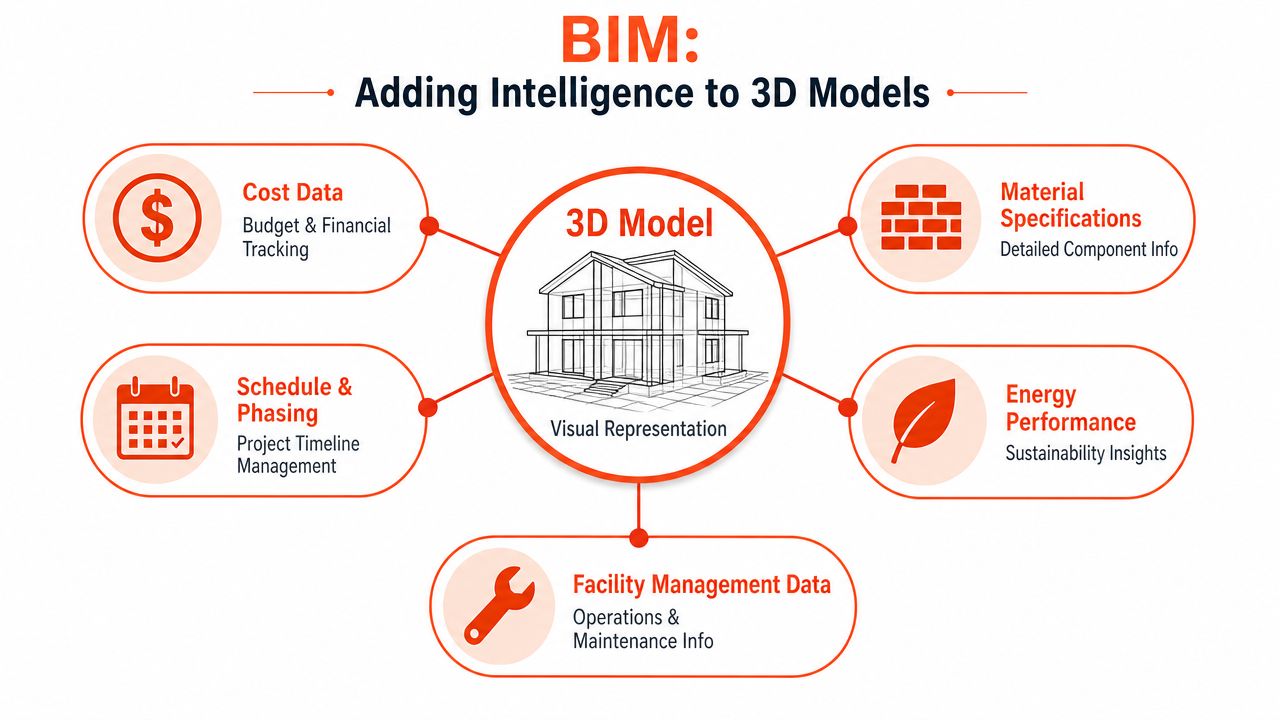
If 3D modeling is the digital photograph, BIM is the property dossier attached to the picture. The geometry still matters, but its underlying value sits behind it. A wall isn't just a wall shape. It can carry information about material, type, location, coordination role, and downstream use inside the wider project workflow.
That's why BIM is not just another flavor of rendering. It's a structured building model built for coordination and decision-making.
What the information layer changes
Industry descriptions of BIM emphasize the same core distinction. BIM models are information-rich, integrating plans, sections, and elevations to coordinate architectural, structural, and MEP elements. That data supports cost estimation, scheduling, and operations planning, making BIM a lifecycle management system, not just a visualization model, as summarized in Catenda's explanation of 3D modeling and BIM.
That changes what the model can do.
A normal visual model helps you present. A BIM model helps teams coordinate. Different disciplines can use it to catch interferences, compare design options, and maintain a shared reference point across planning, construction, and operations.
Here's the simplest way to think about it:
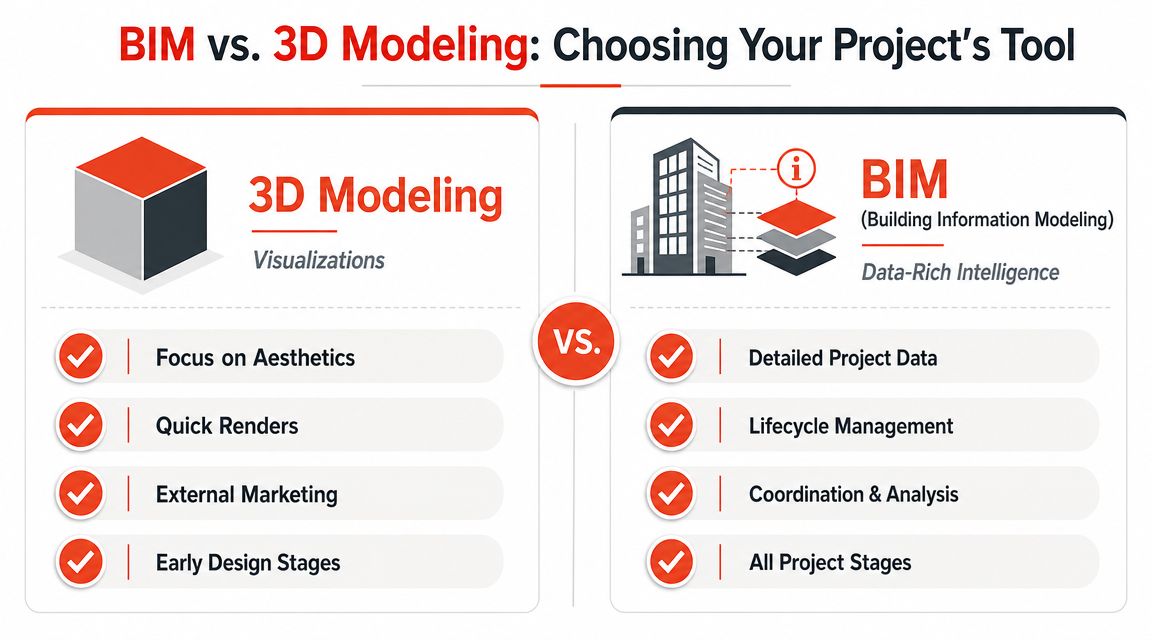
| Aspect | 3D Modeling | BIM (Building Information Modeling) |
|---|---|---|
| Primary purpose | Visual communication | Coordinated building intelligence |
| What objects contain | Shape, texture, lighting, presentation detail | Shape plus structured project data |
| Best for | Marketing, virtual staging, pre-sales visuals, client presentations | Coordination, planning, cost review, scheduling, lifecycle management |
| Typical user need | “Show me what it will look like” | “Show me how it fits, performs, and gets delivered” |
| Strength | Speed and visual persuasion | Depth, traceability, and multi-team decision support |
| Weakness | Limited operational intelligence | More effort to build and maintain |
Why the ROI can be so high
The economic case for BIM gets attention because the model can influence real project decisions, not just aesthetics. A peer-reviewed ASCE paper reviewing BIM projects reported ROI ranging from 140% to 39,900%, with an average ROI of 1,633% across all projects and 634% even when planning or value analysis phases were excluded, according to the ASCE paper on BIM ROI and capabilityLM.1943-5630.0000127).
Those figures are wide because projects use BIM differently. But the pattern is clear. When teams use a model to avoid clashes, improve coordination, and support planning decisions, the value goes far beyond visualization.
For a real estate audience, this matters most in commercial and complex asset settings. If you're dealing with office fit-outs, mixed-use development, repositioning work, or handoffs between development and operations, BIM starts earning its keep because people need answers, not just imagery.
A short explainer can help if you want to see the concept visually before going deeper.
Where point clouds fit in
Many non-technical teams often struggle with the distinction. A laser scan or point cloud is not the same as BIM. Raw point cloud data is just a mass of unconnected points. Teams typically register and align those scans, classify surfaces into elements like walls, ceilings, columns, and MEP systems, then model them in tools such as Revit, ArchiCAD, Civil 3D, or Navisworks before validating against the original scan, as explained in this overview of point cloud to BIM workflow.
That distinction matters in repositioning and renovation projects. A scan gives you reality capture. BIM gives that reality structure and meaning.
If a vendor says they can “just convert the scan,” ask what information the final model will actually contain. Geometry alone won't support coordination.
Choosing the Right Model for Your Real Estate Project
Most real estate teams don't fail because they picked a bad technology. They fail because they bought a tool built for one job and used it for another.
The cleanest way to choose between BIM and 3D modeling is to start with the client decision you're trying to enable. Not the software. Not the file type. The decision.
Residential listing agent
You've got a dated listing with solid bones, weak photos, and buyers who can't see past old finishes. In that situation, a full BIM workflow is usually overkill. You need visual translation. Fast.
3D modeling helps when the question is, “Could this home feel modern, warm, or high-end after light work?” Virtual staging, finish swaps, renovation concepts, and room-use visuals all support that conversation.
Use BIM only if the assignment moves beyond imagination into technical planning. That can happen with large remodels, complicated additions, or developments where multiple stakeholders need a shared data model.
Commercial broker
A tenant rep has to show whether a floor can support a law firm, a medical user, or a hybrid office plan. The decision isn't purely aesthetic. It touches circulation, departmental adjacencies, coordination constraints, and often phased delivery.
That's where BIM becomes more useful. It gives design and fit-out teams something they can test against. If the client only needs a persuasive test-fit visual for an early pitch, 3D modeling may be enough. If the client needs confidence in execution, coordination, and change management, the information layer starts to matter.
A practical way to split the work looks like this:
- Use 3D modeling for pitch decks, prospecting visuals, leasing brochures, and investor presentations.
- Use BIM for detailed tenant planning, renovation coordination, service integration, and handoff into delivery teams.
- Use both when the visual story wins the client and the data-rich model supports the work after they say yes.
Property manager or asset manager
Property teams often sit in the middle. They need visuals for leasing and communication, but they also deal with physical reality. Existing conditions, upgrade planning, service coordination, and operational handoff all surface over time.
For them, the right answer often changes by task:
| Real estate task | Better fit |
|---|---|
| Marketing a vacancy | 3D modeling |
| Showing a future lobby refresh | 3D modeling |
| Planning a complex retrofit | BIM |
| Coordinating building systems during renovation | BIM |
| Presenting a concept to ownership | 3D modeling |
| Supporting long-term asset information needs | BIM |
A simple decision filter
Ask these four questions before you commission anything:
- Is the audience buying the vision or managing the asset? Buyers and prospects usually need visuals first.
- Will anyone make scheduling, cost, or coordination decisions from this file? If yes, BIM is more likely to be justified.
- Does the model need to survive beyond the presentation? Marketing assets can be disposable. Coordination models usually aren't.
- How quickly do you need output? Urgent campaigns often favor lighter visual workflows.
The strongest operators don't confuse technical depth with commercial usefulness. They match the model to the sales motion.
How to Implement 3D and BIM Workflows
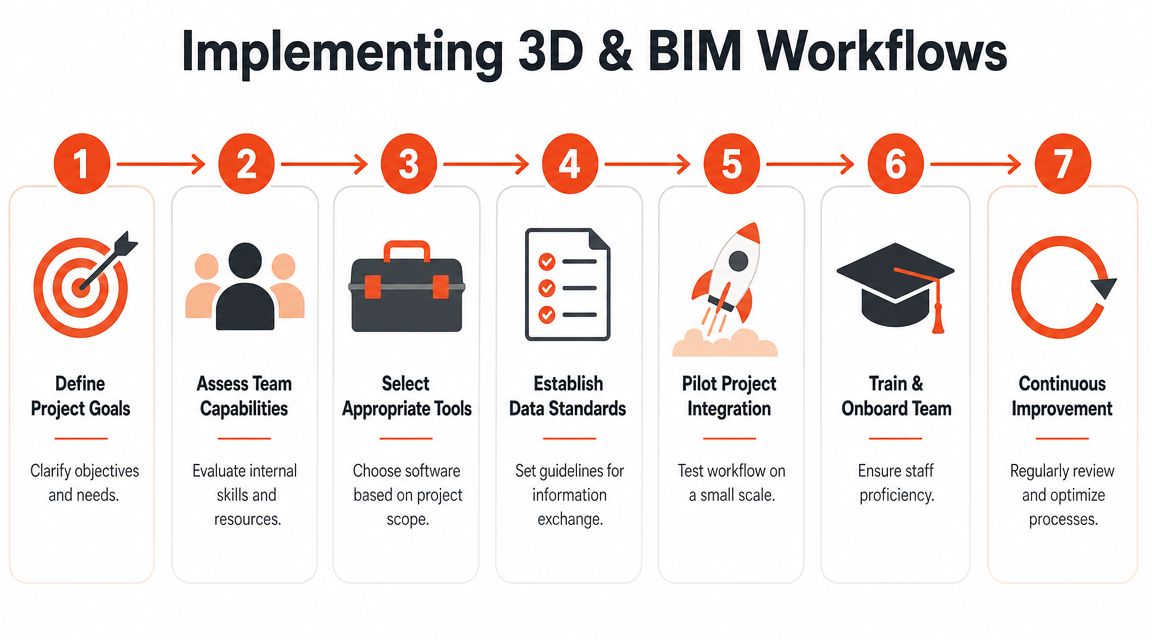
The fastest way to waste budget is to start with deliverables before you define the business job. Real estate teams do this all the time. Someone asks for “a BIM model” because it sounds advanced, or for “renders” because they know clients respond to visuals. Neither request is specific enough.
Start with the outcome.
Brief the job before the model
A common misconception is that BIM is always superior. It isn't. The more useful question is how much information the project needs, because BIM's rich data comes with added effort and cost to maintain, which is often unnecessary when the goal is fast visual communication, as explained in NY Engineers' discussion of BIM vs 3D modeling in construction.
That means the first conversation should cover:
- Who is the audience. Buyers, tenants, investors, asset managers, or contractors all need different outputs.
- What decision needs to happen next. Approve a concept, sign a lease, review a fit-out, or coordinate work.
- How polished the visual must be. Mood-rich imagery and technical coordination are different products.
- Whether the file needs a life after the presentation. If no one will maintain the information, don't buy a data-heavy deliverable.
Buy the minimum model that gets the next decision made.
Choose the right production setup
There are three common ways to procure this work.
Specialized visualization vendors are a good fit when the job is marketing-first. They know cameras, materials, composition, styling, and post-production. They're less useful when your client needs an intelligent model for ongoing planning.
Architecture or BIM consultants make more sense when geometry must carry structured information and support coordination. They can also work from scans or existing documentation, though the process is usually slower and more involved.
Internal teams plus software work best when a brokerage, developer, or property group has repeatable needs and enough volume to justify process. In commercial settings, that may also connect to estimating and documentation tools. If you're comparing adjacent construction workflows, this review of Exayard vs Bluebeam for construction takeoffs is useful for understanding how production choices change once teams move from visual ideas into quantification and technical execution.
Build a lean workflow
For most real estate organizations, the best implementation pattern is not “go all in.” It's staged adoption.
- Start with recurring use cases. Listing visuals, test fits, renovation concepts, leasing decks.
- Create a decision tree. Decide what gets a fast visual workflow and what triggers a BIM scope.
- Standardize inputs. Video walkthroughs, floor plans, photos, finish references, and scope notes.
- Keep review cycles tight. Real estate loses momentum when creative production drifts.
- Use collaboration tools clients can follow. Fancy files don't help if stakeholders can't comment clearly.
A lot of teams improve by getting visual review out of email chaos and into one workspace. If that's a current pain point, client studio visual collaboration is the kind of workflow reference worth studying before you add more software complexity.
What doesn't work
The weak pattern is easy to spot. A team commissions a data-heavy model for a marketing brief, then no one uses the embedded information. Or they order glossy visuals for a space planning problem, then discover the images can't answer basic operational questions.
Both mistakes come from buying output before defining purpose.
How AI Complements BIM and 3D Modeling
There's a gap between heavyweight technical models and the speed real estate demands. Traditional BIM can be powerful but slow to build and maintain. Traditional 3D modeling is lighter, but it still depends on specialized production time, revisions, and vendor coordination.
That gap is exactly where AI has become useful.
Research has highlighted a practical need to convert data-heavy BIM into lighter meshes for AR and mobile viewing, showing that the industry still needs faster ways to produce quick visual outputs from complex models, as discussed in this study on preprocessing BIM for lightweight visualization. For real estate professionals, the business takeaway is simple. Many day-to-day marketing and communication tasks don't need a full technical chain. They need fast, clear visuals that help clients react.
Where AI fits best
AI is strongest when the goal is visual iteration, not deep building intelligence.
That includes jobs like:
- Decluttering listing photos
- Virtual staging
- Style changes for different buyer profiles
- Concept renovations for outdated rooms
- Quick alternatives for tenant presentations
- Marketing materials generated from simple property media
These are tasks where speed matters more than exhaustive object data. An agent trying to win a listing presentation doesn't need a full lifecycle model. They need to show possibility quickly, cheaply, and in a way the client can understand without technical translation.
Where AI does not replace BIM
AI does not replace the coordination value of BIM on complex projects. If teams need structured asset data, clash review, disciplined modeling, or a long-term source of truth, BIM still owns that lane.
What AI does is remove friction from the visual side of the business. It gives brokers, marketers, and leasing teams a faster front-end layer. That can support the sales process long before a project needs technical depth.
The smart stack isn't BIM or 3D modeling or AI. It's knowing when each one is the shortest path to client clarity.
For real estate, that's the whole game. Use BIM when information has to travel with the building. Use 3D modeling when presentation quality drives the decision. Use AI when speed and volume matter more than technical richness.
Bounti Labs helps real estate teams create that fast visual layer without the usual production drag. From a single walkthrough, Bounti can generate listing descriptions, pull stills, create MLS-ready photos, and transform spaces with AI decluttering, staging, restyling, and renovation concepts. If your team needs marketing-ready visuals and client communication assets without waiting on slow manual workflows, Bounti is built for that job.



