


You've got the photos. You've got the listing copy. You've probably even got a video walkthrough sitting in your camera roll.
And yet the listing still feels incomplete.
That gap is usually the floor plan. Buyers want to understand flow before they book a showing. Sellers want proof that your marketing is more polished than the next agent's. MLS reviewers want clean, legible documentation. If your current approach is a rough sketch, an old builder PDF, or nothing at all, you're leaving clarity on the table.
A strong floor plan template fixes that. What's more, it turns a basic marketing asset into a trust signal. The agents who treat floor plans like a strategic part of the listing package look more prepared, more credible, and more modern.
Beyond the Sketch Why a Professional Floor Plan Wins Listings
A buyer opens your listing on their phone during lunch. The photos look good. The kitchen is updated. The primary suite seems large enough. Then they hit the point where they need to understand the layout, and there is no real floor plan, just a rough sketch or nothing at all. That buyer does not book the showing. They move to the next listing that makes the decision easier.
That is the job of a professional floor plan. It removes uncertainty fast.
A loose sketch creates friction at the exact moment a buyer is trying to answer practical questions. How does the living room connect to the kitchen? Does bedroom two sit next to the nursery or across the hall? Is the office a separate space or just a corner with a label? If the layout is unclear, buyers fill in the gaps themselves, and they usually assume the worst.
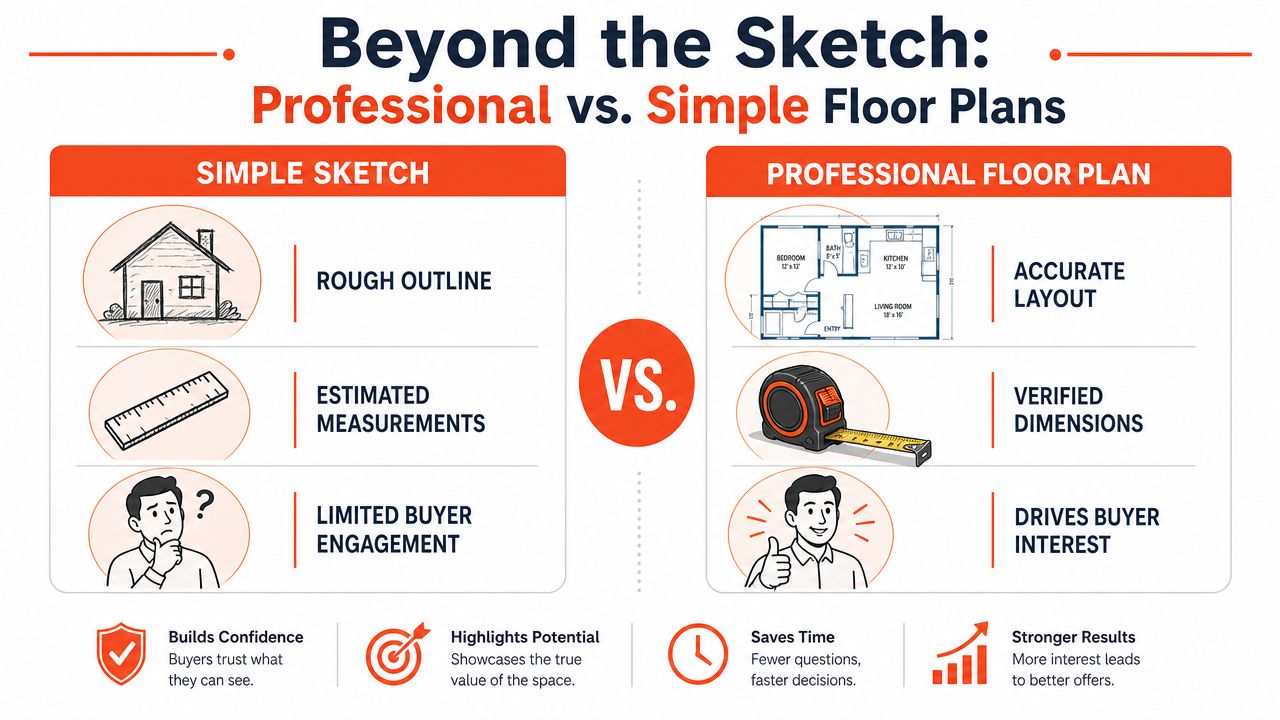
What separates a listing asset from a throwaway sketch
Professional floor plans do five things well:
- Keep scale consistent: Buyers need to compare room sizes without guessing.
- Show layout instantly: The path from entry to living areas to bedrooms should read in seconds.
- Label rooms clearly: Generic boxes do not help. Named spaces do.
- Include usable dimensions: Dimensions help buyers judge fit for beds, desks, and dining tables.
- Show structural elements cleanly: Doors, windows, stairs, and walls should be obvious at a glance.
Agents who skip these basics weaken the rest of their marketing. Great photos cannot fix a confusing layout.
Its value is strategic, not cosmetic. A professional floor plan supports staging decisions, helps buyers connect photos to physical flow, and gives sellers a visible reason to believe your marketing package is more disciplined than the one offered by the agent down the street. It also reduces problems later when you need assets that are clean enough to adapt for brochures, listing presentations, and MLS submission standards.
Why professional plans influence buyer behavior
Photos create interest. Floor plans help buyers qualify the home for their actual life.
That matters because serious buyers are screening for fit before they ever call. They want to know whether the guest room is far enough from the primary, whether the mudroom connects to the garage, and whether the dining area is a real room or borrowed space in the living area. A polished plan answers those questions quickly and keeps the listing moving.
It also sharpens how the property is perceived. An awkward floor plan presented clearly can still perform well because buyers know what they are getting. A strong layout presented poorly loses trust. Clarity beats decoration.
If you want a useful visual reference on presentation choices, Roomstage AI has a strong guide on understanding 2D and 3D floor plans. Review it if you are deciding how much detail and visualization to include in the listing package.
My recommendation is simple. Make the floor plan a standard deliverable on every listing worth winning. Tie it to staging. Check it against MLS requirements before publishing. Use automation with Bounti to produce consistent, usable assets faster than agents still chasing sketches and old PDFs. The agent who makes a home easier to understand usually makes it easier to sell.
Choosing Your Floor Plan Template Format and Source
A seller asks why your floor plan looks blurry in the MLS, the brochure text is too small to print, and the dimensions changed between versions. That problem started before the first room label. It started with a bad format choice.
Choose the file type based on distribution, editing needs, and compliance. Agents who start with a random download usually create extra work, inconsistent branding, and preventable listing errors.
Which format works for what
| Format | Best use | Main limitation |
|---|---|---|
| PNG | MLS uploads, listing portals, websites, presentation decks | Limited editing after export |
| JPEG | Quick sharing, lightweight uploads | Compression can blur lines and labels |
| Print brochures, seller packets, document sharing | Difficult to revise without the original file | |
| DWG/DXF | Measured edits, vendor collaboration, drafting workflows | Too technical for many agents and admins |
Here's the rule. Keep one editable master file. Export channel-specific versions from that source. Use PNG for portal visibility, PDF for print and client-facing collateral, and DWG or DXF only when a drafter, architect, or measurement vendor needs to touch the file.
That decision saves time and protects accuracy.
Where your template should come from
You have three real options, and one of them usually wins.
Free templates are acceptable for training, internal mockups, or a one-off rental listing. They are a poor choice for serious listing marketing because they often come with weak typography, generic symbols, and limited edit control.
Paid template libraries are better if your team needs speed and a cleaner base file. They cut setup time, but they do not solve the hard part. You still need accurate measurements, consistent labels, and exports that hold up across MLS, flyers, and listing presentations.
Dedicated floor plan software is the right choice for agents with repeat listing volume. It gives you editable walls, room labels, dimensions, and cleaner exports. It also reduces version chaos across coordinators, photographers, and marketing staff.
If you also use staged visuals, your floor plan source should support the same marketing story as the rest of the listing package. A staged living room that suggests one layout and a floor plan that implies another creates friction. Use the plan alongside your virtual staging strategy for real estate listings, not as a separate asset built in isolation.
Choose the source that fits your workflow after the home is measured, reviewed, and prepared for market. Easy download speed means nothing if the final asset fails in print, confuses buyers, or creates MLS cleanup later.
A practical decision filter
Use this filter and move on:
- Need speed for digital marketing: Start with an editable template and export a clean PNG.
- Need polished print materials: Use a source that exports sharp PDFs with readable room labels.
- Handling listings every month: Use software or automation, not static files buried in old folders.
- Working with outside vendors: Keep DWG or DXF available only if another professional needs to revise the drawing.
- Want consistency across the team: Standardize one source, one naming convention, and one export process.
The wrong source creates rework at every handoff. The right one becomes invisible because it fits your marketing system, supports staging decisions, and produces files you can publish without cleanup.
How to Customize a Template for Maximum Buyer Impact
A blank floor plan template has no marketing value. The value comes from what you add, what you leave out, and how clearly the final plan answers buyer questions.
Start with the essentials. Then optimize for perception.
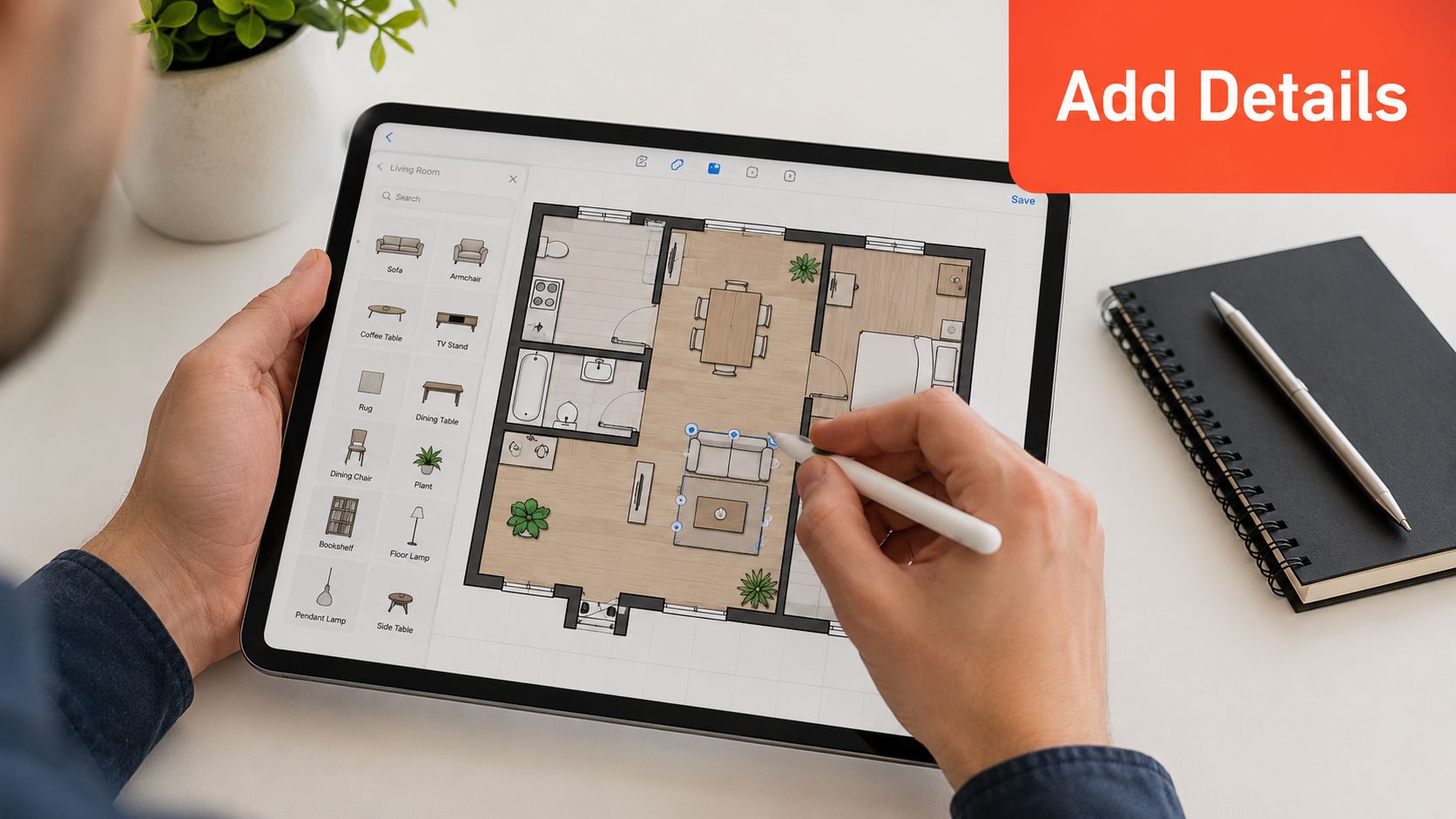
Technical guidance on producing usable floor plans recommends building the plan as a scaled 2D drawing with dimensions, then drawing exterior walls before interior partitions, followed by features and system annotations in a structured sequence, as outlined in this floor plan drafting guide. That's solid advice for architects, and it applies to listing agents too. If you skip the dimensions, you don't have a working plan. You have a sketch with better software.
Add the details buyers actually use
Focus on the information that helps someone understand how they'd live in the home.
Label every important room clearly
Don't make buyers decode “Room 1” and “Room 2.” Use plain labels like Primary Bedroom, Dining Area, Pantry, Laundry, and Office.Include dimensions where they matter most
Bedrooms, living areas, kitchens, and flex spaces need dimensions because those are the rooms buyers evaluate for fit and furniture.Show openings and circulation
Doors, windows, stairs, and major transitions shape how the property feels. If those elements are vague, the layout feels vague.Use furniture sparingly but strategically
A bed in the bedroom and a sofa in the living room help buyers gauge scale fast. Overdo it and the plan becomes cluttered.
If you're also refining the visual story of the home, pair your floor plan with a consistent staging approach. This guide to virtual staging for real estate listings is useful for making sure the layout and the furnished presentation support each other instead of competing.
Handle odd layouts like an adult
Most floor plan content online assumes every room is a rectangle. Real homes aren't that cooperative.
A practical design perspective on angled walls argues that irregular geometry can be handled by using pivot hallways, hiding angles in closets, or folding awkward corners into showers and utility zones so the plan feels intentional, not chaotic, as discussed in this guide to angled walls in floor plans.
That's the right mindset for agents. Don't apologize for an unusual layout. Clarify it.
The goal isn't to make an irregular home look rectangular. The goal is to show buyers how the irregularity works.
When you need a quick visual refresher on layout drafting in action, this video is useful:
A smart customization checklist
- Keep labels short: Long room names create clutter.
- Prioritize legibility: Thin gray text and tiny dimensions look elegant on your screen and unreadable everywhere else.
- Match the home's story: If the listing emphasizes entertaining, make the kitchen, dining, and outdoor connection obvious.
- Clarify flex spaces: If a loft can work as an office or nursery, label it in a way that helps buyers imagine options.
- Don't fake precision: If you're unsure about a measurement, verify it before publishing.
Good customization makes the floor plan template feel like part of the sales strategy, not a borrowed technical document.
Aligning Floor Plans with Staging and MLS Rules
A floor plan can hurt a listing if it disagrees with the rest of your marketing.
That happens all the time. The photos show a staged office. The plan labels it as a bedroom. The video implies an open flow. The drawing makes the home look chopped up. Buyers notice those mismatches, even if they can't explain why the listing feels off.
Consistency is what makes the package credible.
Match the plan to the visual story
If your photos show furniture placement that highlights scale, your floor plan should support that message. If you stage a flex room as a nursery, gym, or office, the plan should either reflect that use or label the room neutrally enough that the staging doesn't feel misleading.
This isn't a design preference. It's a trust issue.
The same goes for your edited visuals. If you're using AI-enhanced photography, keep the floor plan grounded in reality and make sure the imagery and layout tell the same story. This review of AI photo editing software for real estate is useful if you're tightening the broader listing workflow and want fewer disconnects between visuals.
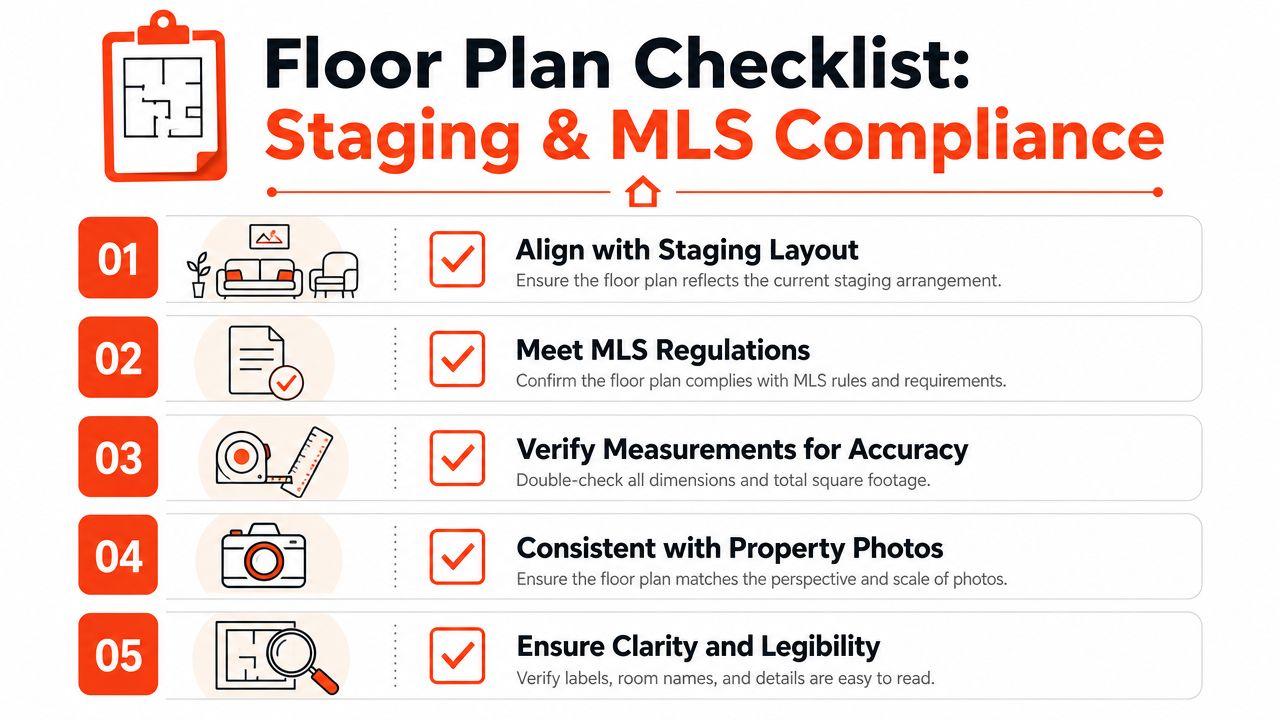
What compliance-focused reviewers care about
For documentation-heavy workflows, floor plans should be legible, use English labels when needed, and clearly show the plan's location within the larger building context. Best practice is to annotate only what's needed to confirm the requirement, preserving clarity over visual polish, according to this floor plan documentation guidance.
That advice maps cleanly to MLS reality.
Reviewers and compliance teams don't care that your floor plan looks sleek if they can't read it. They don't care that your colors match the brand if the layout lacks context.
Use this pre-upload check
Before you send or upload any floor plan template, verify these points:
- Legibility first: Text, dimensions, and room names should still read when compressed.
- English labels where required: Don't assume a reviewer will interpret untranslated room names.
- Correct building context: Condo unit plans, multilevel homes, and mixed-use properties need clear location context.
- Minimal annotations: Mark what matters. Don't drown the plan in decorative extras.
- Staging alignment: Make sure the room use suggested by photos doesn't contradict the plan.
Clean and compliant beats stylish and confusing every time.
Agents lose momentum when a listing package creates avoidable questions. A floor plan should remove doubt, not introduce it.
The Future Is Automated Generate Floor Plans with Bounti
Manual floor plan work is a bad use of agent time.
You've already got enough moving parts in a listing launch. Photos, copy, edits, staging coordination, MLS input, seller approvals. Adding manual measurement, template hunting, redrawing, and annotation cleanup is exactly the kind of repetitive work that should be automated.
That shift is already happening because floor plans are no longer just visual artifacts. Research on modern floor plan intelligence points to ResPlan, a dataset of 17,000 vector-based residential floor plans, showing that layouts can now be treated as machine-readable assets for automated interpretation and generation, as described in this research paper on scalable floor plan data.
Why automation matters in listing operations
This isn't about replacing judgment. It's about removing bottlenecks.
An automated floor plan workflow can help with:
- Template selection: You don't need to start from a blank canvas every time.
- Layout interpretation: Structured systems can read room relationships consistently.
- Output consistency: Every listing gets a cleaner, more uniform presentation.
- Faster packaging: The floor plan becomes part of the listing workflow, not a side project.
If you're evaluating where AI fits more broadly in your business stack, it helps to compare categories. Hyperleap AI's roundup on compare real estate AI chatbots 2026 is useful for seeing how conversational tools differ from production tools like listing-content automation.
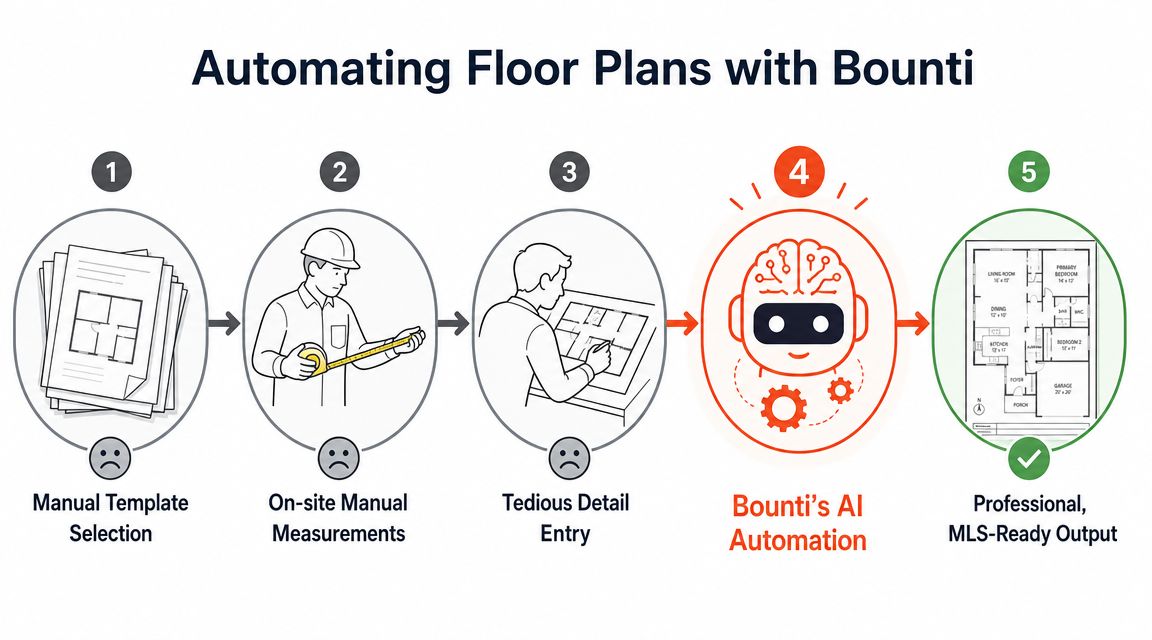
What a modern workflow should look like
A listing workflow should start with one source capture and branch into multiple outputs. That's the efficient model.
With Bounti's AI CMA and listing workflow tools, agents can build around a more unified process instead of stitching together separate vendors and manual steps. In practical terms, that means the same listing operation can support visuals, marketing materials, and presentation assets without forcing the agent back into hand-built production work.
Automation is useful when it eliminates repetitive production while keeping the final asset usable in a real listing workflow.
That's the key standard. Not novelty. Not flashy demos. Usable output.
My recommendation
If you produce occasional floor plans for unusual listings, a manual template plus careful review may still be enough.
If you list consistently, run a team, or manage repeat marketing volume, stop treating floor plan creation like an artisanal task. Standardize it. Automate what can be automated. Keep human review where it matters most, which is accuracy, labeling, and strategic presentation.
The floor plan template is no longer the hard part. The hard part is building a workflow that doesn't waste your time.
Stop Drafting Start Winning More Listings
The agents who win more listings aren't just better at talking. They package property information better.
That's why the floor plan template matters. It gives buyers clarity, gives sellers confidence, and gives your listing package a level of professionalism that rough sketches and missing layouts can't touch. When the plan is scaled, readable, customized to the property, aligned with staging, and clean enough for compliance review, it stops being a technical extra and starts working like a sales asset.
The playbook is simple
- Use a real template, not a rough sketch
- Choose the file format based on where the plan will live
- Customize for buyer understanding, not graphic flourish
- Keep it aligned with staging, photography, and MLS rules
- Automate the production work whenever possible
That's the shift. Stop thinking of floor plans as drafting chores. Start treating them as listing infrastructure.
You don't need more busywork. You need fewer manual steps and better outputs. When your floor plan process is clean, your marketing gets sharper, your listings feel more complete, and your team gets time back for the work that closes deals.
Bounti Labs helps agents turn a single property walkthrough into usable marketing assets faster, including listing visuals, descriptions, and floor-plan-ready support materials. If you're done patching together manual vendors and last-minute edits, take a look at Bounti Labs and build a listing workflow that's easier to run and easier for buyers to understand.



