


More than 10 billion photos are edited annually, and the global photo editing software market was valued at USD 1,149.06 million in 2024, with a projection of USD 1,818.90 million by 2034 at a 4.70% CAGR according to photo editing software market data. That should change how you think about retouching.
For real estate, a professional photo retouching service isn't a cosmetic extra. It's an operating decision. It affects how fast listings go live, how consistent your brand looks across properties, how much your team spends on revisions, and how much admin work sits between the shoot and the MLS.
Agents who treat editing as an afterthought usually create their own bottlenecks. They chase photographers for fixes, resend notes, approve inconsistent images, and lose time at the exact moment speed matters most. Buyers don't see that workflow mess. Sellers do. They see whether you launch polished marketing quickly or stumble through production.
Why Photo Retouching Is a Critical Business Decision
The old way of talking about retouching focused on aesthetics. Better lighting. Cleaner colors. More polished photos. That's too shallow.
The issue is throughput. A listing team doesn't need a digital artist for occasional hero images. It needs a production system that turns raw property photos into accurate, marketable, MLS-ready assets without creating delays.
Real estate teams buy outcomes, not edits
A professional photo retouching service matters because every listing has a clock on it. You need usable photos for the MLS, email campaigns, social posts, property sites, brochures, and internal approvals. If editing drags, everything behind it drags too.
That changes the buying criteria. You shouldn't ask only, "Do these images look good?" You should ask:
- How fast can this provider deliver
- How consistent are results across a full listing set
- How many revision rounds does this workflow create
- How much staff time will approvals and re-briefing consume
- Can this model handle volume when multiple listings hit at once
Those are business questions, not creative questions.
Practical rule: In real estate, the right editing partner isn't the one with the fanciest portfolio. It's the one that helps your team publish faster without creating compliance problems or revision chaos.
Speed and consistency drive the real return
A brokerage with one listing a month can tolerate a messy editing process. A team managing multiple active listings can't.
The pressure isn't just on individual photos. It's on the entire set. Living room shots, bathrooms, exteriors, amenities, and detail images all need to feel coherent. When brightness shifts wildly from room to room or window views look unnatural, the listing feels less credible. That hurts buyer confidence and weakens the seller's perception of your marketing quality.
Retouching is also a client acquisition tool. Sellers notice presentation. They compare your listing media to what competing agents produce. If your visual standards are inconsistent, your listing pitch gets weaker before you even talk about pricing strategy or negotiation.
The wrong vendor becomes an expensive bottleneck
Cheap editing can cost more than premium editing if it forces your team into rework. Slow editing costs even more because it delays publishing, rescheduling, and campaign launch. That hidden operational drag is where many teams lose money.
A strong retouching process does three things well:
| Business need | What strong retouching supports |
|---|---|
| Faster launch | Images are ready quickly for MLS and marketing |
| Brand consistency | Listing sets look unified across rooms and properties |
| Team efficiency | Fewer revisions, fewer vendor handoffs, less admin |
That's the lens you should use for every editing decision. Not "Can they make a sky bluer?" but "Can they support a real estate marketing operation without slowing it down?"
Understanding What Professional Retouching Really Means
Most agents use the phrase "editing" too loosely. A professional photo retouching service isn't a filter pack, and it isn't the same as tapping auto-enhance in an app.
It's closer to the difference between a car wash and a professional detailer. A car wash makes the vehicle look cleaner from a distance. A detailer corrects specific flaws, works panel by panel, and improves the final presentation without changing what the car is.
That same distinction matters in listing photography.

What professionals actually do
According to Pixelz's retouching workflow overview, professional retouching typically includes structured, layer-based edits like masking, color correction, and object cleanup. Those aren't fancy buzzwords. They're the mechanics behind clean commercial images.
In practice, this means:
- Masking isolates parts of the image so an editor can adjust windows, walls, furniture, or backgrounds without damaging everything else.
- Color correction fixes white balance and exposure issues so one room doesn't look orange while the next looks blue.
- Object cleanup removes small distractions that weaken the image, such as cords, outlet distractions, dust spots, or minor visual clutter.
- Cropping and framing adjustments improve composition so the room reads clearly on MLS portals and mobile screens.
The point is controlled realism
Good retouching doesn't make a property look fake. It makes the image look accurate under imperfect shooting conditions.
That's a big difference. Real estate photos are captured in mixed lighting, with window glare, lamp color casts, reflective surfaces, and awkward room angles. A professional editor corrects those technical problems so buyers see the property more clearly.
A polished listing image should feel believable at first glance. If a buyer notices the editing before they notice the room, the editor went too far.
What separates pro work from casual edits
You can usually spot amateur editing fast. Overcooked saturation. Plastic-looking surfaces. Shadows that disappear. Window views that look pasted in. Those mistakes don't just look bad. They make buyers suspicious.
A real professional photo retouching service should deliver these standards:
- Subtle correction that improves image quality without stylizing the property.
- Repeatable consistency across a full gallery, not just one hero shot.
- Clean technical execution so edges, lines, and tonal balance hold up under scrutiny.
- Commercial intent where every adjustment supports buyer understanding and listing presentation.
If you're evaluating vendors, stop asking whether they can "make photos pop." That's vague and usually a red flag. Ask whether they can maintain realism, consistency, and instruction fidelity across an entire listing package.
Common Retouching Tasks for Real Estate Listings
The most useful edits in real estate aren't the flashy ones. They're the corrections that remove friction between the property and the buyer's perception of it.
A good professional photo retouching service solves specific marketing problems. It doesn't just decorate images. It helps a room read clearly, feel inviting, and stay credible.

Color and exposure correction
This is the baseline. If a kitchen looks dim, a bathroom looks green, or a living room has blown-out windows, the photo isn't doing its job.
Editors fix these issues by balancing brightness, contrast, and color so the room feels clean and coherent. This matters most in homes photographed under mixed lighting, where daylight, recessed lights, and lamps all compete.
For agents, the payoff is simple. The property looks cared for. The image set feels professional. The listing doesn't look rushed.
Perspective correction
Wide-angle lenses help photographers capture small rooms, but they also create distortion. Walls lean. Vertical lines bend. Rooms can look warped.
Perspective correction brings those lines back under control. It doesn't fake size. It restores spatial credibility.
That matters because buyers may forgive an average room. They won't trust a distorted one.
Decluttering and object removal
Some distractions are minor but costly. Trash cans, cords, fridge magnets, pet bowls, cleaning products, and countertop overload all pull attention away from the room itself.
AI-assisted cleanup can handle many of these edits quickly. Manual editors can also do them, especially when the request is precise. The key is restraint. Remove distractions that hurt presentation, not permanent features that would mislead a buyer.
Field rule: If the removed item changes the property's actual condition or function, slow down and review for disclosure risk before publishing.
Virtual staging and restyling
Empty rooms are hard to sell visually. Buyers struggle to judge scale, purpose, and flow. Virtual staging helps them picture how the space lives.
Used well, it can turn a blank bedroom into a guest suite, a cold corner into a home office, or an awkward open area into a defined dining zone. If you want a practical walkthrough on when staged images make sense, this virtual staging guide for real estate teams is a useful reference.
Window pulls and exterior cleanup
Window views often blow out in interior photography. Editors can recover or blend those areas so buyers understand the home's natural light and outlook. Exterior edits can also improve sky tone, lawn appearance, and small distractions like bins or parked cars, as long as the final image remains honest about the property.
The right question isn't "What edits are available?" It's "Which edits help this listing communicate more clearly?" That's how you keep retouching useful instead of gimmicky.
Manual Editors vs AI Platforms The Two Retouching Models
Most agents don't need a lecture on editing theory. They need to decide between two operating models.
One model relies on manual retouching services. You send files, write instructions, wait for delivery, review results, and request revisions if needed. The other uses AI retouching platforms, where enhancement, cleanup, staging, and visual variations happen much faster and with less back-and-forth.
The business question isn't which model sounds more creative. It's which one creates better ROI for your team.
As noted in Imagen AI's discussion of professional retouching services, the key issue is how much faster and more profitable AI-assisted retouching is versus manual editing, especially once you account for revision burden and listing delays.
The manual model works best for exception cases
Manual editors are useful when the job is unusually complex. Think difficult compositing, highly specific luxury marketing polish, or unusual image rescue work. A skilled human retoucher can interpret nuance that templates and automation may not handle the same way.
But manual service comes with operational friction:
- You have to brief clearly
- You usually wait for delivery
- Revisions add another cycle
- Output can vary by editor
- Scaling volume means scaling coordination
For one-off projects, that may be fine. For listing operations, it often isn't.
AI wins on workflow economics
AI platforms are built for speed, repetition, and volume. That's why they fit real estate so well. Most listings need strong, consistent, market-ready visuals. They don't need handcrafted perfection on every frame.
An AI workflow also reduces one of the biggest hidden costs in real estate marketing: coordination overhead. Fewer instructions. Fewer revision loops. Faster approvals. Faster launch.
If you're already paying attention to how AI changes visual production in adjacent marketing work, this piece on scaling ad creative with AI is worth reading. The same operational logic applies to property media. Once content volume rises, manual production starts creating drag.
Manual vs. AI Photo Retouching at a Glance
| Factor | Manual Retouching Service | AI Retouching Platform |
|---|---|---|
| Speed | Usually depends on queue and handoff timing | Usually much faster for standard property edits |
| Consistency | Can vary by editor and brief quality | Better suited for repeatable output at scale |
| Revision burden | Often higher because instructions must be interpreted | Often lower for standard enhancement workflows |
| Best use case | Complex bespoke edits and unusual requests | High-volume listing production and rapid turnaround |
| Team workload | More vendor communication and review management | Less coordination for routine edits |
| Cost structure | Commonly per image or hourly | Often more predictable at the platform level |
My recommendation
If you're a solo luxury agent with selective marketing volume and a strong appetite for creative direction, manual editing can still make sense for certain hero images.
If you're a brokerage, listing team, leasing operation, or marketing coordinator handling recurring volume, AI should be your default production layer. Use manual retouching only for edge cases.
One option in that category is AI photo editing software for real estate teams, including platforms such as Bounti Labs that generate MLS-ready photos, stills from walkthrough video, and AI-based decluttering or staging. That's a workflow decision, not just a design preference.
Decoding Pricing and Turnaround Time Expectations
Retouching prices confuse agents because the market mixes simple correction work with labor-intensive manipulation under the same broad label. That's why one vendor looks cheap and another looks absurdly expensive. They're not always selling the same thing.
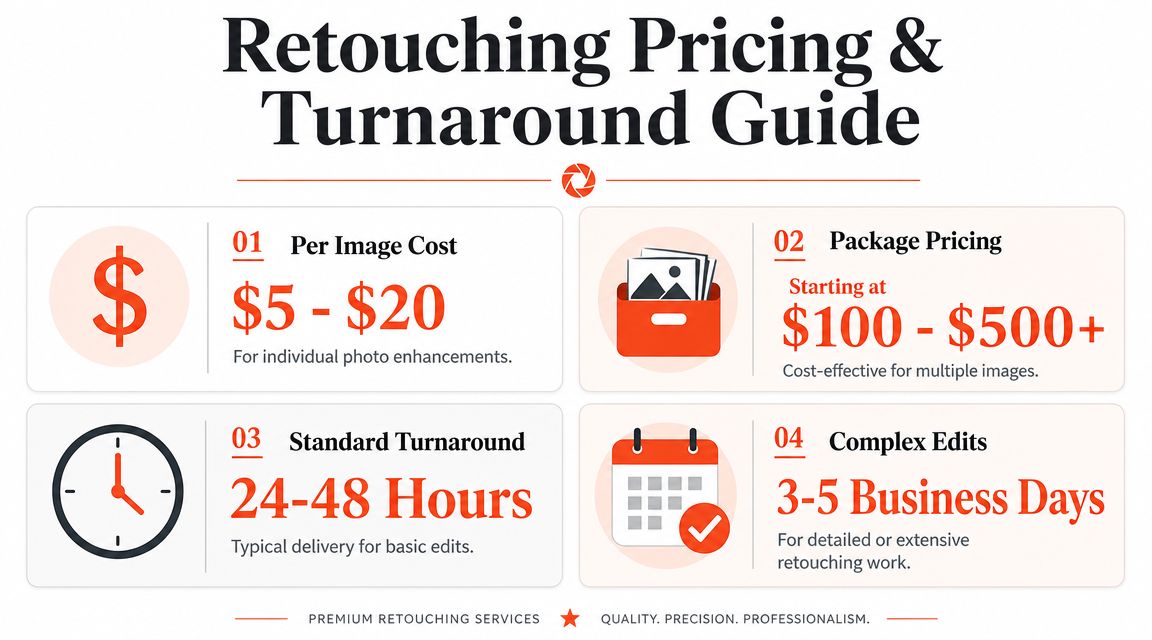
Based on industry pricing examples for photo editing and retouching services, basic retouching often falls around $5 to $20 per image, while more complex work like detailed manipulation can rise to $20 to $100 per image depending on scope. The same source notes that some high-end providers bill at $150 per hour, and one New York studio lists $225 per hour for in-person work. It also points to basic portrait edits around $5 per photo with a 1 to 3 day turnaround.
Why pricing spreads so widely
The short answer is labor depth.
Simple edits are production work. Exposure cleanup, color balancing, minor object removal, and standard brightening can be systematized. Complex edits require more decision-making, more masking, more review, and more time inside tools like Photoshop.
That means you should separate your needs into two buckets:
- Routine listing edits such as tonal correction, cleanup, basic enhancement, and standard presentation fixes
- Specialty edits such as advanced removal, detailed composite work, or extensive visual transformation
If you mix those buckets together when comparing vendors, you'll misread both cost and speed.
Turnaround is part of the price
A low per-image price can still be expensive if it slows your launch. Delayed images can stall your MLS publish date, paid promotion schedule, and seller communications. The invoice doesn't show that cost directly, but your team feels it immediately.
Some providers advertise standard delivery in 24 to 48 hours, while others work on longer queues depending on complexity and workflow type. That's fine if your marketing calendar can absorb it. Many listing teams can't.
This video gives a useful visual primer on what editing expectations can look like in practice:
How to budget more intelligently
Don't ask only, "What's the per-image price?" Ask these instead:
- How many images per listing usually need editing
- How many listings per month need that service
- How often does your team request revisions
- How much admin time goes into briefing and approvals
- What does a one-day delay cost your listing workflow
If you're building the broader listing media budget, this guide on how to budget for property photography helps frame photography spend in context, which is useful before you layer editing costs on top.
The bottom line is simple. Per-image pricing is only one part of the overall cost. The bigger expense often sits in waiting, rework, and team coordination.
Your Vendor Selection Checklist
Most agents choose an editing partner the wrong way. They look at a few polished before-and-afters, ask about pricing, and stop there.
That's not due diligence. A real vendor review should test whether the provider can support your workflow reliably, repeatedly, and without constant supervision.

What to inspect before you commit
As described by FixThePhoto's workflow model, top-tier services usually follow a defined process. You upload images, provide instructions or references, receive edited files, and work within a revision structure. That process matters as much as the visual output.
Use this checklist:
Review full listing sets, not hero shots
Ask to see complete property galleries. You want to know whether the kitchen, bedroom, bath, and exterior all hold the same quality standard.Test instruction fidelity
Give a provider a small batch with precise notes. See whether they follow brightness targets, object removal requests, and style preferences without drift.Verify turnaround expectations
Ask what happens during busy periods, weekends, and multi-property uploads. A promise is weaker than a documented delivery process.Check the revision policy
Revisions aren't just a customer service issue. They're a sign of workflow quality. Frequent revisions often mean the process is weak at intake.Confirm deliverables
Make sure image size, export quality, and final format match MLS, portal, brochure, and social requirements.
Questions that expose weak vendors
Use direct questions. Weak providers usually get vague fast.
| Ask this | Why it matters |
|---|---|
| How do you handle batch consistency across one listing | Tells you whether they think in sets, not single images |
| What instructions do you need upfront | Reveals process maturity |
| How are revisions submitted and tracked | Shows whether rework is controlled or chaotic |
| Can you separate standard edits from complex requests | Helps you avoid overpaying for routine work |
| What edits do you avoid for realism or compliance reasons | Tests judgment, not just skill |
A slick portfolio can hide a messy production process. What you need is evidence that the provider can follow instructions cleanly, deliver on time, and avoid over-editing.
Borrow standards from agency hiring
If you've ever hired outside marketing help, the same procurement logic applies here. This advice on choosing a marketing partner is relevant because reliability, communication, and process discipline matter just as much in image production.
Compliance should also be part of your checklist, especially if your team uses AI for object removal, staging, or visual alterations. This overview of California AB 723 and AI real estate photos is a practical starting point.
Integrating Retouching Into Your Listing Workflow
The best teams don't treat retouching as post-production cleanup. They treat it as a pre-listing system.
Start at the shoot. Capture rooms cleanly, keep compositions repeatable, and note known issues on site. If a room needs decluttering, a window pull, or virtual staging, flag it before files leave the camera roll. That reduces guesswork later.
Standardize your edit requests next. Build a short internal brief for every property that defines what "done" means. Include your normal brightness preference, whether you allow sky replacement, how you handle personal items, and which rooms should be staged or left untouched. Consistency starts with the brief, not the software.
Finally, slot editing before every marketing dependency. That means before MLS upload, before brochure design, before ad launch, and before the seller asks for the listing link. The teams that move fastest don't scramble after the shoot. They bake retouching into the launch sequence and keep the pipeline moving.
If your team wants a faster way to turn walkthrough video or property photos into MLS-ready visuals, Bounti Labs is built for that workflow. It helps real estate teams generate stills, create listing descriptions, and apply AI decluttering, staging, restyling, or renovation concepts without relying on slow manual production cycles.



