


More than 140 million U.S. property records are accessible through RentCast's API, alongside active listings, valuation estimates, and rental data, which is a useful reminder that a real estate API isn't a niche developer toy anymore. It's operating infrastructure for modern real estate teams (RentCast API coverage).
That matters because it is common for teams to still treat property data and marketing production as two separate jobs. One system stores facts. Another system creates flyers, photos, listing copy, social posts, and client updates. The handoff between those two worlds is where time gets lost, details get missed, and launch speed slows down.
The better approach is to think of a real estate API as the bridge between source data and execution. When the data arrives in a structured format, software can route it into pricing tools, CRM records, alerting systems, and increasingly into AI-driven content workflows that turn listing inputs into publishable assets. For team leads, that's the key opportunity: fewer manual steps, faster listing launches, and more consistent marketing output across every property.
What Is a Real Estate API and Why It Matters Now
A real estate API is best understood as a translator between systems. Your MLS, CRM, website, valuation tool, and marketing stack all “speak” differently. The API handles the translation so those systems can exchange property data automatically instead of relying on copy-paste work.
In practice, that means one application can request listing details, property records, valuation inputs, or status changes from another system and receive them in a format machines can use immediately. That's the difference between data sitting in a portal and data moving through your business.
The reason this matters now is simple. Real estate operations have become too fast and too fragmented for manual coordination. Teams need listing data to move from source to search pages, client alerts, CMA tools, and marketing channels without someone re-entering the same facts multiple times.
As noted in Realtyna's overview of real estate APIs, when APIs provide standardized, machine-readable property and listing data at scale, teams can automate valuations, refresh marketing content, and trigger alerts on status changes, which reduces manual research time and supports more responsive client-facing workflows in major markets.
Why agents and marketers should care
If you lead a team, the business case isn't “we need an API because tech companies use APIs.” It's more direct than that.
- Faster listing launches: New property data can move into websites, email drafts, and internal systems without waiting on manual entry.
- Cleaner marketing operations: When square footage, status, and pricing come from one structured source, your team is less likely to publish conflicting details.
- Better client responsiveness: Alerts, valuation refreshes, and listing updates can happen automatically instead of after someone notices a change.
Practical rule: If your staff is retyping listing facts into more than one system, you already have an API problem, even if nobody has named it that way.
There's also a second shift happening. Teams aren't just connecting databases anymore. They're connecting data feeds to content-generation systems. That's where something like Mallary.ai's developer API becomes relevant in the broader workflow conversation. Once property data is structured and accessible, it can feed downstream creative automation instead of stopping at a back-office record.
Where the real leverage shows up
The biggest win isn't the API call itself. It's what that call enables.
A clean data feed can trigger listing descriptions, image workflows, neighborhood summaries, brochure drafts, internal notifications, and follow-up campaigns. The firms that get the most value from a real estate API are usually not the ones obsessed with the endpoint. They're the ones that map the endpoint to a business moment like new listing intake, price change, stale inventory refresh, or client outreach.
The Six Core Types of Real Estate APIs
Teams rarely need “a real estate API” in the abstract. They need a specific kind of API tied to a specific job. That's where confusion usually starts. A listing feed won't solve valuation enrichment. A property records API won't handle transaction coordination. A media API won't tell you when a listing goes pending.
By 2025 to 2026, major APIs were moving beyond listings alone and into multi-layer market intelligence, including ownership, tax, environmental, and geographic context at national scale. HouseCanary's overview also notes that ATTOM classifies APIs into categories such as enterprise property data, investment analytics, rental intelligence, geospatial services, and climate risk modeling (HouseCanary real estate API overview).
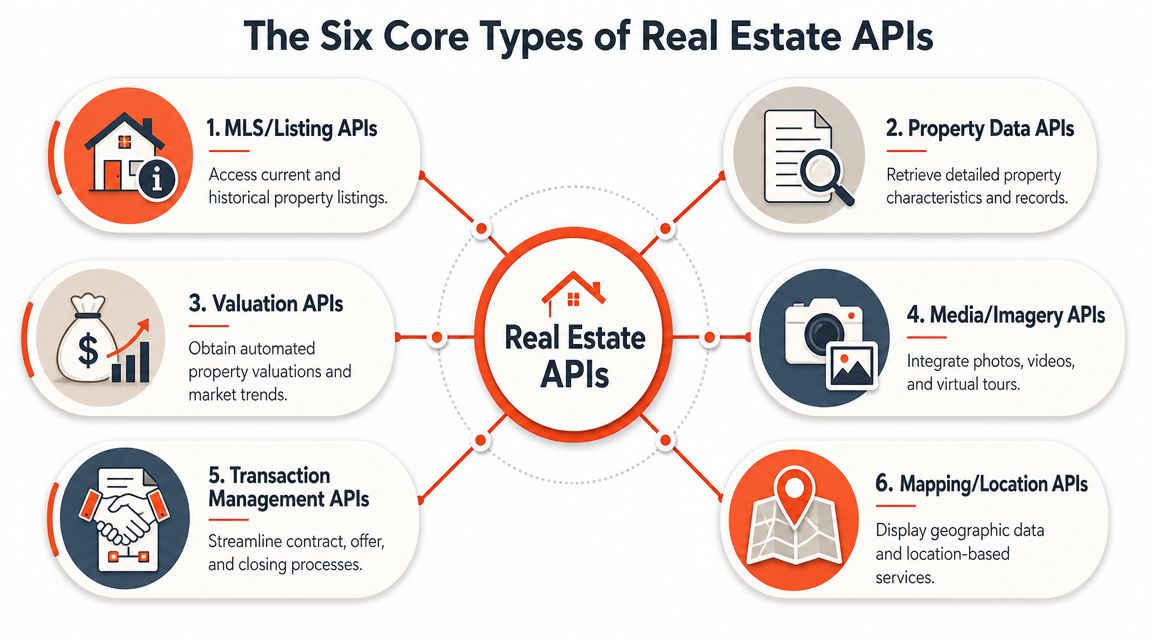
Real Estate API types at a glance
| API Type | Primary Data | Key Use Case | Example |
|---|---|---|---|
| MLS and Listing APIs | Active listings, status, remarks, listing media | Power search portals and listing alerts | Brokerage website search |
| Property Data APIs | Ownership, tax records, parcel facts, characteristics | Enrich lead records and off-market research | Investor prospecting tool |
| Valuation APIs | AVMs, rent estimates, market trend inputs | Pricing support and underwriting workflows | CMA support dashboard |
| Media and Imagery APIs | Photos, video, virtual tours, image processing | Publish and transform listing visuals | Automated listing media pipeline |
| Transaction Management APIs | Documents, offers, signatures, workflow states | Coordinate deal progress | Contract and closing workflow |
| Mapping and Location APIs | Maps, boundaries, location context, geospatial layers | Show neighborhood and location intelligence | Search by area and proximity |
MLS and listing APIs
These are the feeds most agents think of first. They focus on active and historical listing inventory, including price, status, remarks, media, and listing-level attributes.
They're useful when you need current market inventory on a website, in a CRM alert, or inside a search application. They tend to be strongest when freshness matters. New listing, price reduction, pending, back on market. Those are operational events, not just data points.
What they don't do well on their own is provide deeper ownership history, tax detail, or broad off-market intelligence.
Property data and valuation APIs
These two often get lumped together, but they solve different problems.
A property data API is record-driven. It helps you answer questions about the asset itself. Who owns it? What are the parcel characteristics? What does the public record say? That's useful for prospecting, seller research, and data enrichment.
A valuation API is model-driven. It helps answer what a property may be worth or how it fits market pricing patterns. That's useful for lead triage, initial pricing discussions, and automated underwriting support.
A listing tells you what's being marketed. A property data API tells you what's on record. A valuation API helps you interpret probable market value. Good workflows use all three differently.
Media, mapping, and transaction APIs
These are the categories many brokerages underuse.
- Media and imagery APIs: These handle photos, galleries, virtual tours, transformations, and media delivery. They matter when marketing teams need assets in the right format and location fast.
- Mapping and location APIs: These add spatial context. Boundaries, nearby amenities, neighborhoods, and map rendering all sit here.
- Transaction management APIs: These move the workflow past marketing and into execution, handling offers, documents, signatures, and process states.
Which type usually matters most
For a listing-heavy residential team, the most practical stack is often MLS plus media plus CRM or transaction connectivity.
For an investor or commercial team, property data plus mapping plus CRM enrichment usually creates more advantage than listing data alone.
For a marketing coordinator, the key insight is this: if you want automated brochures, visual variants, landing pages, and follow-up assets, the bottleneck usually isn't design. It's missing integration between listing data and media systems.
From Data to Deals Practical API Use Cases
The easiest way to judge a real estate API is to ignore the spec sheet and look at the daily workflow it removes.

Residential listing workflow
A residential listing agent gets a property live in the MLS. That's the starting signal, not the finish line.
A practical setup looks like this: the listing entry triggers a pull of the core property fields, media assets are routed into an AI content workflow, and the system generates the first round of marketing deliverables. Those usually include listing descriptions, image selections, social captions, email-ready highlights, and website copy.
Teams exploring AI-driven valuation and marketing automation often start with workflows like AI CMA generation from MLS, because it shows how structured listing data can feed a client-facing deliverable instead of just a back-office record.
What works well here is event-driven automation. New listing entered. Price changed. Status updated. The content refreshes off the event. What doesn't work is waiting for a coordinator to manually rebuild every asset each time the listing changes.
Commercial and investment workflow
Commercial marketers usually have a different challenge. They're not trying to publish broad consumer inventory as quickly as possible. They're trying to identify the right properties before competitors do, then package the opportunity clearly.
A property data API can help flag candidate assets by ownership and characteristics. A mapping API adds location context, boundary logic, and proximity filters. Then the CRM receives enriched records so outreach is based on actual property fit instead of a rough address list.
This becomes especially useful when a team is targeting off-market owners, redevelopment prospects, or tenant representation campaigns. The marketer isn't just building a map. They're building a repeatable pipeline.
The strongest API use cases usually start with one operational pain point. Stale listing marketing, weak lead enrichment, or slow off-market research. They rarely start with “we want more data.”
The missed opportunity in most teams
Most firms stop at data retrieval. They pull records, display them, and call it done.
The more valuable move is using that same data to create ready-to-publish assets. That includes image handling, presentation materials, listing refreshes, and campaign drafts. The gap between data access and marketing execution is still where many teams lose speed. Bridging that gap is where API strategy starts producing visible business value.
Understanding the Technical Essentials
You don't need to code to evaluate a real estate API, but you do need to recognize the terms that affect cost, reliability, and rollout speed.
Modern systems are generally built as RESTful, HTTPS-based services returning JSON, and RESO's Web API standard is a key example of a format designed for direct use by web and mobile apps. That structure reduces integration errors and supports near-real-time synchronization (RESO Web API standard).
Authentication and access
Authentication is the system's way of checking who's asking for data. The simplest analogy is a staff keycard. Without it, you don't get in. With it, you may still only get access to certain rooms.
For a team lead, the main questions are practical:
- Who holds the credentials
- Which vendors or developers can use them
- How access is revoked if a contractor leaves
- Whether the provider supports secure production use
If nobody on your side knows where the credentials live, your integration is already fragile.
Rate limits and usage rules
A rate limit is the provider's cap on how often your system can ask for data over a period of time. Business teams often discover this only after a launch when pages slow down or automations fail.
That matters because the same API can behave fine in testing and break under real usage. A listing search on one office website is one thing. A brokerage site, CRM sync, client alert engine, and marketing workflow all hitting the same provider is another.
Ask your technical team two plain questions: what happens at peak usage, and what happens when the cap is hit?
Data standards and consistency
A standard is the common language that keeps fields consistent across systems. Without standards, one source may call a field “sqft,” another “livingArea,” and a third something else entirely. Every mismatch creates cleanup work.
Here's why non-technical leaders should care:
- Cleaner migrations: Data moves into a CRM or website with less custom mapping.
- Fewer display errors: Beds, baths, status, and media fields are less likely to break.
- Easier vendor changes: Standardized structures make it less painful to replace one tool with another.
Bad API projects usually fail before launch because the data model is messy, not because the endpoint is impossible.
Error handling in plain English
Every API call can fail. The important issue isn't whether failure happens. It's how gracefully the system handles it.
A solid implementation should answer these questions:
- Does the system retry when a temporary failure occurs?
- Does someone get alerted when a sync breaks?
- Does the website show a safe fallback instead of a blank section?
- Are failed requests logged so the issue can be fixed quickly?
That's the vocabulary that helps you run a competent vendor conversation. You don't need to write the code. You need to know whether the people writing it are building for production or just for a demo.
Building Automated Workflows with APIs
A good real estate API strategy shows up as a workflow, not a diagram in a slide deck. One of the highest-value examples is new listing to automated marketing campaign.
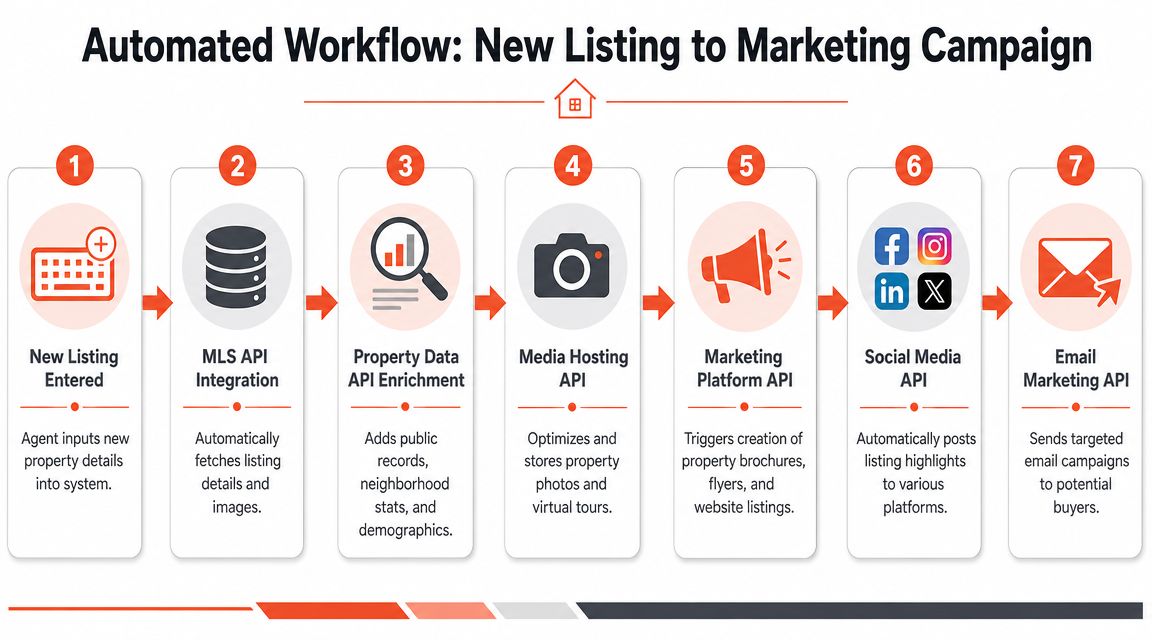
A practical sequence that teams can actually use
Here's a straightforward version:
- A new listing is entered into the source system.
- The MLS or listing API triggers a fetch for core listing details.
- A property data source enriches the record with public facts or context if needed.
- Media processing kicks in to organize images or route visuals into content creation.
- The CRM and campaign tools receive the packaged assets for email, social, and website publishing.
- Status changes trigger refreshes so the campaign stays aligned with the listing.
- The pipeline is logged so coordinators can see where each listing stands.
A lot of teams can assemble this with low-code tooling before they commit to a full custom build. If that's the path you're considering, this guide for connecting apps without code is a useful reference because it frames the integration problem in workflow terms instead of pure engineering terms.
What the API layer looks like
The core interaction is usually simple. One system requests data from another and gets back structured JSON.
Example request:
GET /property?address=123 Main StAuthorization: Bearer YOUR_API_KEYExample response:
{"address": "123 Main St","status": "active","price": "available from source","beds": "available from source","baths": "available from source","photos": ["photo1.jpg", "photo2.jpg"]}The important part isn't the syntax. It's that each field can be picked up by another system without manual re-entry. Price can populate the website. Photos can move into a gallery or transformation tool. Status can control whether the campaign says “just listed” or “pending.”
Later in the workflow, a simple operational tracker matters just as much as the API itself. Teams that want a lightweight handoff often use a pipeline view first, then automate around it. A practical example is this Google Sheet as pipeline tracker workflow.
Where AI-driven media fits
Many real estate teams now have an opening.
The property data and listing feed provide structure. AI media workflows turn that structure into outputs your audience sees. That can include polished image sets, copy variants, email snippets, presentation pages, and visual transformations for different buyer segments.
The video below gives useful context on how modern listing workflows are being automated.
What doesn't work is pushing raw data straight into public marketing without review. The best setup is automation first, then human approval where brand, compliance, or positioning matters.
A reliable workflow doesn't replace your marketing judgment. It removes the repetitive setup so your team can spend time on positioning, pricing, and client communication.
How to Choose the Right API Provider
A poor API choice rarely fails on day one. It fails three weeks later, when listings are missing in key ZIP codes, status updates lag, or the team realizes the feed stops at raw records and does nothing to support the marketing workflow built on top of it.
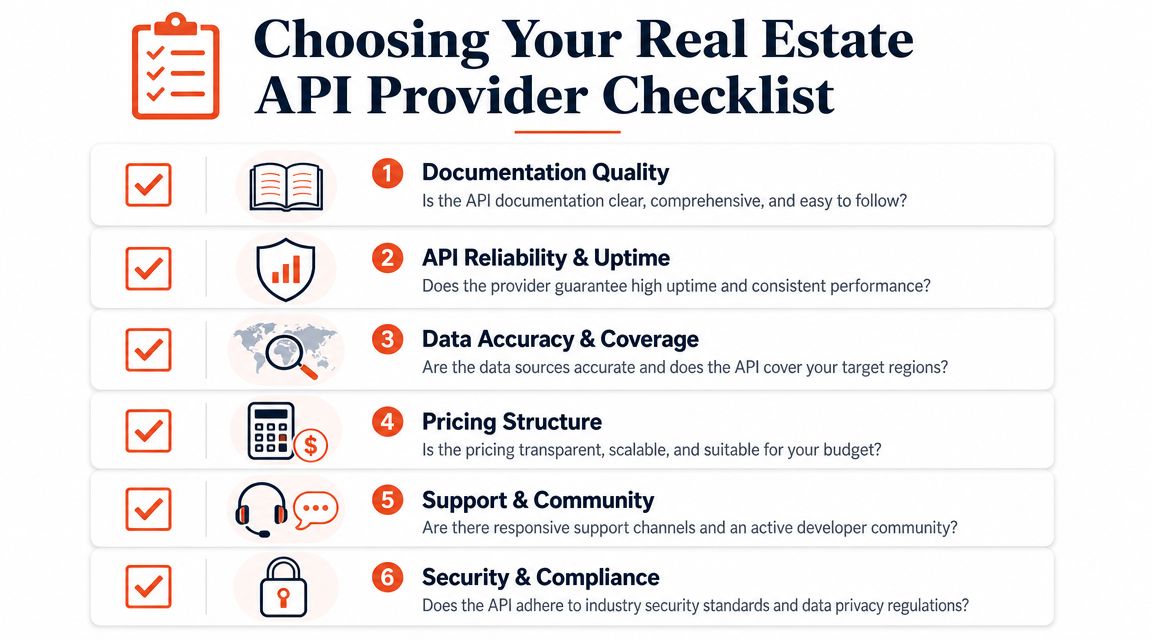
Start with coverage, not pricing
Coverage problems are expensive because they usually appear after implementation starts. A vendor can look competitive on paper and still miss the counties, property classes, rental inventory, or ownership fields your team needs.
Check your own market first. Run a sample set of addresses from active listings, past deals, and target farm areas. Compare record completeness, update behavior, and photo availability. If the API will feed AI-generated listing pages, ad creative, or visual transformations, test the exact fields those workflows depend on. Missing lot size, outdated status, or inconsistent image URLs will show up downstream as weak content, manual cleanup, or approval delays.
Price matters, but only after data fit is clear.
The criteria that matter in practice
Use a short decision screen that reflects how your team will operate:
- Documentation quality: Developers should be able to get a working call into staging without opening a support ticket for basic questions.
- Reliability: Response times, uptime, and error handling need to hold up under normal daily usage, not just in a sales demo.
- Data fit: Confirm the fields your workflow requires, including facts, media, status, valuation inputs, and ownership data where relevant.
- Workflow compatibility: The provider should fit the systems you already use, especially if property data needs to flow into CRM records, websites, and content generation tools. Teams planning automated enrichment and asset creation should also review real estate-friendly integration options.
- Pricing logic: Usage-based billing can work well, but only if you model what happens when alerts, refreshes, and content jobs all call the API at once.
- Support quality: Good support shortens implementation time and limits downtime when data mapping or authentication breaks.
One factor gets missed in many evaluations. Ask whether the provider helps you move from record retrieval to production output. For many teams, the goal is not just to fetch parcel or listing data. The goal is to turn that data into faster campaigns, cleaner seller reports, stronger landing pages, and AI-assisted media that still passes review.
Red flags worth taking seriously
Procurement teams often catch pricing issues and miss operational ones. The operational problems cause more damage.
| Red flag | Why it matters |
|---|---|
| Demo-heavy, doc-light provider | Your developer spends time reverse-engineering behavior that should have been clear from the docs |
| Unclear data update behavior | Old status, pricing, or availability data creates bad client experiences and weakens trust |
| No sandbox or trial path | You cannot test field quality, edge cases, or rate-limit behavior before committing |
| Weak support around errors | Small implementation issues turn into stalled automations and manual workarounds |
The best provider is usually the one your team can deploy quickly, trust daily, and connect to revenue-producing workflows. Cleaner docs, predictable data, and easier downstream content production often beat a broader feature list.
Your Implementation Checklist and Next Steps
Teams that get early value from a real estate API usually start with one workflow tied to one measurable output. The fastest path to internal buy-in is a pilot that saves time, reduces rework, or gets marketing assets into market faster.
Choose a use case with a clear owner and a short path to production. Good first projects include:
- Automating new listing marketing
- Enriching inbound seller leads with property details
- Refreshing client alerts when status changes
- Generating first-draft CMA or listing assets from structured data
The fourth option often creates the clearest business case because it connects data retrieval to revenue-facing output. Property facts, photos, status changes, and location context are useful on their own. They become more valuable when they feed listing copy, seller reports, ad variations, image selections, and AI-assisted visuals your team can review and publish quickly.
Build the pilot around a short checklist
Keep the first implementation narrow enough to finish in weeks, not quarters.
- Define the output: Pick one deliverable, such as an enriched lead record, listing page draft, seller report, or campaign asset pack.
- Name the systems involved: CRM, website CMS, marketing automation platform, design tool, AI content workflow, or internal dashboard.
- List the fields you need: Property facts, listing status, photos, ownership data, valuation inputs, school context, or map data.
- Shortlist providers by workflow fit: Ignore broad feature lists if the API does not support the exact fields, refresh behavior, and usage rights your pilot needs.
- Test in a low-risk environment: Use a sandbox, trial account, or limited-call setup to check field quality, error handling, and job timing before rollout.
- Set review rules: Decide what publishes automatically and what requires agent, marketing, or brokerage approval.
- Assign one accountable owner: One person should manage the pilot from field mapping through launch and post-launch fixes.
One practical test matters here. Confirm that your team can move from raw data to finished output without manual copy-paste between tools. If listing data enters one system, then triggers draft copy, selects visuals, and routes assets for review, the API is doing business work, not just technical work.
Don't skip compliance review
Pilots often stall late here.
Check MLS rules, provider terms, image rights, data usage permissions, privacy obligations, and client-facing disclosure requirements before anything goes live. If API-fed data will appear in public marketing or AI-generated creative, set clear approval standards with marketing leadership and the brokerage. Teams that skip this step usually end up pulling assets after launch, which costs more than a short review upfront.
What success should look like
A strong first project does three things:
- It removes a repetitive manual task.
- It improves consistency across systems and channels.
- It shortens the time from property input to client-facing asset.
That is enough for phase one. A useful pilot proves the team can connect data feeds to real output, including AI-assisted marketing content and visual asset creation, without creating new review problems.
If your team wants to turn listing inputs into polished marketing output without the usual production lag, Bounti Labs is worth a close look. Bounti is built for real estate teams that need property visuals and marketing materials fast. With a single walkthrough, it can generate property descriptions, pull stills, create MLS-ready photos, and apply AI-powered decluttering, staging, restyling, or renovation concepts so agents and marketers can move from raw listing input to client-ready assets much faster.



