


Homes with high-quality images sell 32% faster, with average time on market dropping from 123 days to 89 days, and they can earn up to 61% more views according to PhotoUp's breakdown of photo editing ROI. That changes the conversation. Real estate photo retouching isn't a cosmetic afterthought. It's part of the sales process.
Agents feel this in practical ways. Better images pull more clicks, more showing requests, and more seller confidence at the listing appointment. Poor images do the opposite. They make a home feel smaller, darker, older, and harder to sell, even when the property itself is solid.
The shift over the last few years has made the decision more complicated, not less. You can still edit manually. You can still outsource to a retouching service. You can also run much of the workflow through AI. Each path can work. Each has trade-offs in speed, quality control, consistency, and compliance.
What matters now is choosing a workflow that fits your volume, your brand standard, and your risk tolerance.
Why Photo Retouching Is a Critical Sales Tool
A lot of agents still talk about retouching as if it's a finishing touch. It isn't. It's one of the fastest ways to change how a listing performs online, where most buyers form their first impression.
When one listing has flat, yellow, slightly crooked images and the competing listing looks bright, balanced, and clean, buyers don't experience those as small differences. They experience one home as more desirable and one as less desirable. That's true even when the homes are similar on paper.
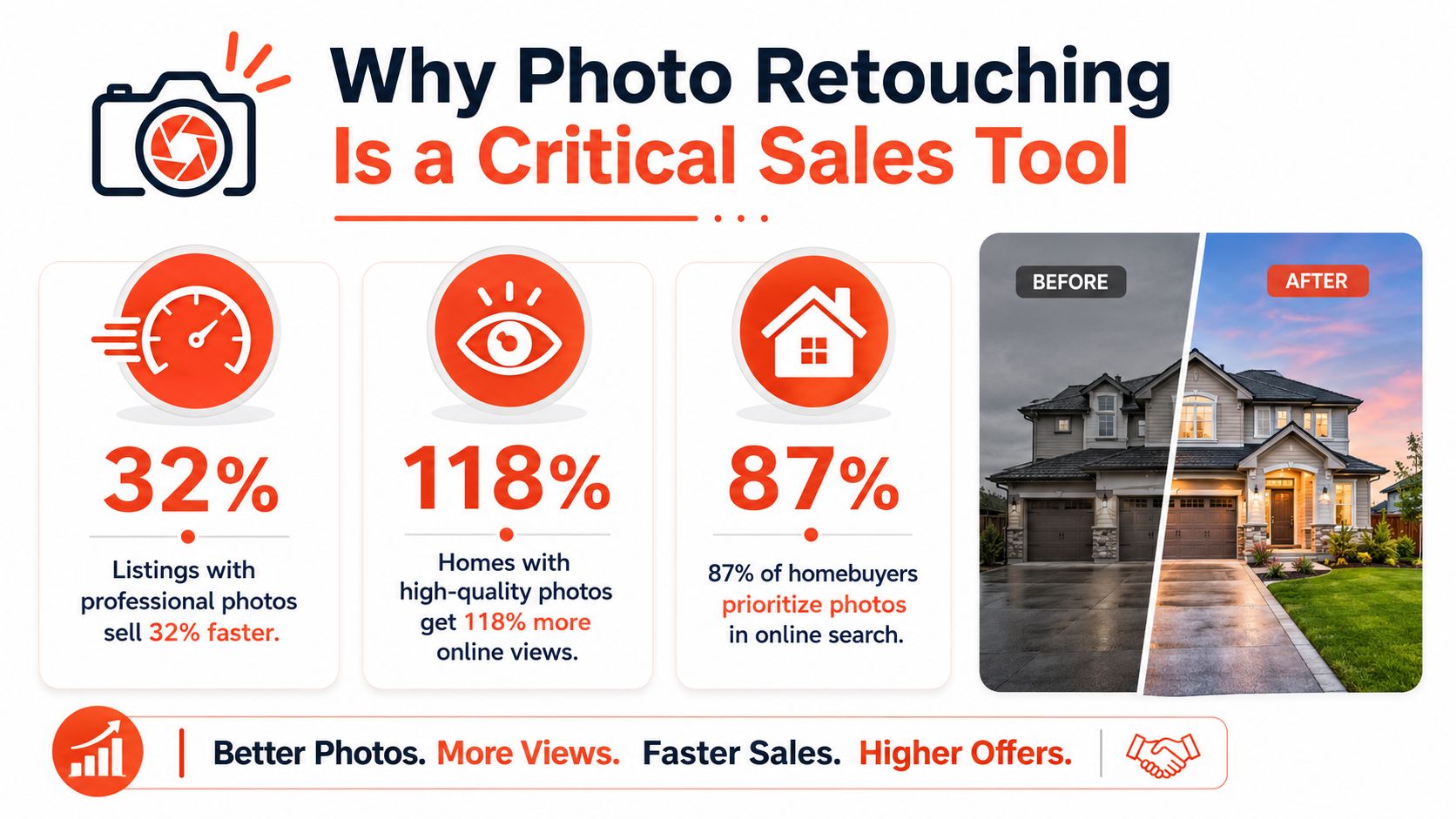
What the business impact actually looks like
The clearest argument is operational, not artistic. If a listing presents better, it tends to attract more attention faster. That matters to a solo agent trying to create momentum, and it matters even more to a team or brokerage juggling multiple active listings.
A shorter sales cycle helps in three ways:
- Faster turnover: The agent can move attention to the next listing sooner.
- Stronger seller confidence: Clients notice when their home launches with polished marketing.
- Better listing presentations: Visual quality becomes part of the agent's pitch, not just the photographer's deliverable.
Practical rule: Sellers rarely ask whether you used HDR blending, perspective correction, or selective masking. They do notice whether their home looks premium online.
Why polished photos influence buyer behavior
Buyers shop visually before they read details. They scan the hero image, judge brightness, notice clutter, and decide whether the home feels worth a click. That's why related visual choices matter across the whole listing ecosystem, including staging, styling, and even furniture references. If you're helping a seller or buyer think through room presentation, this guide on using online furniture photos effectively is a useful example of how imagery shapes perceived fit and quality.
Retouching is the layer that makes the photography hold up under that scrutiny. It corrects what the camera misreads. It makes windows readable, walls neutral, and lines straight. It also gives agents a consistent visual standard across every property, from starter condos to high-end homes.
In 2026, the key question isn't whether a listing should be retouched. It's whether your workflow is fast enough, controlled enough, and honest enough to support the way you market property now.
The Anatomy of a Perfect Listing Photo
The best listing photos don't look edited. They look believable, balanced, and easy to understand at a glance. That's the standard.
A strong image helps the buyer read the room correctly. They should understand the space, the light, and the finishes without fighting odd color casts, blown windows, or slanted verticals.

Foundational fixes
These are the edits every serious real estate photo retouching workflow should handle.
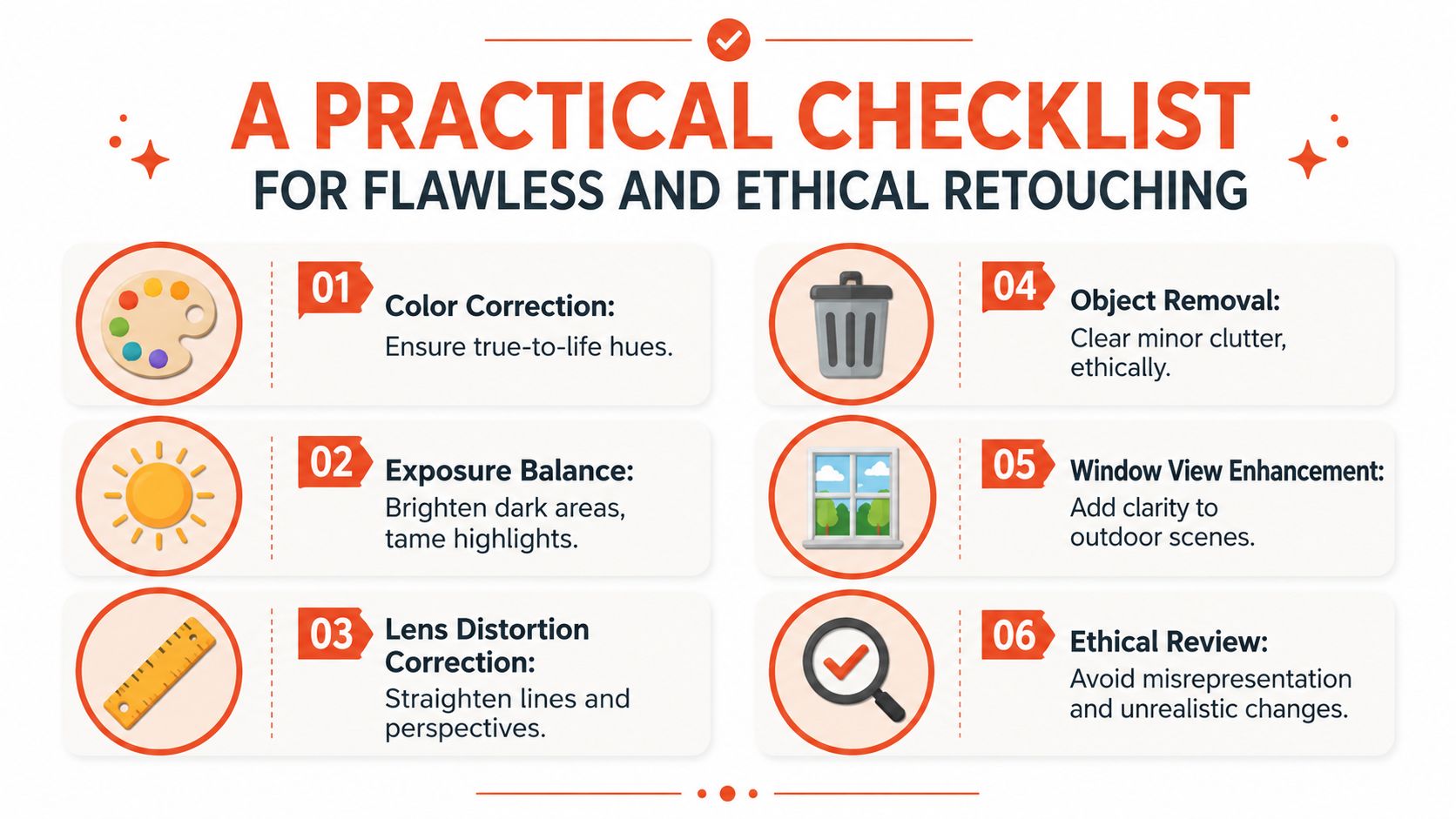
- Color correction: Walls should look like their actual paint color, not green, orange, or blue from mixed lighting.
- Exposure balancing: Dark corners need to open up without making the room look washed out.
- Vertical and perspective correction: Cabinets, door frames, and walls should stand straight.
- Lens distortion cleanup: Wide-angle stretch has to be controlled so rooms feel spacious but not warped.
HDR and exposure blending sit at the center of this. In practical terms, it works like your eyes adjusting to a bright window and a dim interior at the same time. A single frame usually can't do that well. Blending bracketed exposures can, but only if it's handled carefully.
According to this explanation of HDR blending for real estate photography, exposure blending preserves detail in both bright windows and darker interiors by combining bracketed frames, but it's highly sensitive to alignment and ghosting. That's why localized corrections matter. Global sliders alone tend to create halos around windows, muddy shadows, and edges that don't look natural.
If you want a deeper technical breakdown, this guide to HDR photography for real estate is useful for understanding what the camera captures versus what the final edit needs.
A good HDR edit makes the room feel visible. A bad HDR edit makes the room feel fake.
Strategic enhancements
After the essentials, there are edits that improve presentation without changing the core reality of the property.
Some common examples:
- Sky replacement: Useful when the original sky is dull and drags down the exterior.
- Window view enhancement: Good for clarity, but risky if the view is materially altered.
- Minor object removal: Hiding cords, trash cans, or a lone tissue box is usually harmless.
- Lawn and landscaping cleanup: Helpful when the goal is cleaner color and definition, not inventing a different yard.
What works and what usually fails
The best retouching respects the structure of the home. It supports the image instead of announcing itself.
What works:
- Natural brightness
- Consistent white balance
- Straight verticals
- Selective cleanup of temporary distractions
What doesn't:
- Over-sharpening
- Aggressive saturation
- Unrealistically blue skies on every property
- Heavy object removal that changes how the home lives
Agents don't need to master Photoshop to judge quality. They just need a visual checklist and the confidence to reject edits that look slick but misleading.
Choosing Your Retouching Workflow Manual Vendor or AI
Most agents have three realistic options. Edit the photos yourself, send them to a vendor, or run them through an AI platform. The right choice depends less on hype and more on listing volume, turnaround needs, and how strict your brand standards are.
Manual editing still gives the highest degree of hands-on control. Vendor editing still works well when you want skilled retouchers without doing the work yourself. AI has changed the speed equation, especially for agents who need usable output fast and often.
Workflow comparison by decision criteria
| Metric | Manual (DIY) | Vendor/Freelancer | AI Platform (e.g., Bounti) |
|---|---|---|---|
| Control | Highest control over each edit | Moderate to high, depends on briefing | Moderate, with settings and review steps |
| Speed | Slowest if the agent edits personally | Usually predictable, but not instant | Fastest for first-pass production |
| Consistency | Depends on the editor's skill and discipline | Depends on the vendor and QC process | Strong on repeatable basics, variable on edge cases |
| Scalability | Hard to scale across many listings | Scales better, but creates coordination overhead | Scales well for higher listing volume |
| Learning curve | Steep | Low for the agent, higher for the vendor relationship | Moderate, especially around prompts and QA |
| Best fit | Low volume, high control, photography-savvy agents | Agents who want polished output without editing themselves | Teams and agents who need speed and repeatability |
Manual editing
DIY editing makes sense when an agent or in-house marketer already knows Lightroom, Photoshop, Capture One, or similar tools. It gives precise control over color, masking, and perspective. It's also the easiest way to protect against over-editing because you see every step.
The downside is simple. Manual retouching takes attention away from prospecting, client communication, pricing strategy, and negotiation. For most agents, editing is not the highest-value use of their time.
Vendor and freelancer workflows
Outsourcing sits in the middle. You keep a human editor in the loop without having to do the retouching yourself. For luxury listings, architecturally complex spaces, or unusual lighting situations, that can still be the safest path.
But vendors introduce friction:
- Revision cycles: If the first pass misses your standard, you wait again.
- Style drift: Different editors may interpret your brand differently.
- Operational dependency: Fast launches become harder when you rely on outside turnaround.
AI workflows in 2025 and 2026
The biggest change is that AI is no longer a novelty step. Recent industry analysis notes that AI culling and basic edits are now standard, but consistent MLS-ready output across different properties remains the key challenge, especially when artifacts or brand inconsistency creep in, as described in this review of AI retouching options for 2025 and 2026.
That's the dividing line. AI is excellent at repeatable tasks such as exposure balancing, decluttering, sky cleanup, and quick first-pass enhancement. It becomes less reliable when the scene is messy, the architecture is unusual, or the edit risks crossing an ethical line.
One example is AI photo editing software for real estate, where the practical value isn't just automation. It's whether the output still looks natural enough for listing use.
The smart workflow for many agents isn't purely manual or purely AI. It's AI for speed, then human review for anything the buyer could reasonably interpret as material.
A Practical Checklist for Flawless and Ethical Retouching
Most retouching mistakes don't come from bad intent. They come from fuzzy standards. One editor removes a trash can. Another removes power lines. A seller asks to erase a stain on the ceiling. Someone says yes because the rulebook wasn't clear.
That ambiguity is where risk starts. Practical guidance on compliance, disclosure, and consistency is often missing from editing advice, as noted in PhotoUp's discussion of distortion, realism, and editing boundaries.
Before the shoot
A clean editing workflow starts on site, not at the computer.
- Declutter what you can physically move: Small items on counters, pet bowls, cords, bins, and loose toiletries are easier to remove before the camera comes out.
- Turn on lights selectively: Consistency matters more than turning on every bulb in every room.
- Check window coverings: Uneven blinds create distracting lines and harder composites.
- Capture brackets carefully: Better source images make HDR blending cleaner and reduce correction later.
Standard edits that are usually safe
This is the baseline list many agents should standardize across all listings.
- Correct color and white balance so materials look true to life.
- Balance exposure to recover interior detail and avoid blown highlights.
- Straighten verticals so walls and door frames don't lean.
- Correct lens distortion so the room reads naturally.
- Remove minor temporary distractions such as a visible cord, a single trash bin, or a reflection from a flash artifact.
- Improve window clarity carefully when the goal is readability, not invention.
Red-flag edits to avoid
These are the edits that create trust problems.
- Hiding damage: Water stains, cracked surfaces, mold signs, and other condition issues shouldn't be edited out.
- Changing permanent features: Removing utility poles, neighboring structures, or built-in elements can mislead buyers.
- Altering scale: Stretching rooms to make them feel larger crosses from correction into distortion.
- Inventing views or finishes: If the property doesn't have that skyline, that lawn condition, or that renovation level, don't create it.
Ethical review: If a buyer toured the home and felt the photos concealed a meaningful fact, the edit was too aggressive.
For agents working in markets that are actively scrutinizing AI-generated listing media, it's also worth reviewing policy developments such as California AB 723 and AI real estate photos. The legal details vary by market, but the operational lesson is universal: create a repeatable review process before images go live.
Calculating the ROI of Professional Photo Retouching
Agents often frame retouching as a line-item expense. That's the wrong lens. The better question is what poor visuals cost you in lost attention, slower launches, extra manual work, and weaker listing presentations.
You don't need a complex model to make this practical. You need a simple worksheet that reflects how your business operates.
A simple ROI framework
Use this structure:
ROI of retouching = value of time saved + value of faster listing movement + value of winning or retaining more listings - total retouching cost
That formula works whether you edit personally, outsource, or use automation.
Where the return usually comes from
The first bucket is time. If you're personally editing images, ask what that displaces. Most agents are better served spending that time on pricing prep, follow-up, showings, and prospecting.
The second bucket is listing velocity. Better visuals help listings launch stronger and maintain momentum. That matters to sellers because the home enters the market with a more competitive presentation. It matters to agents because fewer marketing weak spots need to be patched after the listing is already live.
The third bucket is business development. Retouched, consistent imagery helps win the next listing because sellers compare marketing packages. They don't just compare commission rates.
A practical way to run the math
Create a per-listing review using four questions:
- How long did image prep take from shoot to publish?
- Who handled the editing, and what was that person's time worth inside the business?
- Did the final images meet your standard without multiple revision rounds?
- Did the visuals strengthen your listing presentation for future sellers?
If your current process delays launch day, forces repeated revisions, or produces uneven quality across listings, the cost isn't limited to editing. It affects sales operations.
The strongest ROI usually comes from reducing friction. Fast, clean, compliant visual production helps agents market more confidently and spend less time fixing preventable problems.
Putting Your Retouching Strategy into Action
A usable strategy is different for a solo agent, a team lead, and a brokerage. The workflow should fit the business, not the other way around.
The biggest mistake is adopting a tool before defining a visual standard. Decide first how your listings should look. Then choose the method that produces that result consistently.
For a solo agent
Keep the workflow tight. Build a repeatable sequence: prep the home, capture images, run the first edit pass, review for realism, then publish. If you're using AI, keep a short approval checklist beside you so you don't accept bad skies, odd shadows, or accidental object removal just because the turnaround was fast.

For a team lead
Your job is standardization. Create a house style for brightness, color temperature, vertical correction, exterior sky treatment, and what counts as acceptable object removal. Then make every agent work from the same review rules.
A short team standard might include:
- Exterior standard: Natural sky, straight verticals, no fake landscaping changes
- Interior standard: Balanced windows, neutral whites, no oversaturation
- Compliance standard: No edits that hide condition or permanent features
For a brokerage or larger marketing team
At scale, the workflow needs governance. Approved tools, approved vendors, a review owner, and documented edit boundaries matter more than individual taste. AI can help with throughput, especially when you need MLS-ready photos, decluttering, staging variants, or stills from a walkthrough video, but someone still needs final sign-off.
The firms that handle this well treat retouching like a marketing operation, not a one-off creative task.
Frequently Asked Questions About Photo Retouching
What's the difference between retouching and virtual staging
Retouching improves the photo that already exists. It corrects color, exposure, distortion, and minor distractions. Virtual staging adds furnishings or design elements that weren't physically present.
That distinction matters because buyer expectations change once you start adding content. Basic retouching usually supports clarity. Virtual staging changes interpretation and should be handled with clearer disclosure and stricter review.
Can AI handle heavy clutter or difficult rooms
Sometimes, but not always cleanly. AI is strongest when the room has a clear structure and the requested changes are predictable, such as removing small distractions, balancing exposure, or restyling an otherwise readable space.
It becomes less dependable when the room is packed, damaged, visually chaotic, or full of overlapping objects. In those cases, artifacts, missing edges, and strange texture replacements become more likely. For difficult properties, a human editor or a combined AI-plus-review workflow is usually safer.
What should I do when a seller asks for an unethical edit
Set the boundary early and keep it simple. You can improve presentation, but you can't hide material facts. If the seller wants to remove visible damage, erase a permanent structure, or make the property appear renovated when it isn't, decline the edit and explain that the listing media has to reflect the home accurately.
That conversation gets easier when your team already has a written image policy. Then you're not making a personal judgment in the moment. You're following a documented marketing standard.
Should every listing get the same level of retouching
No. Every listing should get the same baseline standard, but not every listing needs the same level of enhancement. A straightforward condo may only need exposure correction, verticals, and basic cleanup. A high-end property with complex interiors may need more careful window work, detailed masking, and tighter quality control.
The standard should be consistent. The effort can vary.
Bounti Labs offers one practical option for agents and teams that want to speed up listing media creation with AI-assisted photo editing, decluttering, staging, restyling, and MLS-ready outputs from a property walkthrough. If your current process feels slow or inconsistent, it's worth looking at Bounti Labs as part of a broader retouching workflow that still includes human review and compliance checks.



