


You already know the symptom. The listing is live, but the floor plan is questionable, room dimensions don't quite match the walkthrough, and the empty space looks worse online than it does in person. On the commercial side, the problem is different but related. Prospective tenants ask whether a suite can support a new layout, and the marketing team has no reliable base file to work from.
That's where scan to bim enters the conversation. Not as an architecture buzzword, and not as a default answer for every listing, but as one of the few ways to turn a physical property into a dependable digital asset. For marketers, the key question isn't whether the technology is impressive. It is. The key question is whether the asset you get can be reused enough times to justify the cost, time, and operational friction.
For some properties, the answer is yes. For many listings, the answer is no. The teams that make good decisions here separate architectural-grade documentation from marketing-grade output and buy only the level of precision they'll use.
What Is Scan to BIM and Why Should Marketers Care
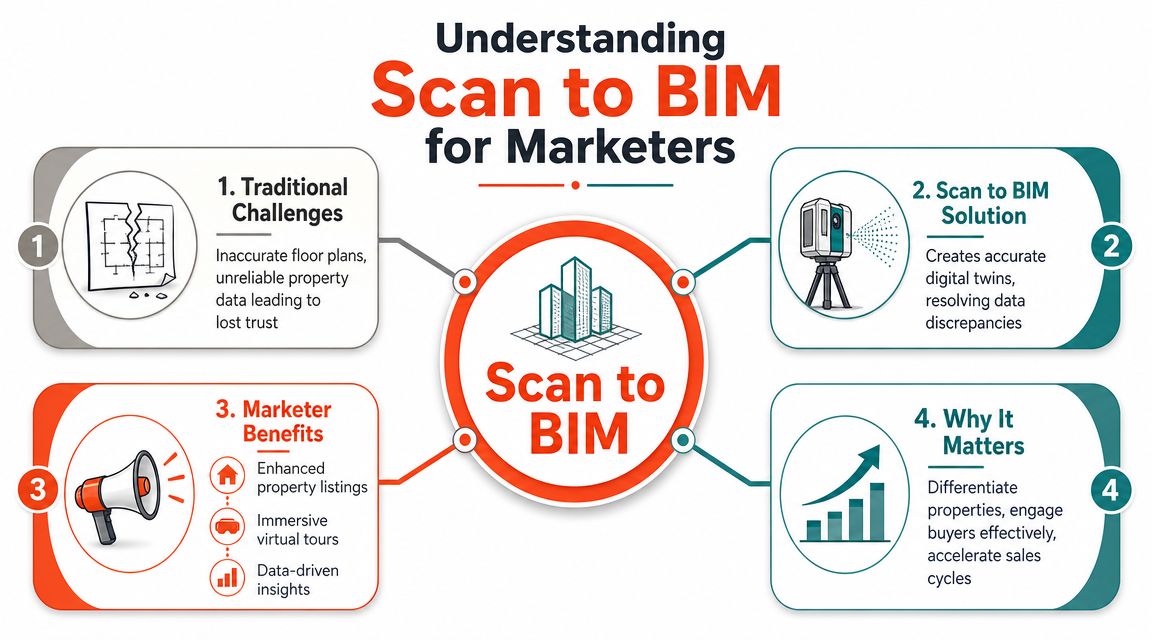
At a practical level, scan to bim is the process of capturing an existing building with 3D laser scanning and turning that data into an editable building information model. Think of it as a digital twin for an existing property, built from real measurements instead of guesswork.
NavVis describes the shift clearly. Scan to BIM moved the industry away from slow manual measurement and redline workflows toward reality capture, where 3D laser scanning creates a point cloud made of millions of measurement points that becomes the authoritative record of existing conditions for renovations and property documentation, according to NavVis on scan to BIM and reality capture.
What that means in marketing terms
A marketer doesn't need the full technical vocabulary to understand the value. You need one thing: a trusted source of property truth.
When the base property data is wrong, every downstream asset gets weaker:
- Floor plans drift from reality and buyers start questioning the listing.
- Virtual staging loses credibility because proportions feel off.
- Leasing materials break down when tenant questions get more specific than the brochure.
- Creative teams waste time rebuilding the same space from scratch across vendors and tools.
A good scan-to-BIM workflow solves a data problem before it solves a design problem. That matters when you're marketing unusual layouts, older properties, mixed-use assets, or vacant commercial suites that need stronger visualization.
Why marketers should care before architects get involved
For marketers, the BIM model itself usually isn't the hero asset. The hero assets are what the model enables:
Accurate source data changes how a team produces every listing asset after that. The point isn't the model. The point is what the model makes easier to create, reuse, and trust.
That can include cleaner floor plans, better virtual tours, more realistic test fits, and stronger visual concepts for unstaged space. It can also reduce the awkward gap between what a prospect sees online and what they encounter on-site.
Still, marketers shouldn't romanticize scan to BIM. It is a heavyweight workflow. It works best when the property has complexity, long shelf life, multiple stakeholders, or repeated downstream uses. If all you need is polished listing content fast, there are lighter options that do the job without building a full BIM model.
The simple rule
Use scan to BIM when the property needs a durable digital foundation. Skip it when you only need campaign-ready marketing assets and don't expect to reuse the data extensively.
The 5-Step Scan to BIM Workflow Explained
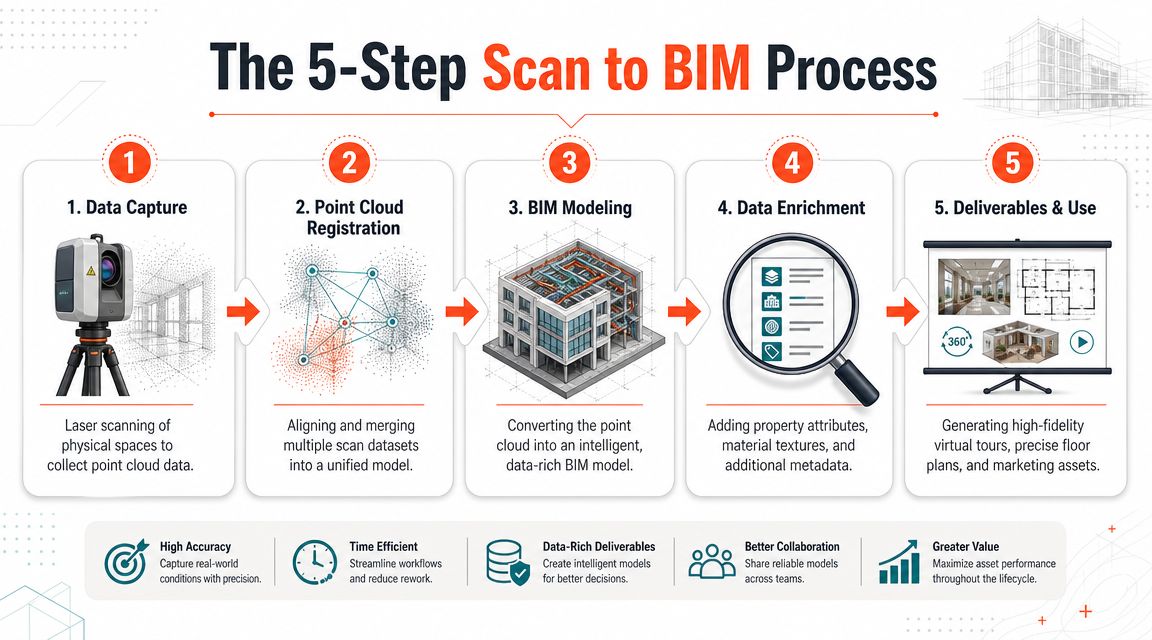
Most real estate teams hear “scan to BIM” and assume it's one black-box service. It isn't. It's a pipeline with distinct stages, and each stage affects cost, timing, and what you can do with the final files.
Step 1 Data capture
Everything starts on site. A scanner captures dense XYZ measurements of the physical space.
Alterpex explains the core pipeline this way: LiDAR scanners capture dense XYZ measurements, those scans are processed and registered into a single point cloud, and that point cloud becomes the template for the BIM model so the digital file reflects as-built reality rather than old plans or field sketches, as outlined in Alterpex's scan-to-BIM workflow overview.
For a marketing team, the practical implication is simple. If the space is cluttered, inaccessible, occupied, or poorly planned during capture, the project inherits those problems immediately.
Step 2 Point cloud registration
The scanner doesn't create one perfect file in one pass. Teams usually capture multiple scans from different positions. Those scans then get aligned into one coordinated point cloud.
Many non-technical clients often lose the thread at this stage, but you don't need to. Registration is the stage that turns raw site capture into usable spatial reference. If registration is sloppy, everything after it gets shakier.
A good vendor should be able to explain, in plain language, how they handle overlap, alignment, and problem areas before modeling starts.
A short demo helps if your team is new to the workflow.
Step 3 BIM modeling
In tools such as Revit or Archicad, the point cloud transforms into a BIM model. The important distinction is that modelers are not just tracing shapes. They are interpreting the built environment into structured digital objects.
For marketers, this is usually the most misunderstood step. You are not buying “a 3D file.” You are buying a model built to a defined purpose. If that purpose is leasing visualization, the model should be scoped differently than a fabrication-grade engineering deliverable.
Practical rule: Don't ask for “the highest detail.” Ask for the minimum model fidelity required to produce the assets your team will actually use.
If your goal is campaign output rather than construction documentation, a lighter workflow may be smarter. Teams that need fast listing visuals often pair simpler capture with tools that can turn a listing into animated marketing content instead of commissioning a full BIM process.
Step 4 Quality assurance
This is the checkpoint most clients ignore and later regret. Before the model becomes a marketing or planning asset, someone has to verify it against the scan.
Ask direct questions:
- What is being checked
- Who signs off on model accuracy
- How are missing areas handled
- What happens if deliverables don't match scope
If the provider can't answer those cleanly, assume rework risk is high.
Step 5 Deliverables and use
The final output can include the BIM file, point cloud, extracted plans, views, or other derivatives. What matters is whether those files match your actual use case.
For brokers and marketers, the most useful outcome is usually not the native BIM file alone. It's the package of reusable assets that can feed leasing decks, floor plan graphics, virtual concepts, and coordination with creative vendors.
Calculating the Marketing ROI of Scan to BIM
Most scan-to-BIM content spends too much time on geometry and not enough time on commercial logic. Brokers don't get paid because the point cloud is elegant. They get paid when the digital asset helps move a property.
Matterport accurately identifies the core issue. It notes that most content misses the ROI question for brokers, and that the value is not the point cloud itself but how many downstream assets can be created from the resulting model, including accurate floor plans, virtual tours, and staging concepts. It also notes that break-even depends on reusability, as explained in Matterport's take on scan-to-BIM value.

Where the return actually comes from
If you're evaluating scan to BIM from a marketing seat, use a reuse test.
A scan-to-BIM project tends to make sense when one source asset will feed several outputs over time, such as:
- Leasing visuals: Accurate floor plans, suite diagrams, and concept layouts for vacant space
- Sales support: Better buyer confidence when the spatial story is precise
- Creative production: Cleaner inputs for virtual staging, restyling, and presentation assets
- Portfolio reuse: Ongoing updates for ownership, leasing, redevelopment, or property operations
That's a different ROI model than a one-off listing campaign. If the asset will only support a handful of marketing outputs once, the economics get harder fast.
A broker-friendly ROI filter
A practical ROI model starts with business questions, not technical specs. Before approving a scan-to-BIM scope, ask:
| ROI question | Why it matters |
|---|---|
| Will this model support more than one campaign output | Reuse is the core economic driver |
| Will multiple teams use the same source asset | Shared value improves justification |
| Is the property complex enough that standard floor plans and photos create risk | Precision matters more in unusual spaces |
| Will prospects need layout visualization, not just pretty media | Test fits and planning concepts raise value |
If your team needs a simple framework for evaluating return across channels, ReachLabs.ai's marketing ROI insights are useful because they force you to connect spend to business outcomes instead of vanity activity.
Where scan to BIM shines for marketers
Commercial leasing is the clearest use case. A vacant office floor, medical suite, or irregular retail footprint often needs more than polished photography. Prospects want to understand fit, constraints, and options.
Residential is different. High-end or unusual homes may justify stronger source data, but many listing teams get more marketing lift from speed. In those situations, a faster visual workflow, including assets informed by a solid virtual staging guide for listing teams, can create more practical value than a full BIM conversion.
Scan to BIM vs AI Marketing Tools A Decision Framework
This isn't a fight between old and new tech. It's a fit question. Scan to BIM and AI marketing tools solve different problems, and most brokerages make bad decisions when they try to use one for the other.
Scan to BIM is best when precision, documentation, and reuse matter across multiple stakeholders. AI marketing tools are best when the goal is speed, visual output, and campaign agility.
The side-by-side decision table
| Criteria | Traditional Scan-to-BIM | AI-Powered Marketing Tools (e.g., Bounti) |
|---|---|---|
| Primary job | Create an as-built digital model from reality capture | Turn existing property media into marketable listing assets |
| Best fit | Renovations, complex CRE suites, long-lived property documentation | Residential listings, quick refreshes, creative testing, rapid campaigns |
| Cost profile | Higher upfront project spend tied to scope and modeling depth | Lower barrier for most marketing teams, usually software-led rather than project-led |
| Speed | Slower because capture, registration, modeling, and QC all take time | Faster because outputs can be generated from existing media or a simple walkthrough |
| Accuracy level | Suitable when spatial precision is central to the job | Suitable when marketing realism matters more than engineering precision |
| Team requirement | Needs specialist vendors or technical partners | Easier for in-house marketing teams to use directly |
| Output style | BIM files, point clouds, as-built references, detailed plans | Staged visuals, edited imagery, listing media, polished campaign content |
| Weak spot | Easy to overspend if the downstream use is shallow | Not a substitute for fabrication-grade or documentation-grade modeling |
How to choose without overthinking it
Use scan to BIM when the space itself is the sales obstacle. That usually means unusual geometry, empty commercial inventory, redevelopment, or a property where inaccurate source data creates downstream friction.
Use AI marketing tools when the challenge is presentation, not measurement. That covers most residential listings and many routine leasing campaigns.
Buy the least complex workflow that still gives the team confidence in the output.
That principle saves more money than any vendor negotiation.
One practical dividing line
If your team is asking for test fits, coordinated layout options, or durable digital documentation, scan to BIM belongs on the table.
If your team mainly needs stronger media, polished visuals, and faster turnaround, AI is often the better fit. For example, some marketing teams pair fast image generation with tools that can generate fully edited videos with captions to produce campaign-ready content without commissioning a full technical model.
Typical Project Timelines and Cost Breakdowns
A broker wins a listing on Monday and wants launch assets by the following week. That timeline matters, because scan to BIM is usually priced and scheduled like a technical documentation job, not a marketing production sprint.
Cost swings hard based on square footage, building complexity, and the required Level of Development, or LOD. In ViBIM's scan-to-BIM cost breakdown, U.S. projects range from $2,500 to over $200,000. Their figures also put scanning fees around $2,000 to $10,000+, with modeling fees typically falling between $0.50 and over $10.00 per square foot.
The practical issue for marketers is time as much as price. A higher-detail scope usually means more site coordination, more modeling hours, more QA, and a longer wait before anything reaches the campaign team.
What actually pushes cost and schedule up
The main variable is the model brief.
A simple model for broad planning or basic visualization is one thing. A highly detailed model built for engineering-grade coordination is another. The second option costs more because people have to interpret and model far more information, especially in MEP-heavy spaces or older buildings with inconsistent field conditions.
Four factors drive overruns more than teams expect:
- Higher LOD requirements: More detail means more modeling time and more review cycles
- Complex systems: Hospitals, labs, industrial sites, and dense office infrastructure take longer to interpret
- Poor scan coverage: Missing areas create rework, return visits, or assumptions nobody wants to defend later
- Large footprints: Bigger properties multiply both capture time and model production time
In that same ViBIM analysis, larger and more complex facilities often start around $40,000 to $50,000 and can run past $200,000. They also cite a 25,000 sq. ft. hospital wing with layered MEP systems at LOD 400 as a project that can exceed $100,000. That is a reasonable benchmark for understanding how fast technical scope can outrun marketing value.
What a real estate marketing team should do with that
Buy to the decision, not to the technology.
If the campaign needs leasing visuals, cleaner listing media, or a fast way to show potential, full scan to BIM often overshoots the brief. The spend can make sense when the model will keep serving leasing, planning, operations, or redevelopment work after the listing push. If the output has a short marketing shelf life, the economics usually favor lighter production methods.
Use two filters before requesting proposals:
- What assets are needed in the next 7 to 30 days
- Will this model create value after the marketing campaign ends
If the honest answer is "we need polished assets fast," compare the quote against faster alternatives before approving a technical workflow. This perspective on AI marketing tools' real ROI is useful because it frames software spend around output speed, reuse, and campaign impact rather than technical sophistication alone.
Common Pitfalls That Inflate Costs and Timelines
Most scan-to-BIM overruns don't happen because the technology fails. They happen because the brief is weak. Clients ask for “an accurate model,” vendors proceed, and nobody defines what accurate means for the actual use case.
Autodesk's guidance is the right anchor here. Advanced workflows can reach a tolerance range of a single millimeter or less, but errors compound quickly when scan coverage, registration, or model interpretation are weak. Autodesk also stresses that teams should define deliverables, agree on LOD ranges, and run quality control before modeling begins, as covered by Autodesk on scan-to-BIM accuracy and QA.
The mistakes that cost marketers money
Some of the most common failure points are operational, not technical:
- Undefined deliverables: The team asks for a model but never specifies whether the actual need is floor plans, test fits, or visual concepts.
- Over-scoping detail: A marketing team pays for model fidelity that only an architect or fabricator would use.
- Incomplete site capture: Missing areas force modelers to interpret what they can't clearly see.
- Late QA: Errors get discovered after graphics, layouts, or leasing materials are already in production.
The better way to scope it
A tighter intake process prevents most of this.
Use a short pre-vendor checklist:
| Ask before kickoff | Why it matters |
|---|---|
| What exact outputs are required | Prevents buying unnecessary detail |
| Which spaces matter most | Focuses scan coverage and model effort |
| Who will use the files after delivery | Clarifies whether this is marketing, planning, or both |
| How will accuracy be checked | Reduces expensive revision cycles |
Weak scope creates expensive precision in the wrong places.
The practical warning
Marketers often inherit these projects from development, design, or ownership teams. When that happens, check whether the model was scoped for your actual needs. A technically impressive BIM file can still be a poor marketing asset if nobody planned for campaign outputs, visuals, or leasing usage.
Sample Workflows for Agents and CRE Marketers
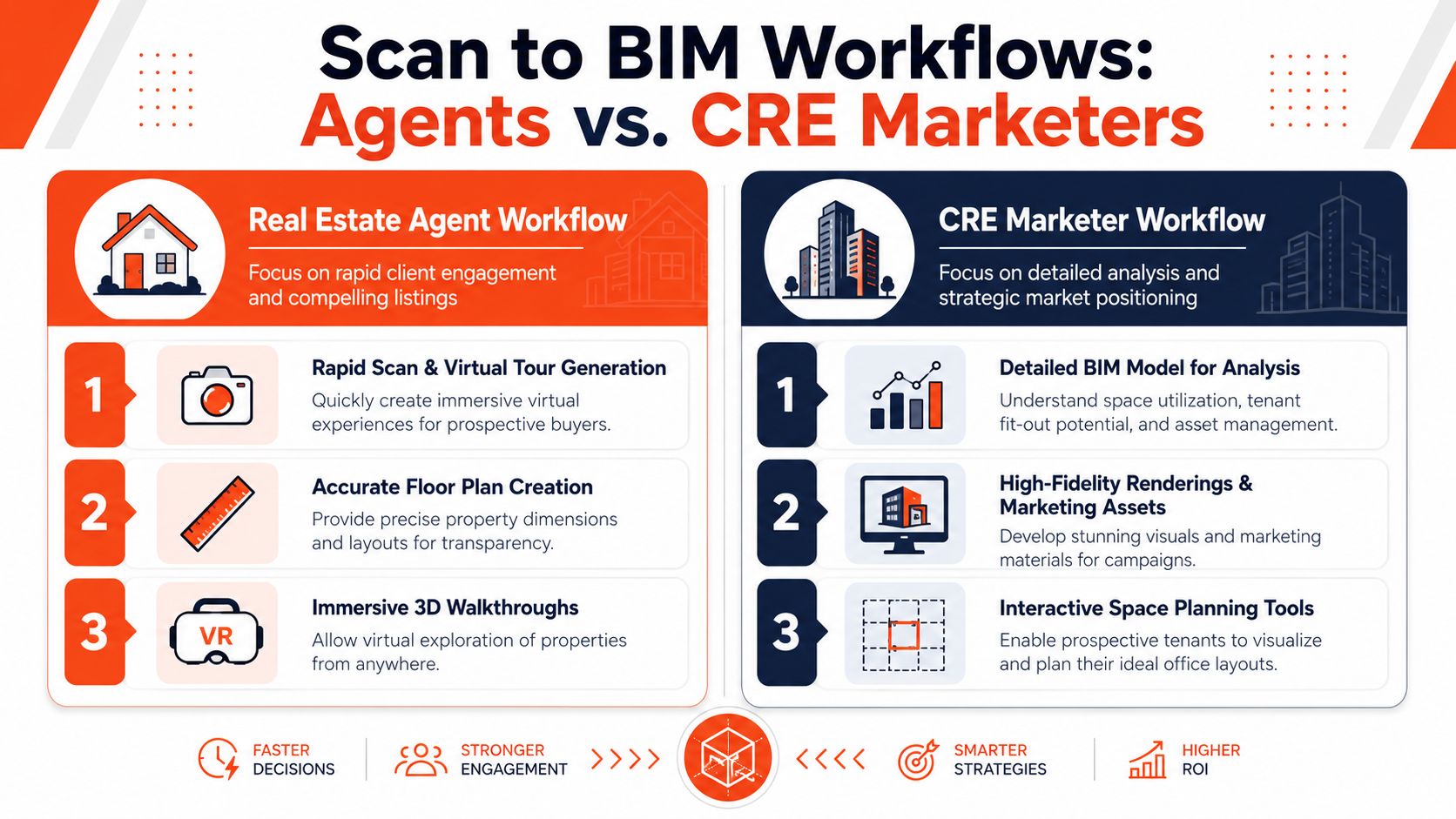
Teams often don't need theory. They need a playbook. The right workflow depends on what you're trying to sell and how fast you need to move.
Residential agent workflow
A residential agent usually wins by speed, presentation quality, and low friction. The property needs to look clean, aspirational, and trustworthy online.
A practical workflow looks like this:
- Capture a walkthrough with a smartphone or lightweight camera setup.
- Pull stills and identify weak rooms such as cluttered bedrooms, empty living areas, or dated kitchens.
- Generate listing-ready visuals using AI-based decluttering, staging, or restyling.
- Publish fast and update creative variations as buyer feedback comes in.
- Use a lightweight floor plan if needed, but don't force a full BIM workflow unless the home is unusually complex.
This is the default path for most listings because the job is marketing output, not detailed building documentation.
CRE marketer workflow
Commercial marketing is different. A vacant suite often needs explanation, not just presentation. Prospects want to see possibility, constraints, and fit.
A stronger CRE workflow often looks like this:
- Commission reality capture for the suite or floor when the layout is complex or the asset has leasing longevity.
- Convert that capture into a usable model with scope tied to leasing needs, not construction vanity.
- Create test-fit concepts for different tenant scenarios.
- Produce marketing materials from one coordinated source so floor plans, visuals, and presentations stay aligned.
- Reuse the asset across broker outreach, ownership presentations, and future tenant conversations.
For CRE, scan to BIM pays off when the same asset supports leasing, planning, and stakeholder communication over time.
Where the split is obvious
If you're marketing a standard home, scan to BIM is often too heavy. If you're leasing a complicated office floor, medical suite, or older asset with poor legacy documentation, it can become the most useful foundation in the whole campaign.
For teams managing client collaboration across visual concepts and property storytelling, a centralized workspace such as client collaboration for property marketing can matter just as much as the production workflow itself, especially when multiple stakeholders need to review variations quickly.
The best real estate marketers don't pick one camp. They pick the right tool for the job. Use scan to BIM when reliable spatial truth creates business value. Use lighter AI workflows when the market rewards speed, iteration, and presentation.
Bounti Labs helps real estate teams choose the faster path when a full scan-to-BIM workflow is more than the job requires. With Bounti Labs, a single property walkthrough can turn into polished listing visuals, AI staging, decluttered photos, and marketing materials without the long lead times of traditional production. For agents, brokers, and creative teams, that means better-looking listings and faster campaign execution.



