


Most advice on AI platform pricing stops at the sticker price. That's the wrong lens for real estate.
Agents and brokers don't buy software to admire a pricing page. They buy it to get usable contact data that turns into conversations, appointments, listings, tenants, or buyers. If a platform burns credits on bad records, the published monthly rate stops being the actual cost.
That's the gap many reviews miss. For a real estate team, the useful metric isn't just monthly spend. It's cost per valid contact, then total cost of ownership, then whether that spend beats other uses of the same budget. If you're evaluating the platform for prospecting, especially for owner outreach, recruiting, or brokerage growth, that's the math that matters.
Understanding Seamless AI's Public Pricing
The public entry point is simple enough on paper. The platform's Basic plan costs $147 per month when billed annually and includes 250 monthly credits that reset each billing cycle and don't roll over, which works out to about $0.59 per credit before any quality issues are considered, according to Cleanlist's 2026 pricing guide.

For a solo agent, that sounds manageable. You get a defined monthly spend, a fixed pool of credits, and enough functionality to test the workflow without moving into a full sales-led contract. The same source notes that Basic includes email and phone data enrichment, a Chrome extension, and basic integrations with tools such as Salesforce and HubSpot.
What a credit actually means
The key detail isn't the monthly fee. It's the credit system.
In practice, the Basic plan asks you to think in units of contact access rather than in seats alone. That matters because many real estate teams underestimate how quickly credits disappear when agents prospect by geography, niche, or role. A few passes through brokers, owners, investors, or likely sellers can eat through a monthly allocation faster than expected.
A useful way to evaluate any lead platform is to compare the sticker price with how many usable records you think you'll need each month. If you want a broader framework for that kind of analysis, this guide to understanding lead qualification platform pricing is worth reading because it forces the same question buyers often skip: what are you paying for once usage starts?
Why the Basic tier appeals to agents
Basic is easiest to justify when the workflow is narrow and disciplined. Think one agent, one assistant, or a small prospecting pod using the tool for targeted outreach instead of broad list building. It can fit scenarios like:
- Listing prospecting: Pulling small batches of likely owners or local professionals for direct outreach
- Recruiting support: Looking up agent contact details one market at a time
- CRM enrichment: Filling missing fields before a follow-up campaign
Practical rule: If your process requires precision budgeting, treat the monthly fee as only the first layer of cost.
For teams comparing software spend across the stack, it also helps to benchmark the software against other recurring expenses. Bounti publishes a straightforward pricing overview for real estate AI workflows, and that kind of visibility is exactly what many buyers wish more prospecting platforms offered beyond the entry tier.
Navigating Pro and Enterprise Custom Quotes
Once you move past Basic, the AI product's pricing stops being self-serve and starts behaving like enterprise software. That's where many brokerages lose pricing clarity.
According to Skrapp's review of Seamless.AI pricing, Pro and Enterprise use custom quote-based pricing, Pro requires a minimum of 5 users, a documented Pro deal reached $9,000 for a 5-user team on a 12-month upfront contract, and Enterprise can scale to over $91,900 per month for large organizations.

That range tells you something important. You're not dealing with a fixed menu. You're dealing with negotiated packaging.
What drives the quote
For broker owners and team leads, these plans usually hinge on a few variables:
- Seat count: Pro starts at a team threshold, not a solo-user threshold
- Credit expectations: Higher-volume use changes the commercial structure
- Contract terms: Annual commitments often shape the final quote
- Add-ons and integrations: Premium workflows push the total up
The practical issue isn't just that pricing is custom. It's that two teams with similar goals may still receive very different offers depending on timing, negotiation, and how much volume the sales team believes they can lock in.
What that means for a brokerage
A five-agent growth team may look at Pro and see a path to higher prospecting output. A regional brokerage may see admin overhead, contract complexity, and a pricing process that becomes harder to benchmark against alternatives. In both cases, the quote matters less than the operational fit.
Ask these questions before you take the demo:
| Decision area | What to clarify |
|---|---|
| Team usage | Are credits pooled, allocated, or effectively controlled by heavy users? |
| Contract structure | Is the agreement annual and prepaid, and what flexibility exists if adoption stalls? |
| Workflow depth | Which integrations are included versus sold separately? |
| Management burden | Who on your team will monitor usage, list quality, and renewal timing? |
A custom quote can be reasonable for a large sales org. For a real estate team, it can also hide the real buying decision until you're already deep in the process.
That doesn't make Pro or Enterprise bad. It means they fit organizations that can actively manage procurement, rollout, and usage discipline. If your brokerage tends to buy tools seat by seat and expects simple month-to-month economics, this pricing model usually feels heavier than the sales pitch suggests.
The Hidden Costs That Inflate Your Bill
The biggest mistake buyers make is treating a credit like a verified lead. It isn't the same thing.
The hidden cost in the service's AI pricing sits inside the credit model itself. Aggregated user reports from 2026 show that 20% to 40% of contact reveals can be invalid, which pushes the effective cost per valid contact on the Basic plan from $0.59 to between $0.74 and $0.98, according to MarketBetter's pricing breakdown.
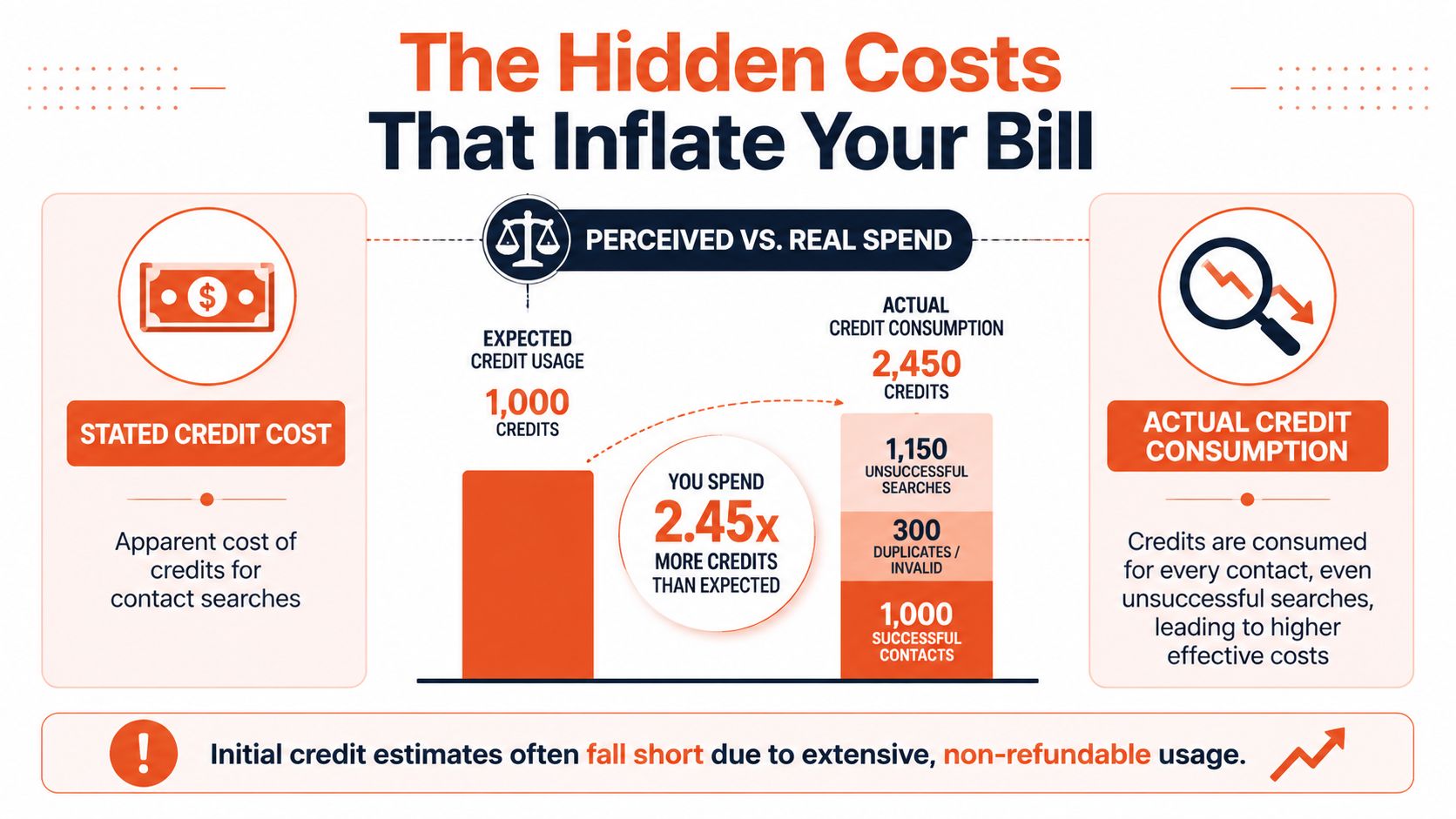
For real estate, that matters more than it does in many generic sales teams. A brokerage prospecting owners in one ZIP code or agents inside one recruiting market often isn't trying to brute-force through giant national lists. The work is targeted. Every bad record wastes money and also wastes rep time.
Why bad records cost more than the credit
A weak contact doesn't only burn platform usage. It also creates downstream drag:
- Agents make dead calls: Time goes to wrong numbers and stale records
- Email campaigns get noisier: Your team spends extra effort cleaning lists
- Managers misread output: Activity looks high even when usable reach is weak
- Budgeting gets distorted: The nominal cost looks acceptable while actual productivity falls
This is why the face-value per-credit rate is misleading. In real use, teams aren't buying pure access. They're buying a mix of good and bad reveals and hoping the good ones justify the waste.
An easy way to understand this is:
| Pricing view | What it tells you | What it misses |
|---|---|---|
| Stated cost | Monthly fee and included credits | Whether records are usable |
| Team usage | How fast reps burn credits | Whether heavy usage produces quality conversations |
| Effective cost | Real spend per valid contact | Whether those contacts convert in your market |
A related issue in brokerage tech is that software often looks affordable until teams factor in adoption, cleanup, and workflow friction. This broader pattern is well described in Bounti's piece on the brokerage tech stack adoption paradox.
Credit waste changes buying behavior
Once teams notice that some reveals don't produce usable contacts, behavior changes fast. Agents get hesitant. They reveal fewer records. They hoard credits. Managers start rationing usage instead of encouraging prospecting.
That is a bad place to be with any sales tool.
Later in the buying process, many teams realize they weren't comparing providers on the right basis. They compared monthly fees and headline features. They should have compared valid contact yield and workflow cost after cleanup.
This walkthrough is worth a look before you commit because it shows the kind of product narrative buyers often hear around the platform:
Reality check: A contact database isn't cheap because the monthly fee looks manageable. It's cheap only if the records it returns are actually usable inside your workflow.
Calculating Your True Cost of Ownership and ROI
If you're a team lead, stop asking whether this AI tool is affordable. Ask whether the workflow pays for itself after waste, admin time, and rep effort are included.
Cognism's analysis of Seamless.AI pricing makes that point sharply: the Basic plan's effective per-credit cost is $0.59, but invalid result charges can inflate expenses by 20% to 30%, and a team's actual cost per usable contact can end up closer to $1.76. That's why ROI models built from the sticker price alone fall apart.
A simple TCO framework for real estate teams
For agents and brokers, I use a five-part filter.
Platform spend
Start with the actual subscription cost.Usable contact yield
Don't use total reveals. Use the contacts your team can call or email with confidence.Labor drag
Add the time spent checking records, cleaning exports, and retrying dead outreach.Contract risk
Annual commitments matter because they turn a weak pilot into a year-long line item.Opportunity cost
Compare the tool against other places the same budget could go, including listing marketing, database reactivation, or local brand campaigns.
Sample ROI calculation for a 5-agent real estate team
Use the table below as a worksheet, not as a universal forecast. The point is the method.
| Metric | Value | Notes |
|---|---|---|
| Team size | 5 agents | Use your actual active prospecting headcount |
| Pricing model | Pro team quote | Custom pricing means model several scenarios |
| Monthly platform cost | Team-specific | Use your quote, not the sales rep's best-case language |
| Usable contact cost | Closer to $1.76 | Based on the Cognism analysis linked above |
| Outreach purpose | Listings, recruiting, or investor prospecting | Keep one goal per model |
| Closed-loop tracking | Required | Tie contacts to conversations, appointments, and signed business |
That worksheet works best when your team builds from internal numbers you already trust. Use your own close rates, average deal economics, and actual appointment rates. Don't let a vendor model your success using assumptions you haven't validated in your market.
How to run the model without fooling yourself
Use this sequence:
- Start narrow: Model one use case first, such as absentee owner outreach or agent recruiting
- Track usable records: Count only contacts a rep would work
- Separate outcomes: Distinguish between contact volume, conversations, appointments, and signed business
- Review monthly: If a team can't connect spend to pipeline movement, the software isn't proving value
If your ROI depends on assuming every revealed contact is workable, the model is broken before the trial starts.
There's also a broader lesson here for brokerages investing in digital growth. Many operators focus on lead volume tools while neglecting the assets they already control, such as listings, local attention, and brand content. This article on how to grow your online business is useful because it frames growth as a system, not just a prospecting problem.
For teams that want stricter spend visibility, Bounti has also published an explanation of its new credit pricing approach for real estate workflows, which is relevant because predictable usage models are easier to govern than opaque ones.
Choosing Your Path Finding the Right Tool
This AI can work. It just doesn't work for every real estate motion.
The strongest use case is a team that values volume, accepts data-quality variance, and has enough process discipline to manage credits, cleanup, and rep behavior. Think outbound-heavy recruiting teams, broad commercial prospecting groups, or brokerages that want reps building large top-of-funnel lists and can tolerate some waste.
When it makes sense
Choose this route if your team can handle these conditions:
- You need broad prospecting reach: Volume matters more than precision
- You have management oversight: Someone will monitor usage and list quality
- You can absorb inefficiency: A portion of reveals won't be workable, and the team won't stall because of it
- You buy software operationally: Contract review, rollout, and enforcement are normal parts of your process
When it usually doesn't
Many residential teams should hesitate.
A solo listing agent, a lean buyer team, or a boutique brokerage usually needs fewer contacts but better ones. In those environments, wasted records do more damage because each outreach attempt carries more weight. The cost isn't just in the subscription. It's in the agent's time, attention, and momentum.
Use a different path if these statements sound more like your business:
- You work narrow geographic farms
- You prospect selectively instead of at scale
- You need straightforward budgeting
- You'd rather improve conversion on existing opportunities than expand cold outreach
That last point matters. Some real estate operators shouldn't spend the next dollar on more contacts at all. They should spend it on presenting listings better, creating stronger visuals, and winning more attention from inventory already in hand. In practice, better listing presentation can be a cleaner investment than another top-of-funnel tool because it improves marketing output for assets you're already responsible for.
The best software decision isn't always the tool with the largest database. It's the one that fixes the most expensive bottleneck in your business.
If your bottleneck is outbound contact discovery, the AI tool may be worth testing carefully. If your bottleneck is winning listings, improving marketing quality, or helping buyers visualize a property, the better investment may sit elsewhere in your stack.
Final Verdict Is Seamless AI Worth It for Real Estate
For real estate, the answer isn't yes or no. It's whether the workflow survives contact with actual usage.
The headline problem with AI pricing is simple: the listed price is not the operating price. What matters is how many valid contacts your team gets, how much cleanup is required, and whether the software produces signed business often enough to justify the contract.
For high-volume teams with oversight and tolerance for messy data, there can be a fit. For smaller agent groups, precision-focused prospecting, or budget-sensitive brokerages, the hidden inefficiency can outweigh the apparent convenience.
The right evaluation standard is tougher than most pricing pages suggest. Measure usable contact yield. Model total cost of ownership. Compare that spend against other ways to drive revenue.
For teams leaning toward listing-side investment instead of another contact tool, it's also worth seeing how stronger presentation affects buyer response. This guide on how to enhance listings with stunning AI tours is a good example of that alternative mindset.
Frequently Asked Questions About Seamless AI
A better way to read these common questions is to treat them as purchase tests. Real estate teams do not lose money on list price alone. They lose money when paid credits turn into bad records, unused seats, and extra admin work.
How clear is the platform's pricing before you talk to sales?
Clear enough to understand the entry point. Not clear enough to forecast team-wide operating cost with confidence.
The self-serve tier gives you a starting number. Once a brokerage needs multiple users, higher limits, or admin controls, pricing usually moves into quote territory. That makes comparison harder because a key question is not monthly subscription cost. It is what each valid contact effectively costs after bounced numbers, outdated emails, duplicate records, and rep time spent checking data.
Is an annual contract risky for agents and brokers?
Yes, especially if the team has not proven usage habits first.
I usually advise brokers to treat annual terms as a second-stage decision, not a starting point. If agents are inconsistent with prospecting, or if managers do not have a clean reporting process, a yearly contract can lock in software spend before anyone knows the effective cost per conversation or appointment. The risk is not just paying for the tool. The risk is paying for credits and seats that never turn into signed business.
What if the contact data is inconsistent?
Then your cost per usable lead rises fast.
One bad record is not the issue. A pattern of bad records changes behavior. Agents stop trusting the list, slow their outreach, and begin cherry-picking only the contacts they can verify elsewhere. At that point, the platform becomes a partial data source, not a reliable prospecting engine. For a team leader, that means the true bill includes the subscription, the wasted credits, and the labor cost of verification.
How does it compare with MLS, title, and local data sources?
They solve different problems.
MLS and title data are usually stronger for ownership context, property history, and local relevance. A contact database is stronger for broad prospecting volume. In practice, real estate teams get the best result when they price both options against the same metric: cost per valid lead that an agent can work today. If local sources produce fewer names but a higher contact rate, they can be cheaper in real terms.
What is the smartest way to test it before expanding?
Run a controlled pilot with a hard scorecard.
Use one market, one agent cohort, and one outreach goal. Track credits used, valid contacts found, conversations started, appointments set, and closed revenue tied back to the pilot. Then calculate total cost of ownership. Include seat cost, credit consumption, manager oversight, CRM cleanup, and rep time spent checking records. That number tells you far more than a demo ever will.
If your budget would work harder improving listing presentation than buying more cold-contact data, take a look at Bounti Labs. Bounti helps real estate teams turn a simple video walkthrough into MLS-ready photos, property descriptions, and AI-powered staging, decluttering, restyling, or renovation visuals so every property shows better and markets faster.



