


Listings with video get 403% more inquiries and sell 32% faster, according to real estate video marketing data summarized here. That changes the conversation around video editing real estate. This is no longer a nice add-on for premium listings. It's part of the core listing package.
The bigger issue isn't whether agents should use video. It's whether they can produce it consistently, quickly, and without getting trapped in a slow post-production process. Old workflows depended on manual editors, fragmented tools, and rounds of revision that dragged on long after a listing went live. The better approach is a repeatable system that starts with clean footage, uses a clear narrative structure, and folds in AI where it saves time, especially on decluttering, staging, and restyling.
Why Masterful Video Editing is No Longer Optional
403% more inquiries and 32% faster sales changed the standard for listing media, as noted earlier. The question now is whether your editing process can produce that kind of marketing asset on a schedule that works for active listings.
A listing video succeeds when buyers can understand the home quickly, remember its strongest features, and take the next step. Editing controls all three. Shot order shapes how the property reads. Color correction affects whether rooms feel clean and bright or flat and uneven. Timing determines whether viewers stay through the kitchen, primary suite, backyard, and call to action.
Poor editing costs response. It also costs speed, which matters just as much in real estate marketing.
Many agents still treat post-production like cleanup after the shoot. That approach breaks down fast. A modern workflow starts making editing decisions before the timeline is built, then uses AI for the jobs that waste the most time by hand, like removing visual clutter, testing virtual staging, and preparing polished variations for different channels. That is how smaller teams produce premium-looking property videos without premium post-production costs.
What agents get wrong
Failed listing videos usually break in three places:
- The walkthrough makes no sense: Buyers see rooms, but they never understand how the home connects.
- The image quality shifts too much: Bright windows clip, interiors turn orange or gray, and the property feels inconsistent from shot to shot.
- The process does not scale: Every editor, agent, or freelancer handles the same tasks differently, so delivery slows down and brand quality drifts.
The third problem is the one brokerages feel first. One polished video does not build a listing machine. A repeatable system does.
Practical rule: Buyers will tolerate simple production. They will not tolerate a confusing tour.
Strong editing still depends on solid capture decisions. If you want a practical reference on shooting choices, pacing, and edit fundamentals for property video, Danny Avila's real estate video expertise is a useful guide to the production side. For teams that need faster approvals and cleaner handoffs during post, a visual collaboration workflow for listing media reviews cuts down revision lag.
What the modern workflow looks like
The current standard is straightforward:
- Prep footage so the edit starts clean
- Build a clear property journey, not a random montage
- Fix exposure, color, and stability before adding style
- Use AI for decluttering, virtual staging, and repetitive cleanup
- Deliver multiple exports that fit MLS, website, YouTube, Instagram, and vertical short-form
That combination works because it protects the parts that need human judgment and automates the parts that do not. Agents do not need a dramatic cinematic edit for every home. They need a fast, consistent video system that makes listings look sharper, helps buyers understand the space, and gives sellers confidence that the marketing is serious.
Organizing Footage for an Efficient Workflow
Messy footage creates slow edits. Slow edits create late launches. Late launches cost attention during the first wave of listing interest.
With many agents now relying on drone footage as part of their listing package, managing mixed media has become a real production problem. Drone clips, gimbal walkthroughs, iPhone vertical clips, agent standups, and branded outros all arrive in different formats. If you don't standardize that intake step, the timeline turns into a junk drawer.
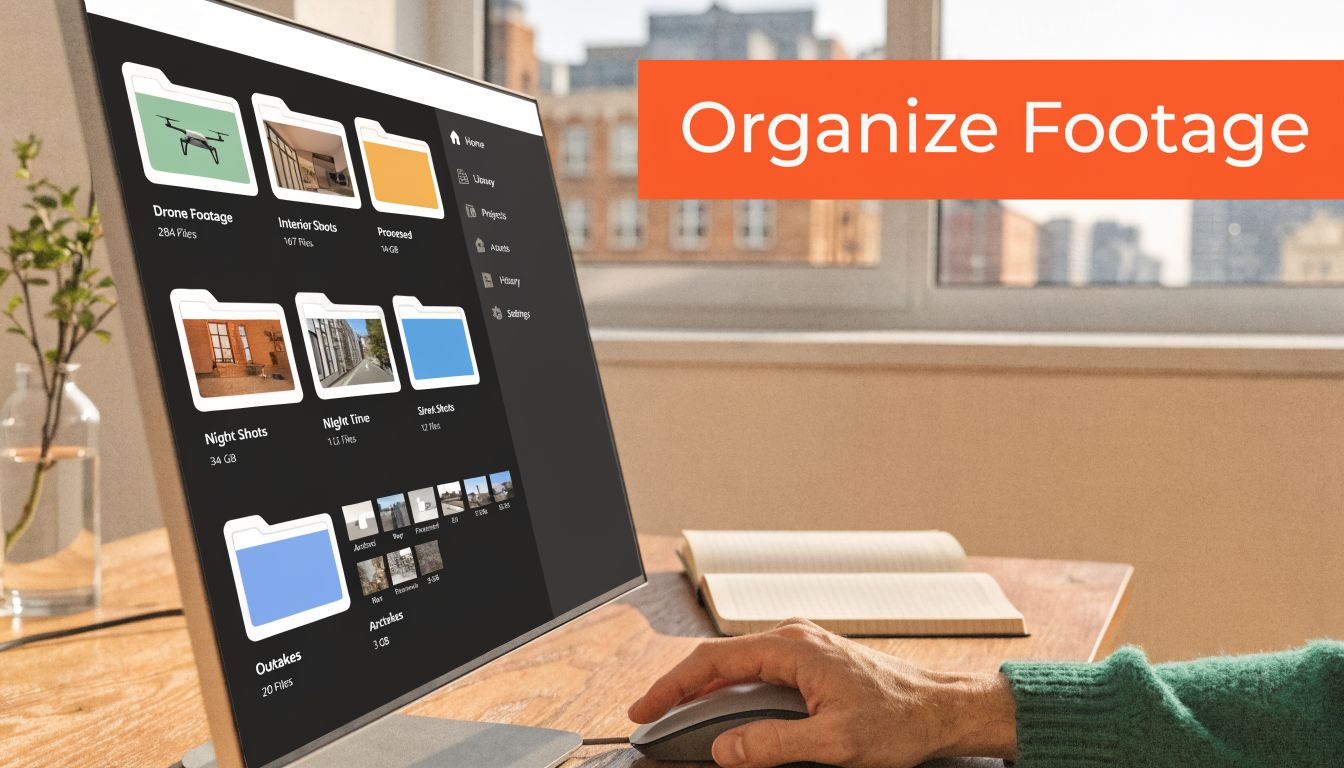
Build one folder system and never improvise
Use the same folder tree for every listing. Keep it boring. Boring is fast.
A practical structure looks like this:
- 01 Raw footage: Original files from drone, camera, phone, and screen captures
- 02 Audio: Music, narration, and room tone if you're using it
- 03 Selects: The clips you've approved for the cut
- 04 Graphics: Logos, lower thirds, CTA slate, agent headshot
- 05 Project files: Premiere Pro, Final Cut Pro, DaVinci Resolve, or CapCut project files
- 06 Exports: Horizontal master, vertical cut, short social versions, clean versions
Inside raw footage, sort by source. Drone, Interior Gimbal, Exterior Ground, Agent On-Camera, Vertical Social. That's enough detail to stay organized without wasting time on over-labeling.
Name clips so teams can find them
Real estate teams lose time when file names tell you nothing. Rename clips during intake based on location and take quality.
For example:
- Kitchen_Wide_Take2
- PrimaryBed_Pan_Best
- Backyard_Drone_Orbit
- FrontExterior_Twilight
That makes handoff easier for coordinators, editors, and agents reviewing cuts. It also pairs well with shared review systems. If your team is still chasing comments across text threads and email, a tighter review process like the one outlined in Bounti's client studio visual collaboration guide is the kind of operational fix that saves hours over a month.
Good editing starts before the first cut. Most delays come from bad intake, not bad software.
Cull early and create proxies
The fastest editors don't work with everything. They reject aggressively.
Do a first pass and remove:
- Shaky clips: If stabilization can't save it, drop it
- Soft focus footage: Especially on kitchens, baths, and exterior hero shots
- Duplicate movements: Keep the smoothest pass, not all six versions
- Exposure disasters: Unless the shot is irreplaceable
After culling, generate proxies if you're working with large files. This matters with drone footage and higher-resolution walkthroughs. Proxies let standard laptops edit smoothly because the software uses lighter files while preserving the original media for export.
A short walkthrough of a clean editing setup is worth watching before your next batch project:
Keep a selects sequence before the real cut
Before building the final edit, create a rough "selects" timeline with only approved shots in likely order. No music. No graphics. No polishing.
This step does two things. It exposes missing coverage early, and it stops you from wasting time perfecting clips that don't belong in the final story.
Structuring Your Video to Tell a Compelling Property Story
Listings with video get more inquiries than listings without it. The catch is that a sloppy edit can waste that advantage in seconds. Buyers decide fast whether a tour feels clear, credible, and worth finishing.
A real estate video fails when it does not behave like a tour. Buyers are trying to understand layout, sequence, and livability. If the cut jumps around for style, the home feels harder to understand and less memorable.
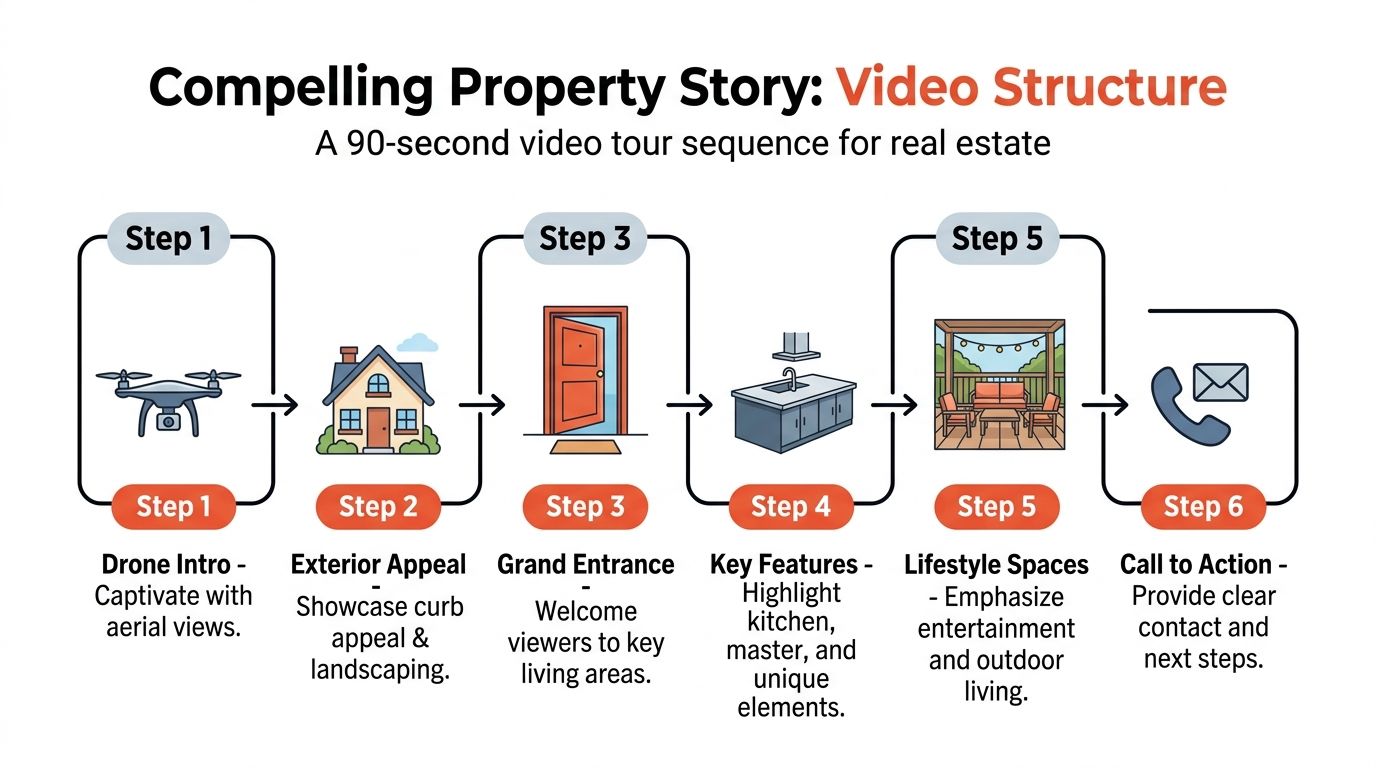
Use a walkthrough structure buyers can follow
The strongest edits mirror an actual showing. Start with a quick visual hook that earns attention, then move through the property in an order that makes physical sense. Front approach first. Entry next. Main living spaces after that. Bedrooms and baths later. End with the feature or lifestyle payoff that helps the listing stick, then a clear call to action.
A practical structure looks like this:
| Section | What to show |
|---|---|
| Opening hook | 1 to 2 best shots that establish price point and appeal |
| Exterior and approach | Front elevation, driveway, landscaping, outdoor living |
| Entry and transition | Foyer, hallway, or first reveal into the main space |
| Primary living zones | Kitchen, living, dining, and how they connect |
| Private spaces | Primary suite first, then secondary bedrooms and baths |
| Close and CTA | Best final image, agent branding, next step |
That order works because it reduces friction. Viewers can build a mental map as they watch. If you also plan to show renovation potential or staged variations, tools like before-and-after video listings work best when the base sequence is already clear.
Pacing decides whether buyers keep watching
Fast cuts do not automatically make a listing feel premium. Controlled pacing does.
Give the opening enough punch to stop the scroll, but do not burn five seconds on a logo. Once the viewer is inside, hold key rooms long enough for them to read finishes, windows, and layout. Kitchens, living rooms, and the primary suite usually earn the longest screen time because that is where purchase decisions are often reinforced.
Connector spaces need less time. Hallways, stair turns, and doorway transitions should move the viewer forward without creating confusion. If a patio, pool, office, or ADU adds real marketing value, place it where it supports the story of the home instead of dropping it in at random.
If a buyer cannot tell how the kitchen connects to the living area, the edit failed.
Match the sequence to the listing, not your template
Every property needs structure. Not every property needs the same emphasis.
A downtown condo usually benefits from tighter pacing, cleaner titles, and stronger attention on views, amenities, and efficient use of space. A luxury estate needs slower reveals, longer holds, and more breathing room around craftsmanship and outdoor living. A family-oriented suburban home usually performs better when the edit makes kitchen function, backyard use, and bedroom separation easy to understand.
The workflow stays consistent. The emphasis changes.
Build orientation first, then add style
Editors often overcut details because close-ups feel polished. In real estate, orientation wins first. Show the room. Show how it connects. Then use detail shots to support value.
These sequencing rules hold up across almost every listing:
- Keep the geography honest. Do not jump from the kitchen to an upstairs bath to the backyard without a clear reason.
- Cut on movement that carries direction. Doorways, pans, and walking motion help the next space feel connected.
- Use detail shots as support. Fixtures, stone, hardware, and texture should strengthen context, not replace it.
- Place standout features intentionally. A wine room, gym, workshop, rooftop deck, or detached studio should feel earned.
That structure also makes AI edits more effective later. Decluttering, day-to-dusk adjustments, and virtual staging land better when the viewer already understands the space they are looking at.
The goal is simple. Help the buyer remember the property clearly enough to book the showing.
From Basic Fixes to AI-Powered Transformations
Most editors stop at correction. They fix exposure, trim clips, add music, and export. That's competent, but it leaves a lot of marketing value on the table.
The more effective approach is to treat editing as both cleanup and visualization. Buyers don't only need to see what a property is. In many cases, they need help seeing what it could become.

Start with the basic corrections every listing needs
Before using any advanced effect, fix the fundamentals. These are not optional.
A reliable baseline pass includes:
- Exposure balancing: Lift dark interiors, control bright windows, and keep brightness consistent room to room
- White balance correction: Mixed bulbs often create yellow kitchens and blue hallways
- Lens distortion cleanup: Especially important on wide interiors and drone clips
- Stabilization: Use it lightly. Too much creates warped edges and a floating look
- Straightening and crop refinement: Vertical lines should feel upright, especially in kitchens and bathrooms
Premiere Pro, DaVinci Resolve, Final Cut Pro, and even simpler editors can handle this baseline work. The point isn't which app you choose. The point is doing these fixes before making creative decisions.
Where AI changes the workflow
Most tutorials still focus on trimming, color, and transitions. The underserved part of video editing real estate is using AI to transform the property presentation directly from walkthrough footage.
That gap is called out in this article on real estate videography cameras settings and AI tools, which highlights integrating AI for instant virtual staging directly from video footage as a major pain point for agents dealing with slow manual post-production. That's exactly where modern workflows have improved.
Instead of sending stills to separate vendors and waiting on revisions, agents can now handle visual transformation as part of the edit itself.
What AI is actually useful for
Some AI features are gimmicks. These are the ones that earn their place:
- Decluttering: Removes visual noise from lived-in spaces so buyers focus on room size and function
- Virtual staging: Helps empty rooms read as bedrooms, offices, dining spaces, or lounges
- Restyling: Softens dated finishes or adjusts furnishings so the presentation aligns with the target buyer
- Renovation previews: Useful when a property needs vision, especially in investor, value-add, or older housing stock scenarios
- Still extraction and asset generation: Lets a single walkthrough support MLS photos, social posts, and branded collateral
This is especially valuable for high-volume teams. A coordinator doesn't need to become a retoucher. They need a fast way to present each property cleanly and consistently.
For a practical example of how before-and-after visual transformation supports listing marketing, this look at before-and-after video listings is worth reviewing.
Field note: AI works best when it clarifies the property, not when it tries to impress the editor.
Trade-offs agents should respect
AI can speed up post-production, but it doesn't replace judgment.
If you over-style a room, remove details that matter to buyers, or make renovations look too speculative, trust drops. The safest standard is simple. Use AI to reduce distraction, communicate potential, and support honest marketing.
A good decision framework looks like this:
| Use case | Best approach |
|---|---|
| Occupied and cluttered home | Light decluttering and exposure cleanup |
| Vacant listing | Virtual staging in key rooms only |
| Dated but livable property | Mild restyling to suggest direction |
| Heavy fixer or investment deal | Use renovation concepts carefully and label clearly |
The best editors today aren't just technicians. They're choosing when to present reality, when to reduce friction, and when to show possibility.
Adding Music Titles and Graphics That Convert
Listings often win or lose attention in the first few seconds. The finishing layer decides whether the video feels expensive, trustworthy, and easy to act on, or whether it feels like another rushed template.
This part of the edit needs discipline.
Good real estate videos use music, titles, and graphics to direct attention toward the home. Weak ones do the opposite. They bury the property under loud tracks, oversized branding, and text that competes with the footage. I see this constantly with agent-edited reels. The house is strong, but the finishing choices make it look cheaper than it is.
Music sets pace, but it should never take control
Track selection changes how buyers read the property before they process a single feature callout. A downtown condo can carry more rhythm. A luxury listing usually performs better with space and restraint. A family home needs warmth without sounding overly sentimental. Multifamily and commercial clips usually need a cleaner, neutral bed.
Volume matters as much as genre. If viewers notice the music more than the kitchen, the mix is wrong. Keep levels low enough that narration, natural room tone, or agent intro can still breathe.
Rights matter too. If you're unsure whether a track is safe for listing marketing, this copyright guide for indie artists is a practical starting point for checking usage before the video goes live.
Titles should answer buyer questions fast
The best text on screen is useful, brief, and placed with intent. Buyers want orientation, not decoration.
Use titles for information that helps someone decide whether to keep watching:
- Address and property type at the opening
- Key features such as vaulted ceilings, pool, guest house, or corner lot
- Agent and brokerage branding in one consistent lower-third system
- A direct CTA at the end, such as book a private showing or request details
Skip paragraph blocks and flashy animation presets. On a phone screen, short tags win. I usually keep feature text to a few words and let the footage carry the persuasion.
Graphics should clarify what the camera cannot
This is where modern workflows save real time. If you've already used AI for decluttering or virtual staging earlier in the edit, your graphics should support that same goal. Clarify layout. Label spaces that may read ambiguously on mobile. Show potential without overselling it.
A practical stack for social and listing edits looks like this:
- Burned-in captions for any spoken intro or agent narration
- Room labels only where orientation helps, such as bonus room, ADU, or lower level suite
- Simple amenity or floor-plan overlays when the walkthrough alone does not explain flow
- A final contact slate sized for mobile viewing
For teams producing a lot of listing content, templating this layer inside an AI real estate video creation workflow cuts turnaround time without making every property look identical. The key is a fixed system with room-specific customization.
Consistency builds recognition
As noted earlier, video marketers tend to outperform teams that barely use video. In practice, the edge does not come from flashy editing. It comes from repeatable presentation. Consistent fonts, music style, logo treatment, and CTA structure make every listing feel like it came from a serious operator.
Minimal graphics usually perform better in real estate because the property needs to stay dominant in the frame. Buyers should remember the kitchen, the yard, and the light. Branding should support recall, not hijack attention.
Exporting and Delivering Your Video for Maximum Reach
Editing isn't finished when the timeline looks good. It's finished when the right files are in the agent's hands, properly formatted for every place the listing needs to live.
A lot of teams still export one master file and call it done. That creates friction for agents who then need to crop, compress, rename, and repurpose everything themselves. A better system is to deliver a full package.

Export by platform, not by habit
Different channels want different shapes and lengths. One export won't serve all of them well.
A simple deployment setup looks like this:
| Platform need | Recommended version |
|---|---|
| MLS and website | Horizontal master in 16:9 |
| YouTube | Horizontal master with full branding |
| Instagram Reels and TikTok | Vertical 9:16 cut with larger titles |
| Stories | Short vertical cut with fast opening |
| Email and text follow-up | Lightweight version that's easy to send |
The editing principle stays the same across formats, but the framing changes. A wide kitchen shot that works beautifully in horizontal may need repositioning in vertical so the island, cabinetry, and windows remain readable.
Build templates so teams don't start over
Real estate teams often ask how to avoid amateur output when producing videos at scale. That concern is well founded. This discussion of common real estate video mistakes points to poor pacing causing up to 80% viewer drop-off in the first 10 seconds, which is why scalable templates and delivery kits matter.
Templates should cover:
- Intro and outro slates
- Brand fonts and lower thirds
- CTA placement
- Music style categories
- Export presets for horizontal and vertical versions
When those pieces are preset, coordinators can focus on footage quality and story flow instead of rebuilding formatting decisions for every listing.
Deliver a video kit, not just a file
The highest-value handoff is a small media package the agent can use immediately.
A practical listing delivery kit includes:
- Main listing video
- Short social cutdown
- Vertical version
- Clean version without heavy branding if needed
- Selected still frames pulled from the video
- Thumbnail image for upload
- A copy-ready caption or posting note
For teams looking to automate more of that production and packaging, Bounti's video creator solution reflects the direction many brokerages are moving toward. One workflow, multiple outputs, less manual repurposing.
The final export isn't the product. The delivery system is.
Keep the review loop tight
Don't send giant files with vague notes like "let me know what you think." Give agents a defined approval path.
Use a checklist:
- Confirm property facts on titles
- Review room order
- Check branding and contact details
- Approve social crops
- Lock final exports
That keeps revisions focused on decisions that matter. It also stops endless "one more tweak" rounds that delay launch and drain margin on every listing video.
Bounti Labs helps agents and real estate teams turn a single walkthrough into polished marketing assets fast. With Bounti Labs, you can generate listing visuals, pull stills, create MLS-ready assets, and transform spaces with AI-powered decluttering, staging, restyling, and renovation workflows built for real estate. If you want a faster system for video editing real estate without relying on slow manual vendors, it's worth a look.



