


Virtual staging is growing fast enough that treating it like occasional freelance work leaves money on the table.
Virtual staging jobs now sit inside a larger real estate marketing operation. Agents, photographers, media teams, and listing coordinators need consistent turnaround, clean revision handling, compliant imagery, and predictable pricing. The people who build stable income in this category usually solve those operational problems first, then improve taste and style choices on top of that.
That changes the job. Strong editors still matter, but production discipline matters just as much. Fast file intake, room-type templates, furniture libraries that match buyer expectations, disclosure rules, and quality control all affect whether a client sends one order or fifty.
A lot of beginners still treat this field like a design side hustle. In 2026, the stronger approach is to run it like a small production business with documented workflows, AI-assisted editing, and repeatable client acquisition. If you want the broader playbook, this virtual staging guide for building a real service business covers the operational side in more detail.
That shift is good news for new entrants. Gig work feels unstable. A workflow-driven virtual staging business can be much steadier because recurring clients care less about hiring an artist for one image and more about finding a reliable vendor who can handle weekly volume without quality slipping.
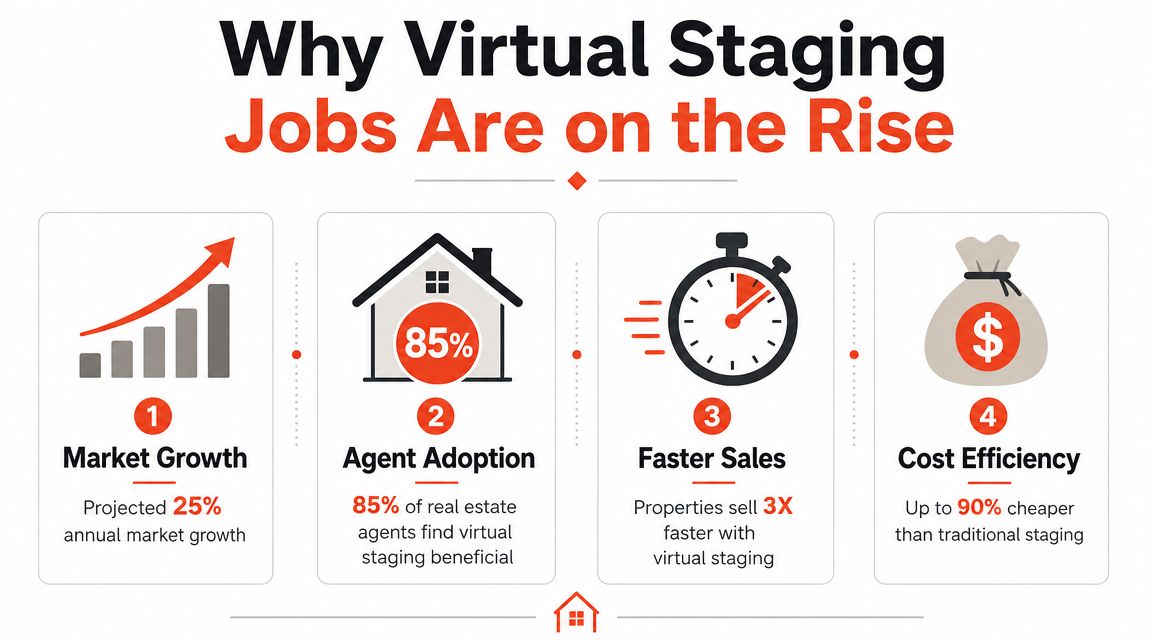
Why Virtual Staging Jobs Are on the Rise
Vacant listings still lose attention fast online, and real estate teams have responded by making digital presentation part of the standard listing workflow. That shift created more demand for people who can turn raw room photos into marketable images on a repeatable schedule.
Cost and speed changed the job category
The business case is straightforward. Physical staging takes furniture, logistics, installers, scheduling, and often a second shoot. Virtual staging removes much of that operational drag, which is why agents, media companies, and broker marketing teams now use it for everyday listing volume, not only for luxury homes or hard-to-sell properties.
That matters for job demand because clients are buying output capacity as much as visual taste. A team with twenty vacant listings does not need a one-off creative experiment. It needs a vendor who can process files quickly, hit the same quality bar every time, and keep revision cycles under control.
AI accelerated this shift. In 2026, many production shops use AI to handle early passes such as cleanup, layout options, and style variations, then use human review to catch realism issues, compliance problems, and bad furniture choices. That hybrid model lowered turnaround times and made high-volume service more practical.
Why teams hire for throughput, not art alone
Virtual staging jobs increasingly sit inside a broader listing media operation. The buyer is often an agent team, photographer, media agency, or brokerage marketing department trying to keep listings live, polished, and consistent across channels. They care about whether you can fit into that system without creating delays.
In practice, the work that keeps clients coming back looks like this:
- Simple intake: Clear file naming, room labels, and order instructions.
- Predictable style control: Living rooms, bedrooms, and offices should match the likely buyer and price point.
- Tight revision management: Fast fixes protect margins and client trust.
- Compliance judgment: Edited photos still need to reflect the actual property accurately.
- Reliable delivery: MLS, portal, and social-ready assets need to arrive in the right format and on time.
I have seen strong image editors struggle here because they treated each order like a custom art project. The operators who build stable income treat it like production. They document room presets, maintain furniture libraries by property type, use QA checklists, and track where revisions come from.
That is why this category keeps expanding. It solves a real bottleneck in real estate marketing, and it scales well when the workflow is set up correctly. If you want the bigger operating model, this virtual staging guide for building a repeatable service business shows how the pieces fit together.
Building Your Virtual Staging Skill Stack
Most beginners overinvest in software tutorials and underinvest in real estate judgment. That's why their images look polished but don't get approved by agents, brokers, or compliance-conscious teams.

A strong operator in virtual staging jobs needs three layers of skill. First, image production. Second, design realism. Third, real estate-specific restraint. Miss any one of those, and your work becomes harder to sell.
Technical execution
You need to be comfortable with the actual build process, not just the final look. The practical workflow described by the National Association of Realtors is clear: capture wide-angle room photos, clean and declutter the space, apply staging, then verify that no permanent fixtures have been altered. The final image must also be disclosed as virtually staged, as outlined in NAR's guidance on virtual staging practice.
That means your technical stack should support five things well:
- Masking and cleanup: Removing distractions cleanly is often harder than adding furniture.
- Lighting correction: A staged room still fails if the base exposure looks muddy.
- Perspective control: Furniture has to sit correctly in the room.
- Shadow realism: Weak staging becomes immediately apparent.
- Export discipline: Final files need to be naming-consistent and listing-ready.
Photoshop still matters. So do AI staging tools and 3D libraries. But software choice matters less than whether you can move from raw image to approved deliverable without creating a review loop.
Design judgment
A lot of virtual staging jobs break down at the style layer. People add attractive furniture that doesn't fit the architecture, price point, or buyer profile. A downtown condo, a suburban family home, and an older bungalow shouldn't all get the same default sofa, rug, and wall art treatment.
Use design decisions to support the listing, not your personal taste.
If the furniture scale flatters the room but wouldn't make sense in a real showing, the image may still fail with buyers.
Check each room for:
- Proportion: Does the bed, sectional, or dining table fit the room footprint?
- Traffic flow: Could someone realistically move through the space?
- Target buyer fit: Does the style match who the property is likely to attract?
- Material consistency: Modern matte black fixtures and rustic farmhouse decor often clash.
A useful habit is to build room-type presets by property style. That speeds production and reduces random design choices.
Here's a walkthrough worth watching if you want to see how practitioners think through staging decisions in a hands-on format.
Real estate context and compliance
Many creative freelancers struggle with this. In real estate, “looks better” is not enough. You need to know what must stay untouched.
Keep these lines clear:
- Furniture and decor are fair game. They present the space.
- Permanent features are not. Don't change views, floors, fixtures, or structural reality.
- Disclosure is mandatory. If the image is staged, it needs to be labeled that way.
- Trust beats flash. One unrealistic edit can cost a repeat client.
The best virtual staging jobs go to people who reduce friction for agents. That means fewer revision cycles, fewer disclosure mistakes, and fewer images that need to be pulled after review.
How to Build a Client-Winning Portfolio
A virtual staging portfolio should answer one question for an agent in under two minutes. Can this person make my listings look better without creating extra work?
That means your portfolio isn't an art gallery. It's a sales tool. The best ones show judgment, consistency, and range, but they also show restraint.
What to include
Before-and-after pairs do most of the heavy lifting. Agents want proof that you can improve a room while keeping it believable. Show the original image first, then the staged version. Don't make people hunt for the transformation.
Include a spread of common listing situations:
- Vacant rooms: Empty living rooms, bedrooms, dining areas, and home offices.
- Decluttering scenarios: Spaces that need simplification more than full furnishing.
- Style variation: Modern, transitional, warm neutral, and market-appropriate looks.
- Problem rooms: Narrow bedrooms, awkward layouts, dark dens, and dated spaces.
A useful companion resource is this collection of house staging before-and-after examples. It's a good reminder that agents don't buy “design.” They buy clearer buyer imagination.
What clients actually scan for
Most prospects won't study every image. They skim for signs of risk. If your portfolio raises questions about realism, they move on.
Use a simple review lens before publishing anything:
| Portfolio element | What the client is judging |
|---|---|
| Furniture scale | Do you understand room proportions |
| Lighting consistency | Can you blend additions naturally |
| Style matching | Do you know how to stage for the property, not yourself |
| Variety | Can you handle more than one room type or market |
| Before-and-after clarity | Are the results obvious and believable |
A thin portfolio with six excellent examples beats a large portfolio padded with inconsistent work.
How to build one without paid clients
You don't need live client work to start. You do need discipline. Build sample projects from legally usable property photos, then treat them like real assignments. Create an intake note, define the target buyer, stage the room, then write one sentence explaining the design choice.
That last part matters. When an agent asks why you chose a compact dining set instead of a larger one, you should have an answer tied to the room. Good portfolios don't just show output. They show decision-making.
Keep the presentation clean. One image pair per screen. Short captions. No dramatic claims. Let the work make the case.
Where to Find and Pitch Virtual Staging Clients
Those looking for virtual staging jobs often search job boards first. That's understandable, but it's usually the slowest path to stable income. The category still looks fragmented. One specialized provider, for example, lists a project-based, remote virtual staging role on its careers page, which is a useful signal that the labor market isn't fully standardized yet, as seen in Stuccco's careers listings.
That instability isn't a reason to avoid the field. It's a reason to build a client base instead of waiting for a perfect full-time opening.
Start with the right client types
Not every buyer of virtual staging services thinks the same way. Some care about speed. Some care about repeatability. Some need one listing fixed. Others need an ongoing pipeline.
Here's the practical breakdown.
| Client Type | Typical Volume | Key Need | Best Pitch Angle |
|---|---|---|---|
| Individual agents | Irregular | Faster listing presentation | Simple turnaround and before-and-after proof |
| Brokerages and teams | Recurring | Consistency across listings | Standardized workflow and dependable revisions |
| Developers | Batch-oriented | Lifestyle visualization for new inventory | Cohesive look across multiple units |
| Property managers and leasing teams | Ongoing | Refreshing vacant units for marketing | Repeatable image packages and quick updates |
Individual agents are the easiest starting point because they decide quickly. Brokerages are harder to win, but they're where virtual staging jobs become stable operating relationships.
Build a pitch around business results
If your outreach says “I create beautiful staged images,” you'll sound interchangeable. A better pitch ties your work to listing performance. The strongest available benchmarks to support that conversation are that staged homes are reported to sell about 73% faster, and AI-staged listings have been associated with a 72% increase in online traffic and a 44% increase in qualified inquiries, according to RoomLift's analysis of virtual staging ROI.
Use those numbers carefully. Don't promise them as guaranteed outcomes. Use them to frame why the service matters.
A direct outreach message can be simple:
I help listing teams turn vacant or underwhelming rooms into market-ready images with clear disclosure and fast delivery. If you're carrying listings that need stronger online presentation, I can show a few before-and-after examples matched to your property style.
That works better than a long intro about your creative background. Agents are screening for relevance, not biography.
Where to look beyond job boards
The easiest clients to win are often already buying related creative services. That includes photographers, transaction coordinators, marketing coordinators, and boutique brokerages that don't have a dedicated in-house editor.
Places to look:
- Photographer partnerships: Real estate photographers already control image flow.
- Brokerage marketing teams: They need consistency more than novelty.
- Local listing agents: Focus on those with vacant inventory or repetitive property types.
- Digital product channels: If you package templates, style boards, or intake kits, this guide on top platforms to sell digital products is useful for thinking beyond pure service work.
What works in follow-up
Don't keep sending generic “checking in” messages. Send something concrete. A sample concept for one room. A brief note on what you'd change. A cleaner service menu. A tighter turnaround promise.
Use a small system:
- Day one: Initial outreach with one relevant portfolio sample.
- Follow-up: Share a quick observation about one listing's visual opportunity.
- Final touch: Offer a low-friction test project or pilot batch.
The point isn't to chase random gigs. It's to convert one-off projects into repeat relationships. That's how virtual staging jobs stop feeling unstable.
Pricing, Proposals, and Getting Paid
Virtual staging income gets more predictable once pricing is built around production capacity, not personal taste. The operators who last in this category usually stop selling isolated edits and start selling a defined service line with clear turnaround, revision limits, and room for margin.
The pricing conversation also gets easier when clients can compare your service to the cost of physical staging. As noted earlier, virtual staging is typically priced far below in-person staging, which gives you a strong value frame without forcing you into bargain positioning.
Pick a pricing model that fits the account
Per-image pricing is the easiest entry point because agents and photographers already buy creative services that way. It works well for test projects, small vacant listings, and one-off orders. The downside is obvious. Revenue swings with listing flow, and every new order starts another small sales cycle.
Package pricing is better for repeatable room sets. A four-image package for a standard condo, or a six-image package for a vacant suburban listing, is easier to quote, easier to batch, and easier to fulfill profitably. It also shifts the client conversation away from tiny per-photo comparisons.
Retainers are where virtual staging starts to behave like a real production business. Brokerage teams, media companies, and marketing coordinators care less about one image price and more about capacity, consistency, and service levels. That changes your role from freelancer to outsourced visual operations partner.
Here's the trade-off in plain terms:
- Per image: Fastest to sell, weakest income stability.
- Package: Better average order value, better batching, fewer pricing debates.
- Retainer: Strongest stability, but only after you've proved speed and consistency over multiple jobs.
A practical way to structure pricing is to build three tiers. Standard for normal delivery, rush for compressed turnaround, and volume for clients sending predictable monthly work. That gives buyers options without forcing a custom quote every time.
What your proposal needs
Weak proposals create revision creep, delayed approvals, and payment disputes. Strong proposals are short, specific, and operational. They read like production agreements, not creative wish lists.
Include:
- Scope: Number of images, room types, and whether cleanup, item removal, or light virtual renovation is included.
- Turnaround: Delivery window, file handoff timing, and what qualifies for rush pricing.
- Revisions: Number included, what counts as a revision, and what triggers a new fee.
- Disclosure responsibility: State that the client is responsible for proper MLS and marketing disclosure where required.
- Usage terms: Clarify whether the images are licensed for one listing, one agent, or broader marketing reuse.
- Payment terms: Deposit, due date, accepted payment methods, and late fee policy.
One sentence saves a lot of trouble: “Proposal includes staging based on the approved style direction. Additional design directions after first draft are billed as revisions.”
That line protects margin because it separates correction from indecision.
If you use AI in your workflow, say so carefully and factually. Clients care about output quality, image realism, and delivery speed. They do not need a long tool stack breakdown, but they should know you use a quality-control process. For teams refining that workflow, this roundup of AI photo editing software for production workflows is useful for comparing where automation saves time.
Protect margin and get paid faster
Low pricing rarely wins the right clients for long. It tends to attract buyers with unclear feedback, inconsistent volume, and high revision demand. A better approach is to price for the total job: communication time, staging time, revision time, file handling, and payment risk.
Adjacent creative fields solve this the same way. If you want a useful benchmark for how professionals structure scope and revision terms, it helps to understand video editing costs and compare how editors charge for complexity, turnaround, and client changes.
Payment terms should match the client type. New clients usually get partial upfront payment or full payment before final high-resolution delivery. Repeat clients with clean payment history can move to net terms. Brokerage groups and media partners often expect invoicing, but that only works if your proposal already defines approval points and late-payment consequences.
Keep the billing process simple. Clear line items. One delivery date. One revision policy. One payment deadline.
That is how virtual staging jobs start producing stable income instead of random project cash.
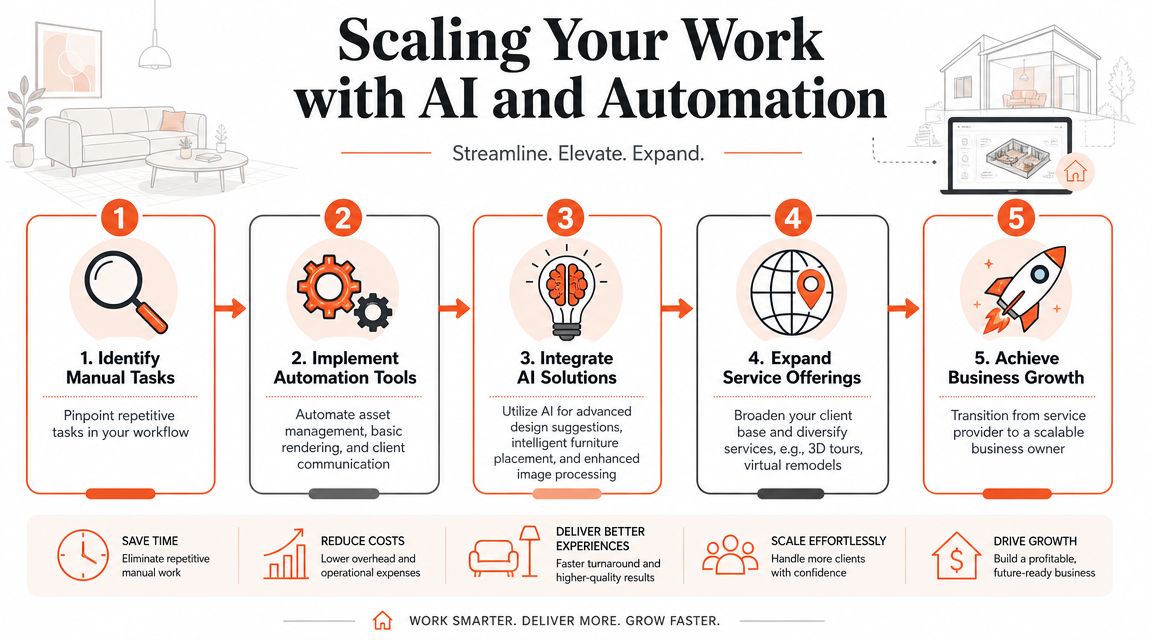
Scaling Your Work with AI and Automation
The ceiling in virtual staging jobs isn't creative ability. It's throughput. If every project depends on manual intervention from the same person, income eventually stalls.
That's why the operators pulling ahead are redesigning their workflow around automation, template logic, and selective AI use. The job is also moving beyond basic furniture swaps. Product-focused industry pages show a shift toward advanced staging that can modify walls and floors, and toward 360° staging for a more immersive experience, as described by BKBN's overview of advanced virtual staging services.
What to automate first
Start with the parts clients don't value as custom craftsmanship.
Automate or standardize:
- File intake and naming
- Room-type presets
- Style libraries
- Delivery checklists
- Revision tracking
- Client update messages
Then apply AI where it meaningfully cuts production time without reducing trust. That usually includes concept generation, decluttering passes, fast style variations, and draft staging options that a human reviews before delivery.
One practical option in this category is Bounti Labs, which can generate MLS-ready photos, pull stills from a walkthrough, and handle AI-powered decluttering, staging, restyling, and renovations from property visuals. Tools like that are useful when your bottleneck is volume, not imagination. If you're comparing categories, this guide to AI photo editing software for real estate is a good starting point.
Build for systems, not heroic effort
A stable business usually has three lanes of work:
- Fast-turn core staging
- Higher-touch premium transformations
- Add-on services like restyling, renovation concepts, or immersive presentation
That mix protects you from racing to the bottom on simple image edits alone. It also prepares you for adjacent visual categories. For example, if you want to study how AI-assisted visual style systems are expanding outside interiors, this resource to explore AI garden design styles is a useful comparison.
The future of virtual staging jobs belongs to people who can operate a visual pipeline, not just decorate a single room well.
The people who last in this category don't treat AI as a shortcut. They treat it as production infrastructure.
If you're building a virtual staging workflow and want a faster way to turn property visuals into staged, decluttered, restyled, and MLS-ready assets, take a look at Bounti Labs. It's built for real estate teams that need repeatable output, not just one-off edits.



