


Virtual staging is the digital process of adding furniture and decor to photos of empty rooms, and it typically costs $5 to $50 per image while full-home physical staging often costs $2,500 to $5,000+. That cost gap is why many agents now treat it as a practical marketing workflow, not a nice-to-have extra.
Most agents still hear the question, what is virtual staging, as if it's just a design term. It isn't. It's a listing strategy. If you can turn a vacant room into a furnished, photorealistic image fast, you can launch marketing sooner, test different looks, and avoid the delays that come with moving furniture, scheduling installers, and waiting on outside vendors.
The bigger shift is operational. Virtual staging used to mean sending photos to a specialist and waiting for edits. Now it often means an agent, marketer, or coordinator can upload a room image and generate multiple finished versions inside one workflow. That changes how teams price prep, how they pitch sellers, and how quickly they react when a listing needs fresh creative.
For agents building a modern listing process, it also sits inside a wider AI toolkit. If you're thinking beyond staging alone, this guide on Optimizing real estate with AI is useful context because it shows how visual automation fits into the larger shift in property marketing.
Your Guide to Virtual Staging in 2026
At its simplest, virtual staging means digitally furnishing a real room photo so buyers can understand the space better online. If you want a glossary-style definition, digital staging terminology is a useful reference, but the business point matters more than the label.
Agents don't win with definitions. They win with faster listing prep, stronger presentation, and fewer production bottlenecks.
Why agents care now
Vacant rooms are hard to market well. Buyers scroll fast, and an empty bedroom or bare living room often reads as smaller, colder, or less useful than it really is. Staging solves that problem by giving shape to the room's purpose.
The old answer was physical staging. It still has a place, especially when in-person presentation is central to the strategy. But for many listings, especially vacant ones, the faster move is digital.
Practical rule: If the seller needs speed, budget control, and visual flexibility, virtual staging usually belongs in the first marketing conversation, not as an afterthought.
What actually matters
A good virtual staging workflow helps an agent do four things well:
- Launch faster: You can go from empty-room photography to polished listing images without arranging furniture delivery.
- Show intent: A blank den becomes a home office. An awkward nook becomes a reading corner. Buyers stop guessing.
- Adapt creative: You can test modern, transitional, or warmer looks depending on the likely buyer.
- Reduce friction: No warehouse coordination, no install crew, no pickup schedule.
That last point is easy to underestimate. A lot of listing delays don't come from strategy. They come from logistics. Virtual staging removes much of that operational drag and replaces it with a visual editing process that fits how listings are marketed now.
Understanding the Virtual Staging Process
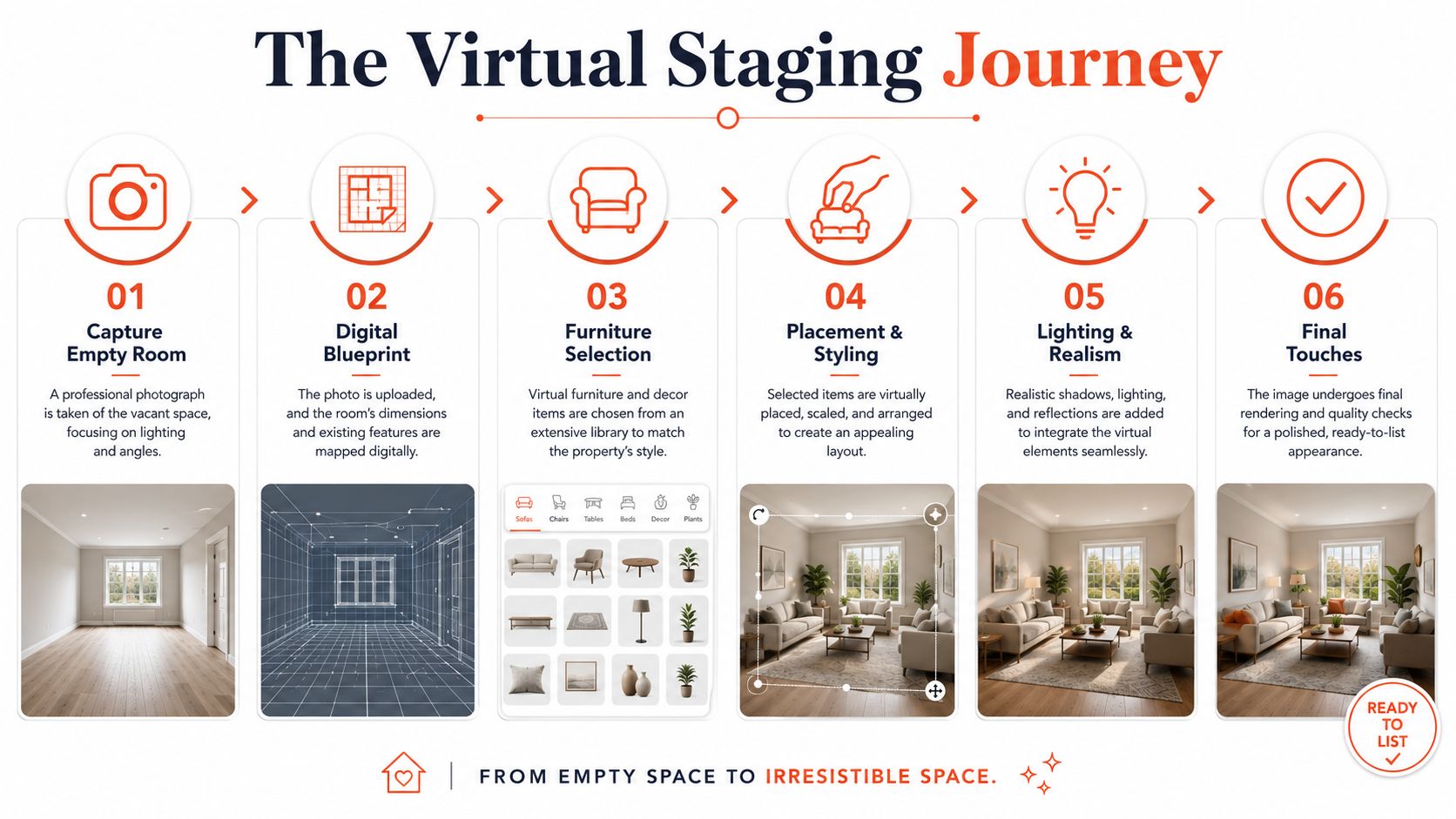
Virtual staging works because the original room photo does most of the heavy lifting. The walls, floor lines, windows, and camera angle establish the scene. The software then adds furniture, decor, and lighting that fit that geometry, which is why the result can look natural instead of pasted on. Bounti's guide describes it as a computer-vision and rendering workflow that turns an empty or outdated room photo into a furnished, photorealistic marketing image in seconds while preserving room geometry and camera perspective through the base photo in its virtual staging guide.
What the software is really doing
The easiest way to think about it is this: the camera captures the truth of the room, and the staging layer interprets how new objects should sit inside that truth.
That means the system isn't starting from scratch. It's working with the actual image.
A reliable workflow usually follows this pattern:
- Capture the room cleanly: Start with a sharp photo of the empty or outdated space.
- Read the scene: The software identifies lines, depth, surfaces, and perspective.
- Place furnishings: Chairs, sofas, tables, rugs, and decor are added in a way that aligns with the camera angle.
- Blend the result: Lighting, shadow, and scale are adjusted so the room doesn't look fake.
Where the old workflow breaks down
Traditional virtual staging often depended on a human editor or design vendor. That model can still produce good work, but it tends to slow down when you want revisions, alternate styles, or full-listing consistency.
The AI-driven approach changes the timing. Instead of briefing a vendor, waiting, reviewing, and requesting edits, the agent or marketing team can generate options much faster and keep iterating until the room matches the listing strategy.
The biggest operational win isn't only realism. It's that the person closest to the listing can control the creative direction without waiting on a production queue.
What good outputs look like
Strong virtually staged images do a few things right:
- They respect perspective: Furniture sits correctly in the room.
- They match the home's likely buyer: The style fits the price point and location.
- They solve a marketing problem: They clarify scale, purpose, or flow.
- They stay believable: Nothing feels oversized, overlit, or architecturally impossible.
The same rendering logic also opens the door to adjacent use cases. Teams can visualize alternate styles or renovation concepts from the same source photo, which is useful when a room needs more than furniture to tell the right story.
Virtual vs Physical Staging A Cost and ROI Breakdown
According to 2026 figures compiled by StageChimp's virtual staging statistics, virtual staging usually costs $5 to $50 per image, while full-home physical staging usually runs $2,500 to $5,000+, making virtual staging up to 97% cheaper in many cases. The same source notes that some AI-based plans start around $19 per month for 20 images.
That pricing gap changes the decision fast. Physical staging affects the property itself. Virtual staging affects the listing media, and that usually gives agents more speed, more testing room, and less budget risk.
Virtual staging vs physical staging at a glance
| Metric | Virtual Staging | Physical Staging |
|---|---|---|
| Cost model | $5 to $50 per image, as cited by StageChimp | $2,500 to $5,000+ for full-home staging, as cited by StageChimp |
| Budget flexibility | Easy to apply only to the rooms that matter most online | Usually needs a larger upfront spend |
| Operational effort | Digital workflow. No delivery, install, or pickup | Rental coordination, delivery, setup, styling, removal |
| Revision style | Fast to test different looks or buyer personas | Changes mean more labor, scheduling, and cost |
| Best fit | Vacant listings, fast launches, budget-sensitive campaigns | Homes that need a furnished in-person showing experience |
The core ROI question is not just "Which option costs less?" It is "Where will staging change buyer behavior enough to justify the spend?"
For many listings, the answer starts online. If the property will get its first wave of attention from Zillow, Redfin, MLS feeds, social ads, and email, virtual staging often produces the better return because it improves the photos buyers first see. Agents using modern real estate agent tools can stage only the hero rooms, test different looks, and launch faster without waiting on a staging crew.
Where virtual staging usually produces stronger ROI
Virtual staging works best when speed and selective spend matter more than furnishing the home for every in-person visit.
- Vacant resale homes: Empty rooms look smaller and harder to read in listing photos.
- Condos with access constraints: Digital staging avoids elevator bookings, delivery windows, and installer coordination.
- Investor or rental portfolios: Teams can create consistent marketing across multiple units without repeating physical setup costs.
- Dated but livable properties: Agents can show design direction without asking the seller to renovate or fully stage first.
This is also where AI changes the math. Older vendor-based staging workflows still work, but they add delay at the exact point where agents need speed. If a listing is going live tomorrow, waiting on a designer queue is a competitive disadvantage.
Where physical staging still earns the spend
Physical staging still has a place, especially in luxury listings, design-led homes, and properties where the showing experience carries as much weight as the photography. A furnished space can improve walk-through flow, help buyers feel scale in person, and support higher-touch presentation.
But it no longer needs to be the default choice.
A practical approach is mixed staging. Physically stage the rooms that matter during showings, then use virtual staging for secondary bedrooms, offices, or awkward bonus spaces that need a clearer story online. That keeps the budget focused where it has the highest impact.
Keep the categories straight
Agents often group several visual services together, but they solve different problems.
- Virtual decluttering removes distracting objects.
- Virtual renovation shows new finishes or layout updates.
- Restyling changes the design direction of an already furnished room.
- Virtual staging adds furniture and decor so buyers can understand use, scale, and flow.
Use the method that matches the listing problem. If the issue is empty-room photos and slow marketing prep, virtual staging usually gives the fastest return for the least spend.
Key Benefits for Listing Agents and Brokerages
The strongest reason to use virtual staging isn't just lower cost. It's that a better first impression gives the listing a clearer story from the moment buyers see the photos.

An empty room asks buyers to do the design work themselves. Many won't. They move on to a listing that feels easier to understand.
Better visuals create better buyer interpretation
Good virtual staging helps buyers answer three questions fast. What fits here? How does the room flow? What kind of life does this space support?
That applies especially well to rooms that don't explain themselves in photos, such as a narrow living area, a flex room, or a large blank primary bedroom.
A staged image can also help an agent guide positioning. A downtown condo may need a cleaner, more modern look. A suburban family listing may need warmth and function. The style choice becomes part of the marketing message.
More options for one listing
One underused advantage is variation. Instead of committing to one static concept, agents can create multiple visual directions and choose the one that matches the audience best.
That works well when the room could serve more than one purpose:
- A spare room can be shown as an office or guest bedroom.
- An open corner can become a dining zone or workspace.
- A basement area can be framed as a lounge, fitness room, or media space.
Teams that pair staging with floor plans and measurement tools often create even clearer marketing assets. If you want a broader look at that stack, these real estate agent tools are a useful complement to staged listing media.
Here's a visual overview of how staged presentation can support listing marketing:
Buyers don't need decoration for decoration's sake. They need context. The best staged images make the room easier to read.
Brokerage-level upside
At the team or brokerage level, virtual staging helps standardize presentation. That matters when multiple agents, coordinators, and photographers are producing listing media under one brand.
A repeatable workflow also helps in recruiting and retention. Agents notice when the marketing system is easy to use and doesn't depend on chasing outside vendors for every update.
How to Get Started with Virtual Staging
Speed matters. Agents who can turn an empty room into market-ready listing media the same day have a clear advantage over agents still waiting on outside staging queues.
Start with photos that can hold up under editing
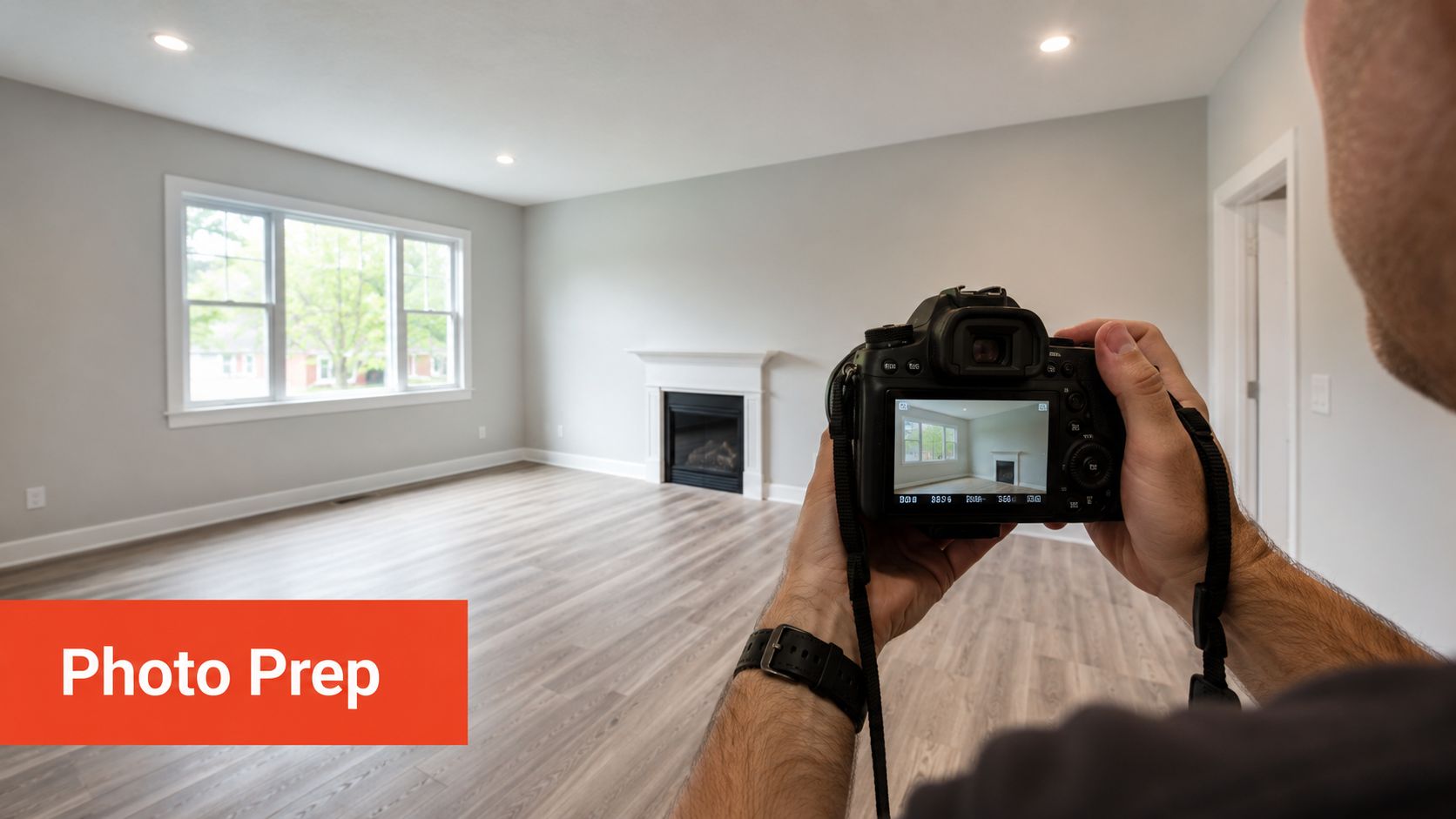
Virtual staging gets judged on realism. That starts with the original shot.
A dark room, blown-out windows, or a tilted frame gives the software less to work with and creates edits that look artificial. Good inputs save revision time and reduce the chance that furniture placement, scale, or shadows feel off.
Use this checklist during capture:
- Clear the room first: Remove loose items, cords, bins, and anything that distracts from the layout.
- Shoot for depth: Corner angles usually explain the room better than flat wall shots.
- Correct vertical lines: Straight walls and door frames make digital furniture sit naturally in the scene.
- Prioritize even light: Clean, bright images produce more believable results than heavily shadowed shots.
If your team is refining listing media across the board, this guide to AI photo editing software for real estate is a useful comparison for adjacent workflows.
Choose a system your team can run fast
The old process was vendor-driven. Send photos out, wait for concepts, request changes, wait again. That still works for occasional listings, but it slows down launches and makes testing multiple design directions expensive.
Agents should evaluate virtual staging based on control and turnaround, not just image quality. The practical questions are simple:
- How fast can you get a usable first version?
- Can you test different room styles without adding days to the timeline?
- Can your team make revisions directly, or does every change go back into a vendor queue?
- Does the workflow fit the rest of your listing media production?
That shift matters because staged photos are no longer a one-off design task. They are part of a faster marketing operation. The best setups let agents adjust visuals as pricing, positioning, or buyer feedback changes.
Build staging into the listing launch plan
Virtual staging works best when it is assigned early, not added at the end because the gallery looks thin.
Set the plan before photography. Decide which rooms need full staging, which only need decluttering, and which should stay untouched because the existing furniture already supports the price point. I have found that this decision alone cuts wasted edits and keeps the final image set focused on buyer objections and selling angles.
Then use staged visuals in more than one place. They can support the MLS gallery, listing presentations, paid social ads, and email campaigns. If your marketing mix also includes immersive media, VerticalRent on virtual tours shows how tours fit into a broader property marketing strategy.
Strong virtual staging is a workflow decision. Teams that control capture, editing, and revisions internally can launch faster and adapt the listing story without waiting on another vendor.
Staying Compliant Virtual Staging Rules and Ethics
Virtual staging is powerful, but it creates risk when agents treat it like unrestricted image editing. The line is simple. You can help buyers visualize a space. You can't misrepresent the property.
Industry guidance highlighted by Reimagine Home notes that virtual staging should not alter fixed elements like windows, doors, ceilings, or exterior views, and that many MLSs require on-image labeling plus paired original photos, as explained in its piece on when virtual staging helps and when it goes too far.
What crosses the line
Adding a sofa to an empty living room is staging. Adding a window that doesn't exist is misrepresentation.
The same goes for hiding permanent defects, changing ceiling height, removing structural columns, or improving a view the property lacks. Those edits don't clarify the home. They distort it.
A practical compliance checklist
Use a simple internal standard before anything goes live:
- Label the image clearly: If the room is digitally furnished, say so on the image when required.
- Keep originals available: Many MLS environments expect the buyer to see the unstaged version too.
- Protect fixed features: Don't modify architecture, structure, or exterior realities.
- Review scale and realism: Oversized furniture or manipulated proportions can still mislead even if the room wasn't structurally altered.
If you're operating in a market where AI image rules are evolving, this summary of California AB 723 and AI real estate photos is worth reviewing with your marketing team.
Honest disclosure doesn't weaken the listing. It protects trust. Most buyer frustration comes from the gap between what the photo implies and what the showing reveals.
Why ethics is also strategy
Unrealistic staging can hurt conversion, not help it. If buyers arrive expecting a brighter, larger, or more polished room than the property delivers, the image did its job too aggressively.
Professional agents use virtual staging to reduce ambiguity, not to manufacture a different house.
The Future is Instant AI and Agent-Driven Visuals
The next phase of virtual staging isn't about prettier single images. It's about control and speed across the full listing package.
NAR's coverage notes that AI virtual staging can generate realistic furnished room designs in seconds and signals a move from manual image editing to instant content generation, while also pointing out a practical gap in how agents can use it across stills, walkthroughs, and alternate design styles without waiting on vendors in its article on rethinking virtual staging for today's real estate agents.
What changes for agents
This shifts the role of the agent and marketing coordinator. They don't just order media. They direct it.
That means faster testing, faster refreshes, and more listing-specific creative. A room can be staged for one buyer profile, then restyled for another. A walkthrough can support the same visual logic as the still photos. A dated room can be turned into a clearer vision of what's possible without waiting on separate vendors for each task.
What to expect from modern workflows
The practical winners will be teams that use AI tools to shorten the gap between capture and campaign. Not because every listing needs endless image variants, but because agents need options while the listing is live.
Virtual staging started as a cheaper substitute for furniture rental. It's now part of a broader shift toward agent-driven visual production.
If you want to put that workflow into practice, Bounti Labs is built for real estate teams that want to create listing-ready visuals from property media, including AI staging, decluttering, restyling, and renovation concepts without relying on a slow manual production chain.



